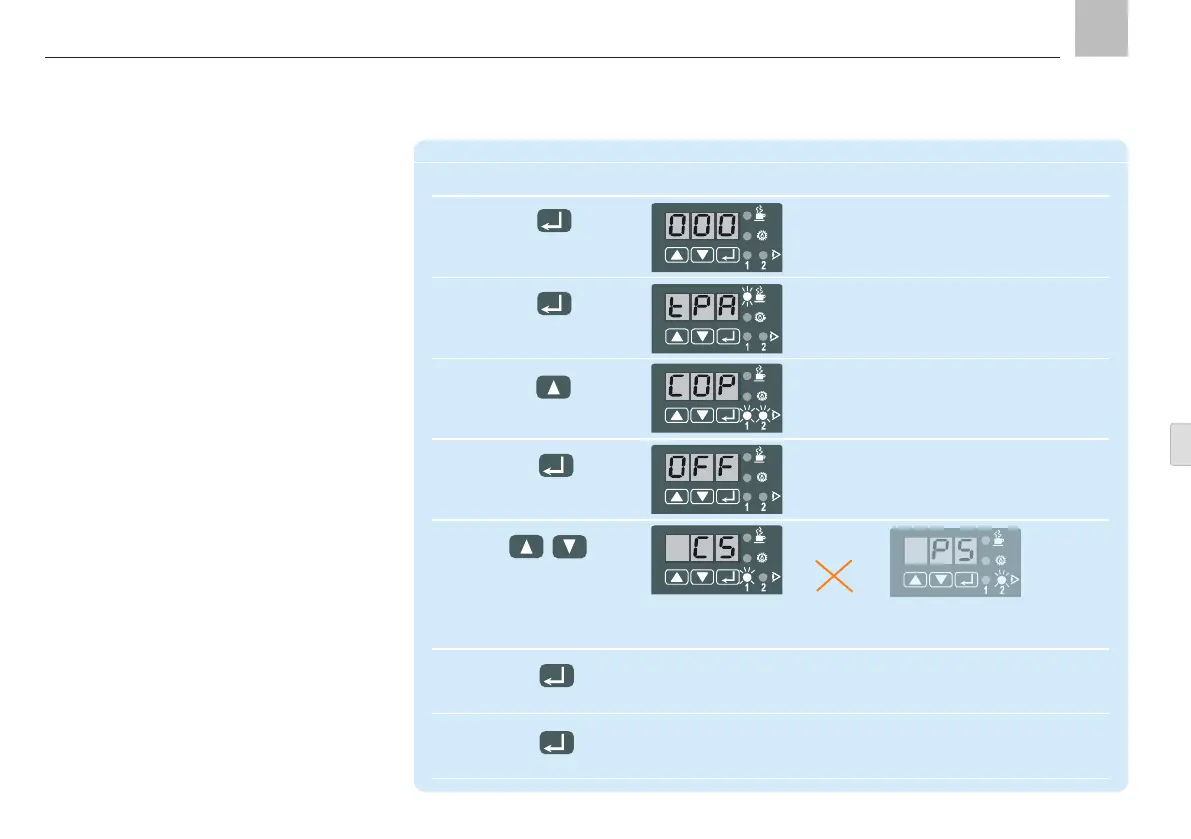
System monitoring can be changed to activate
or deactivate the monitoring functions for
lubrication.
When system monitoring is active, you can se-
lect monitoring via piston detector or monitor-
ing via pressure switch.
9. KFGS control unit
KFGS
Configure system monitoring
Step Key Display
1 Display flashes
(000 factory setting)
Press for more than 2 s
2 Automatic display of first parameter:
"pause in timer operation"
Press briefly "PAUSE" LED flashes
(confirm code)
3 Beginning of monitoring settings
is displayed
Press until:
4 System monitoring switched off
(factory setting)
Press briefly
5
Press either until or
Monitoring via (On progressive systems not admissible!)
piston detector
LED "PS" flashes
6
Press briefly Confirm new setting
7 New settings are written to memory, the
values are activated, and the display clears
Press for more than 2 s
Page 75
EN


 To Next Page