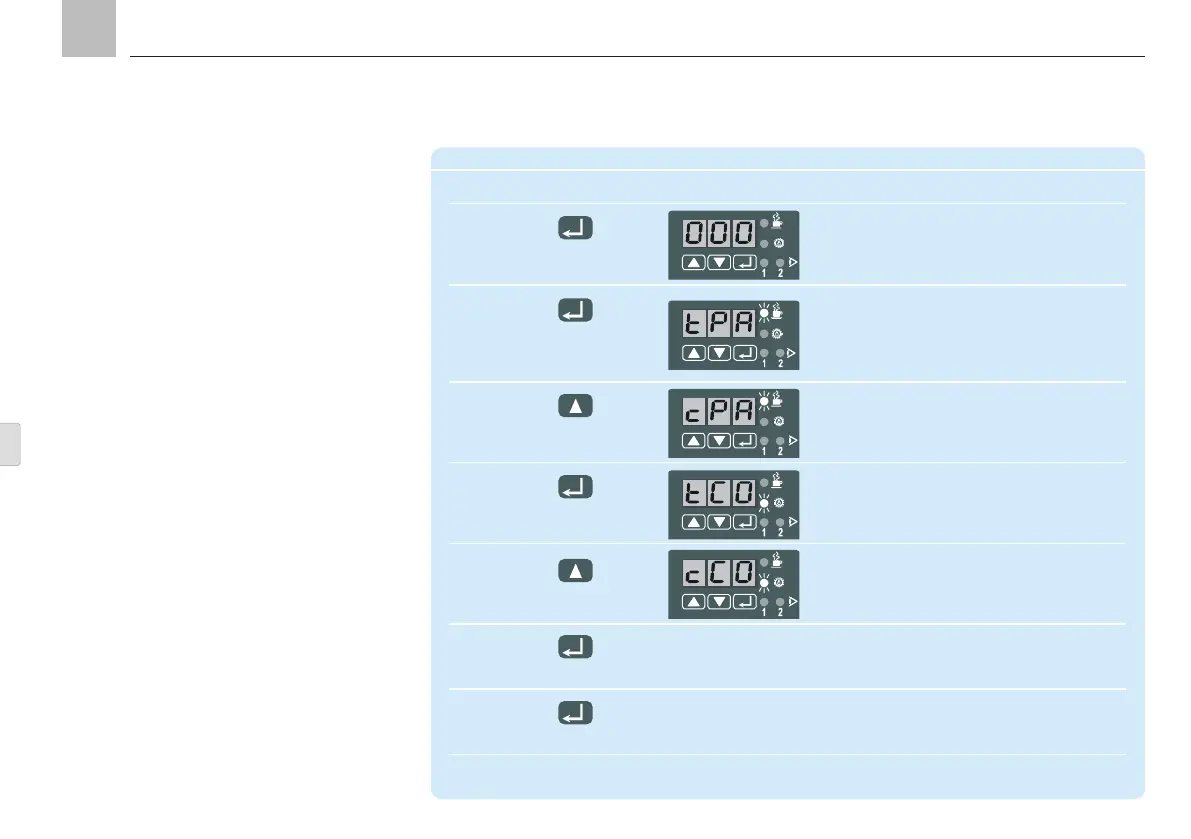
9.3.4 Change operating modes
A change of operation mode means changing
to timer operation, counter operation or special
applications.
9. KFGS control unit
KFGS
Change operating mode
Step Key Display
1 Display flashes
(000 = factory setting)
Press for more than 2 s
2 Automatic display of first parameter:
"pause in timer operation"
Press briefly
(confirm code) "PAUSE" LED flashes
3 Change from interval time to counter oper-
ation (only possible with external electrical
pulse generator) Values in pulses
4 Display pump cycle time in timer operation
Press briefly to
confirm counter operation
5 Change from pump cycle time to counter
operation, special application
6 Confirm new setting
Press briefly
7 New settings are written to memory
and the display clears
Press for more than 2 s
Page 76
EN


 To Next Page