10. KFGL control unit
10. KFGL control unit
10.1 Display and control elements of
control screen
The display and control unit is protected from
water splashes and mechanical damage by a
transparent plastic cover. The cover must be
removed to program the unit and then re-
mounted afterwards.
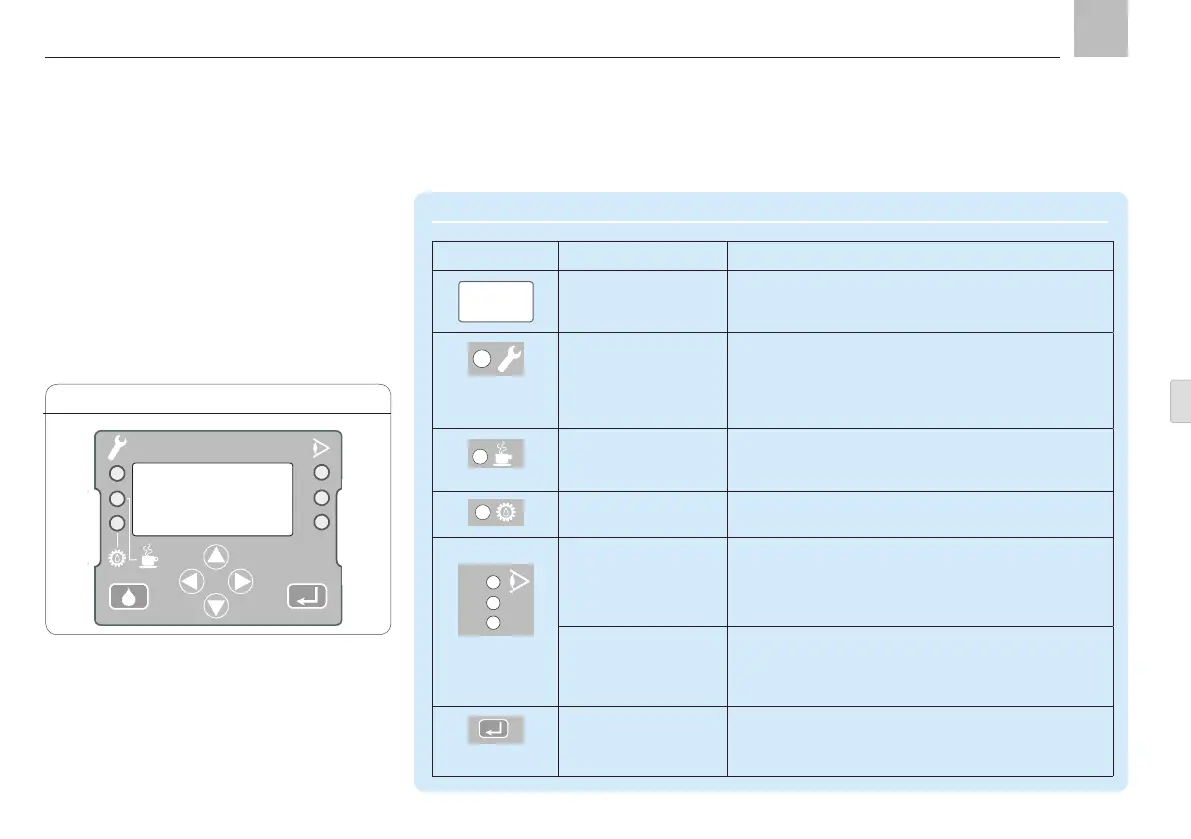
Control screen KGFL, Fig. 18
1
2
3
KFGL
Display and control elements of control screen
Symbol Description Function
Display
Menu display
Display of values and parameters
Fault notification
FAULT LED
Display fault notification
Red LED flashes = error detected
Red LED lights up = fault on a signal input,
no error detected on pump control unit (error is
outside pump)
PAUSE LED Display pause time
Yellow LED lights up = active pump pause time on
at least one main line
CONTACT LED Display contact time (pump operation)
Green LED lights up = active pump run time
1 = Output 1
2 = Output 2
Display pump output 1 to 2
LED on output 1 or 2 lights up = pump output
1 or 2 is switched on. Lubricant is delivered via the
indicated line (1 or 2)
3 = Inputs Display all signal inputs
LED lights up = signal change on input port
The LED lights up for approx. 1 second each time
the signal on the input port changes.
ENTER key Confirm value
Confirm input and values
2
1
3
Page 81
EN


 To Next Page