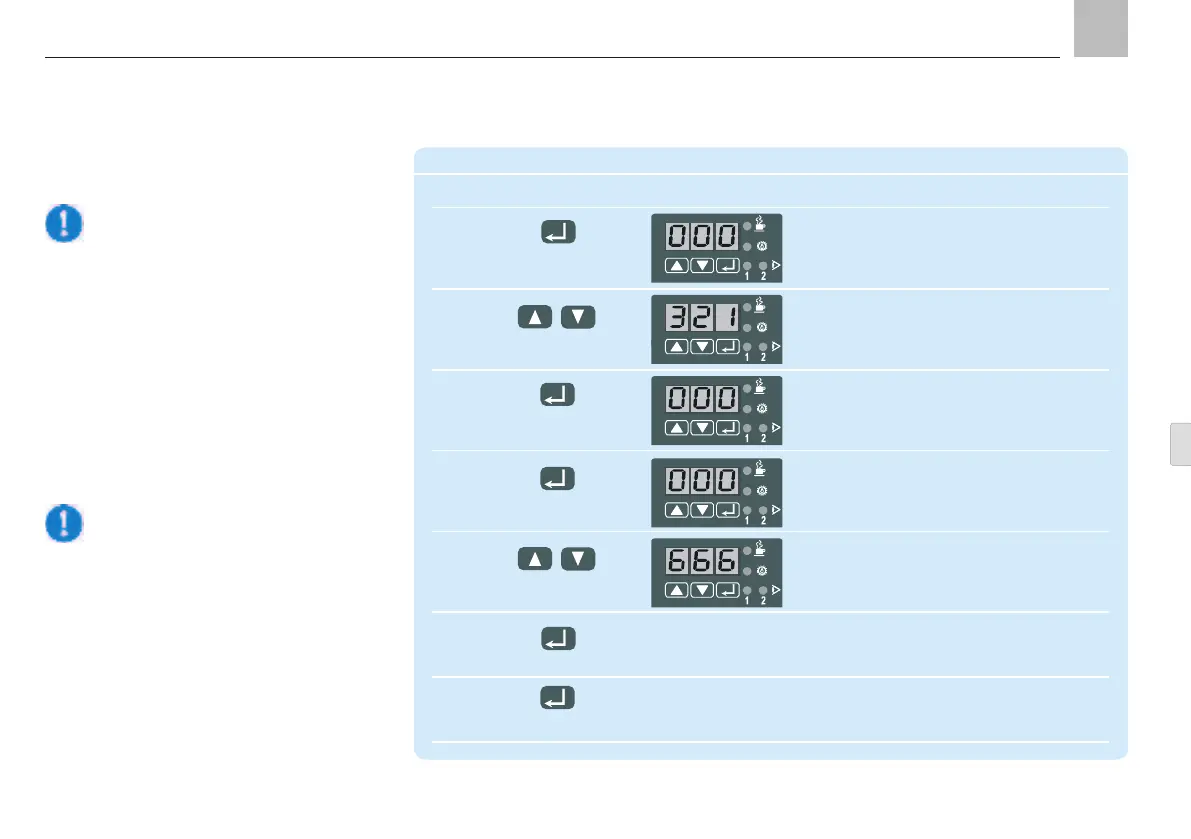
9.3.5 Change access code
Note!!
This factory default code is now deleted
and the new value is activated. Write
down the new value and store it in a
safe place. The parameters cannot be
programmed if the code is lost or for-
gotten. In this case, the pump unit must
be sent to the dealer or authorized SKF
Warning!
Do not enter the digits 321 as the new
code.
9. KFGS control unit
KFGS
Change code
Step Key Display
1 Display flashes
(000 = factory setting)
Press for more than 2 s
2 key number is selected
(321 = factory default setting)
Press briefly (confirm code)
3 Display flashes
Press briefly (000 = factory setting)
(confirm key)
4
Press briefly Display flashes
(confirm code)
5 new code is set
Example: 666
Press either until Warning! Do not enter 321.
6 Confirm new code
Press briefly
7 New code is written to memory
and the display clears
Press for more than 2 s
Page 77
EN


 To Next Page