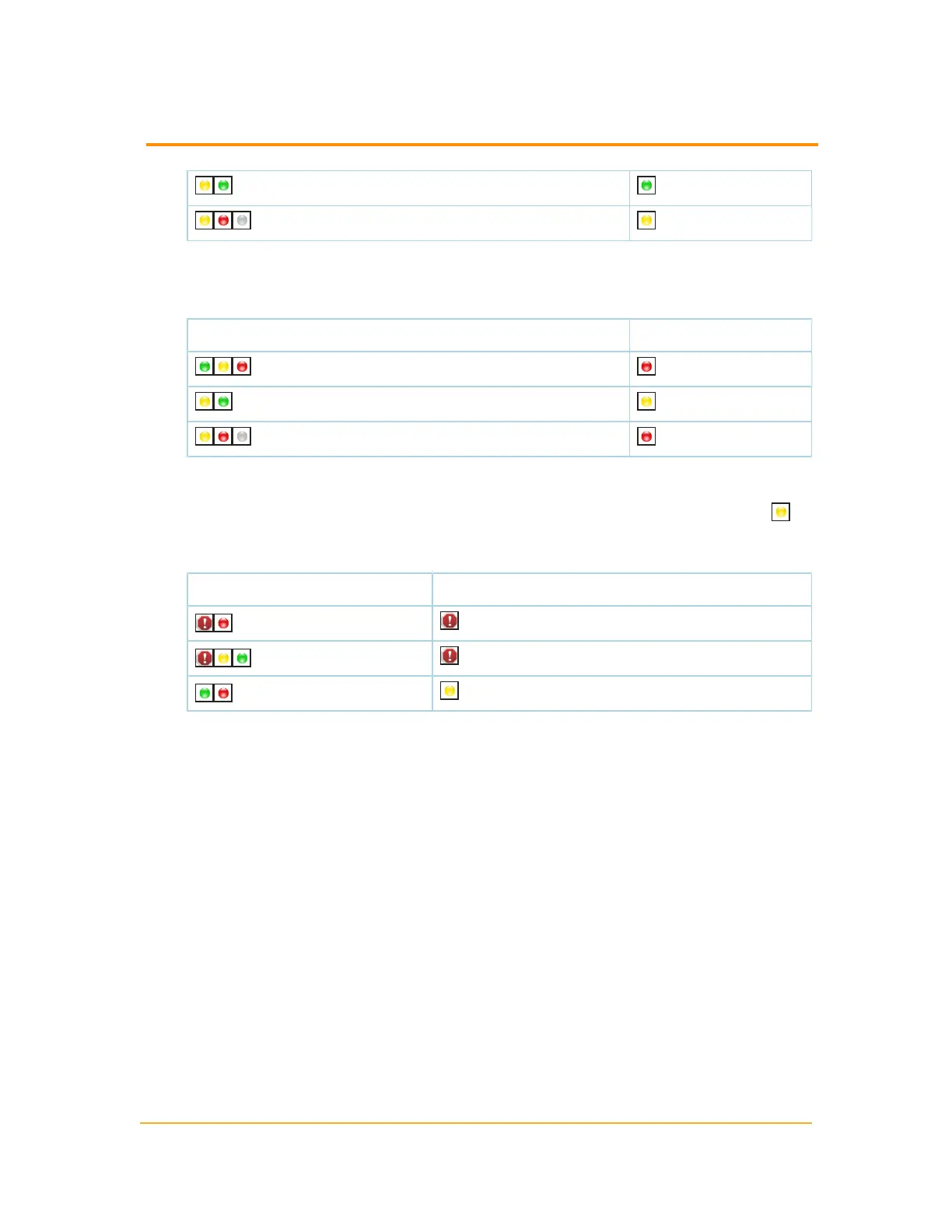
(Warning, Down) (Up)
(Warning, Down, Unknown) (Warning)
n
Show Worst Status ensures that the worst status in a group of objects is
displayed for the whole group. The following table indicates how the Show
Worst Status option operates:
Object States Group Status
(Up, Warning, Down) (Down)
(Warning, Down) (Warning)
(Warning, Down, Unknown) (Down)
n
Mixed Status shows Warning ensures that the status of a group displays the
worst warning-type state in the group. If there are no warning-type states, but
the group contains a mix of up and down states, then a Mixed Availability ( )
warning status is displayed for the whole group. The following table indicates
how the Mixed Status shows Warning option operates:
Object States Group Status
(Critical)
(Critical)
(Mixed Availability)
The following procedure configures the method used to determine group status.
1. Click Start > All Programs > SolarWinds > Orion Web Console.
2. Click Settings in the top right of the web console, and then click Manage
Groups in the Node & Group Management grouping of the Orion Website
Administration page.
3. Check the group you want to edit, and then click Edit Properties.
183
Managing the Display of Group Status



 To Next Page