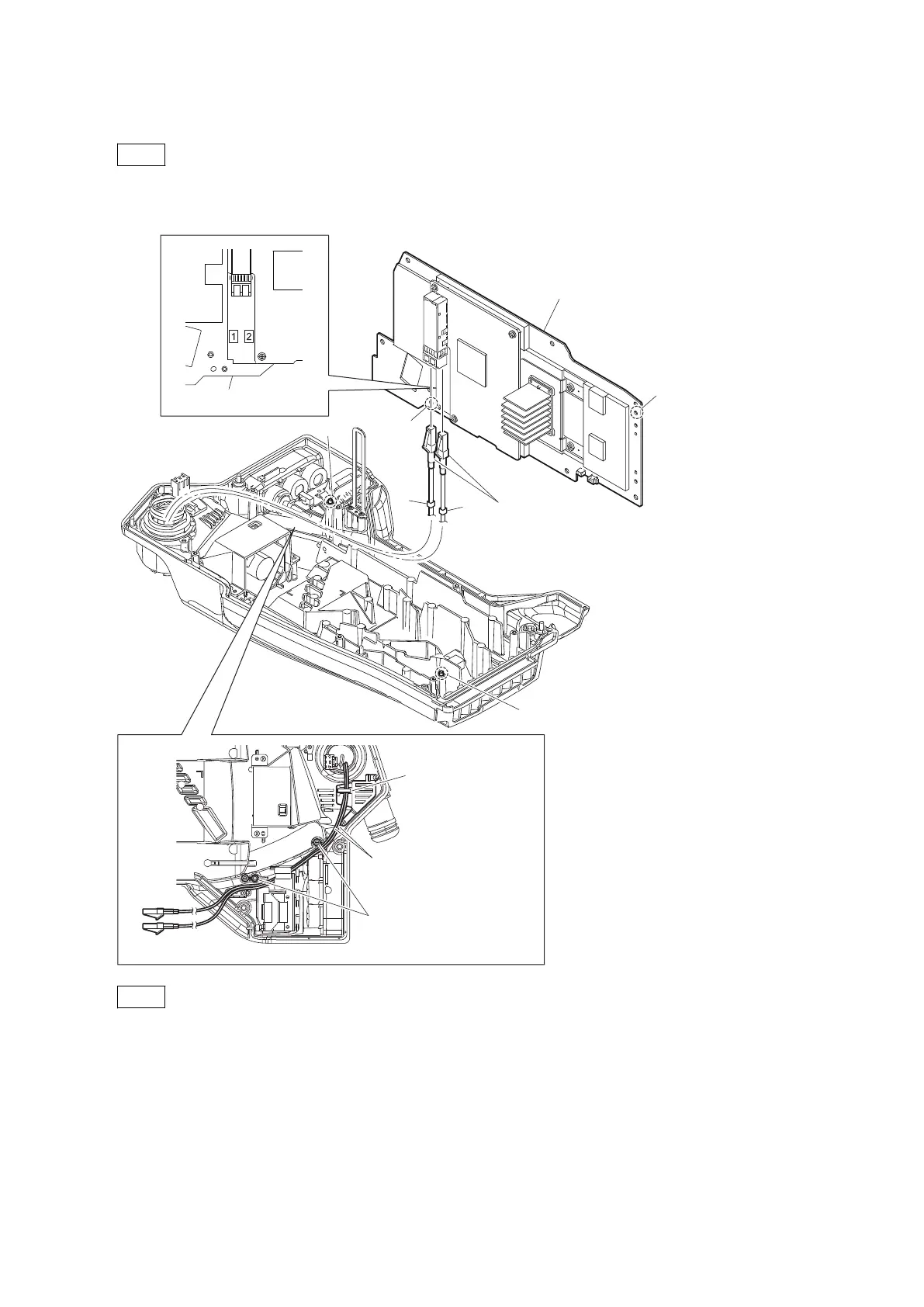
8. Disconnect the two optical fiber cables from the two connectors on the MEM-147 board.
Note
• If optical fiber cable is bent or pulled strongly, it may be disconnected. Handle optical fiber cables carefully.
• Do not touch the tip of optical fiber cable connector. This may result in deterioration of signals.
MEM-147 board
MEM-147 board
Optical fiber cables
2
1
Boss
Boss
Supports of the chassis
Hole
Hole
Optical fiber cables
Clamper of the
TRIAX duct (fan)
Note
• When connecting the optical fiber cables, check their numbers and connect them correctly and securely insert
them to the end of respective connectors.
• When installing the MEM-147 board, match the two bosses with the two holes.
• When installing the MEM-147 board, arrange the optical fiber cables as shown in the figure.
9. Remove the radiation sheet (EC rear) from the TX-146 board.
HDC4300
4-9



 To Next Page