DOC-34014 Rev. C 5–37
Objet24 User Guide
Handling Completed Trays
Afteryouhaveproperlyplacedallobjectsonthebuildtray,yousavethe
trayasanobjtffile,whichissenttothe3Dprinterforproduction.Butbefore
savingthetray,youcancheckthattherewouldbenoproblemproducingit.
Youcanalsocalculatehowmuchmaterial
wouldbeconsumedduring
productionandhowmuchtimethiswouldtake.
Tray Validation
Beforesendingajobtotheprinterforproduction,youshouldcheckthat
thetrayis“valid”andcanbeprinted.
To validate that the tray can be printed:
¾
OntheTraySettingsribbon,intheBuildProcessgroup,click .
or—
FromtheToolsmenu,select
Placement Validation.
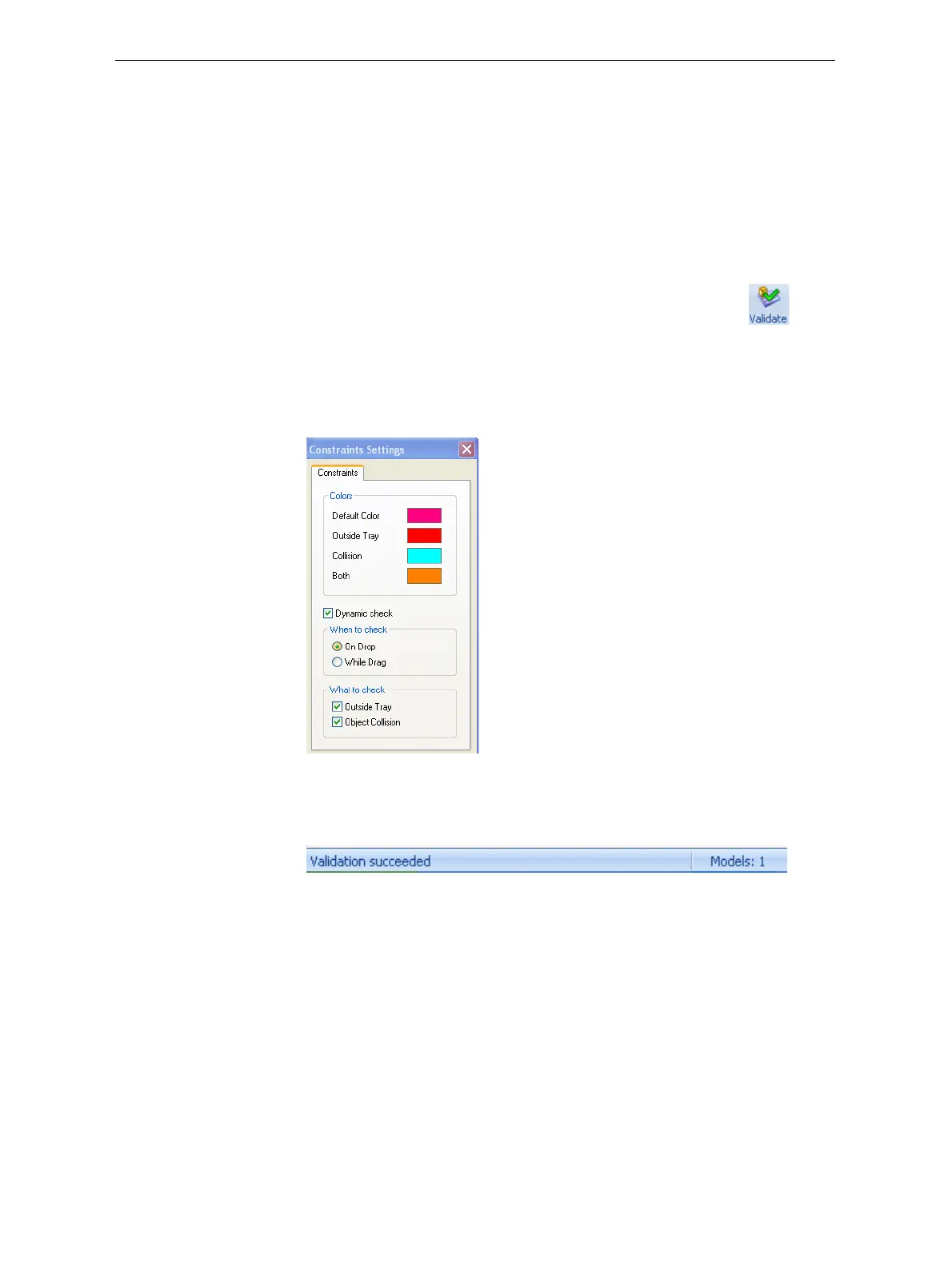
Ifthetrayisnotvalid,thecoloroftheproblematicmodelsonthetray
changesaccordingtoapre‐setcode.
Figure 5-50: Color code
Note: The “Both” color also indicates a problematic stl file.
Thevalidationstatusappearsonthebaratthebottomofthescreen.
Figure 5-51: Validation details in status bar













 To Next Page