Using Objet Studio
5–34
DOC-34014 Rev. C
Loading Large
Files
Verylargestlfilescanbeslowtoloadandmaybedifficulttomanipulate
easilyonthebuildtray.Ifthisisthecase,youcandisplayjustanimageof
theobjectonthebuildtraywithoutloadingtheentirefile.Thestlfileitself
isnotchanged,and
thecompletefileissenttotheprinter.
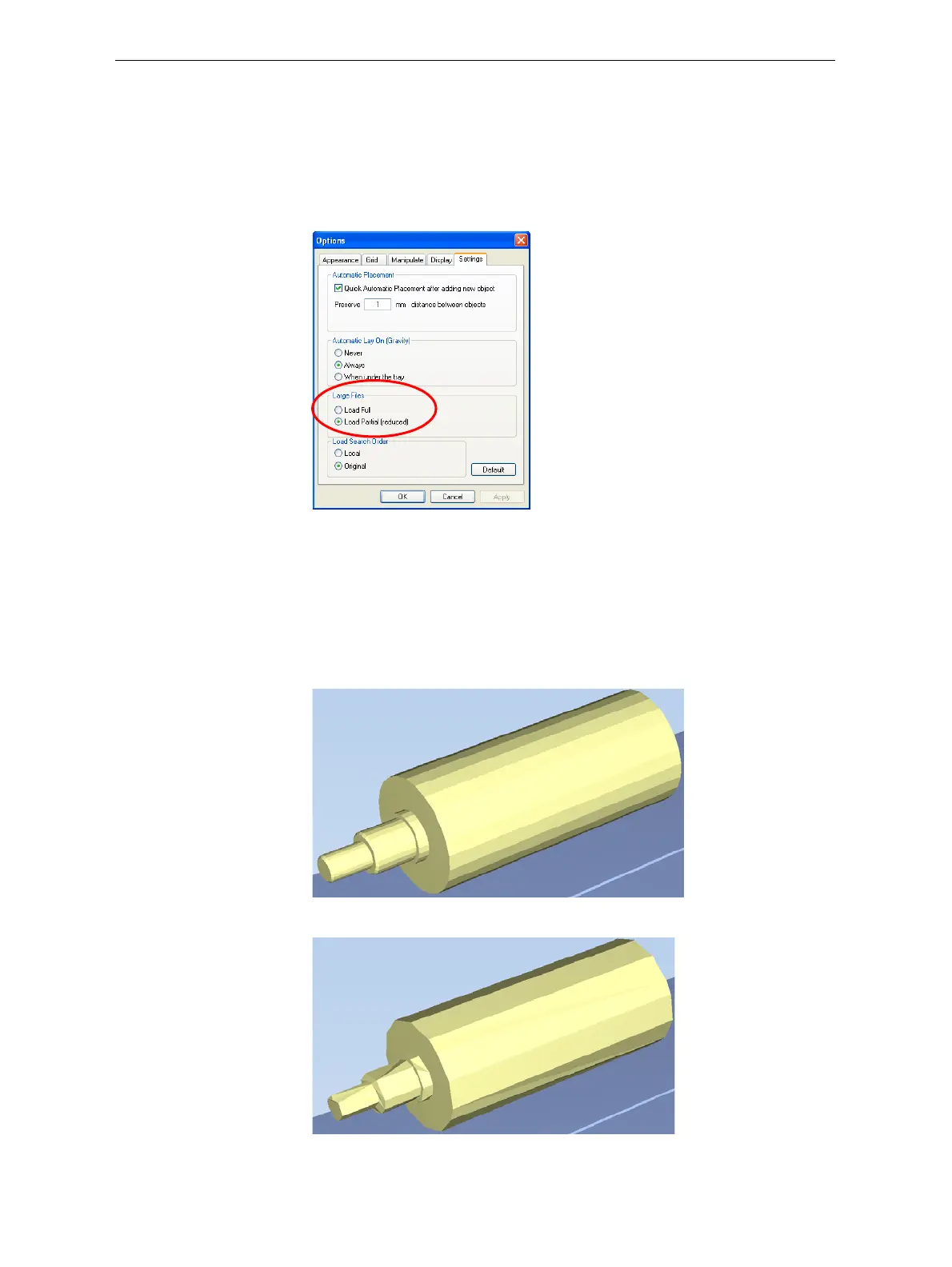
To display an image of stl files when you place objects on the build tray:
1. FromtheToolsmenu,selectOptions,anddisplaytheSettingstab.
Figure 5-45: Options dialog box, Settings tab
2. IntheLargeFilessection,selectLoad Partial (reduced).
Large File
Manipulation
Ifyouneedtoworkwithadetailedmodelthatiscomposedofalarge
numberofpolygons,youcanspeedupitsdisplayandmanipulationin
ObjetStudiobyreducingthenumberofpolygonsonthescreen.Although
thismayreducetheresolutiononthescreen,ithasnoaffect
ontheprinted
models.
Figure 5-46: Object displayed without polygon reduction
Figure 5-47: Object displayed with only five percent of its polygons showing













 To Next Page