S CLASS™ cutter User’s Manual
Setup 1-5
1.2 S CLASS™ Cutter Components
1.2.1 The Cutter as viewed from the front
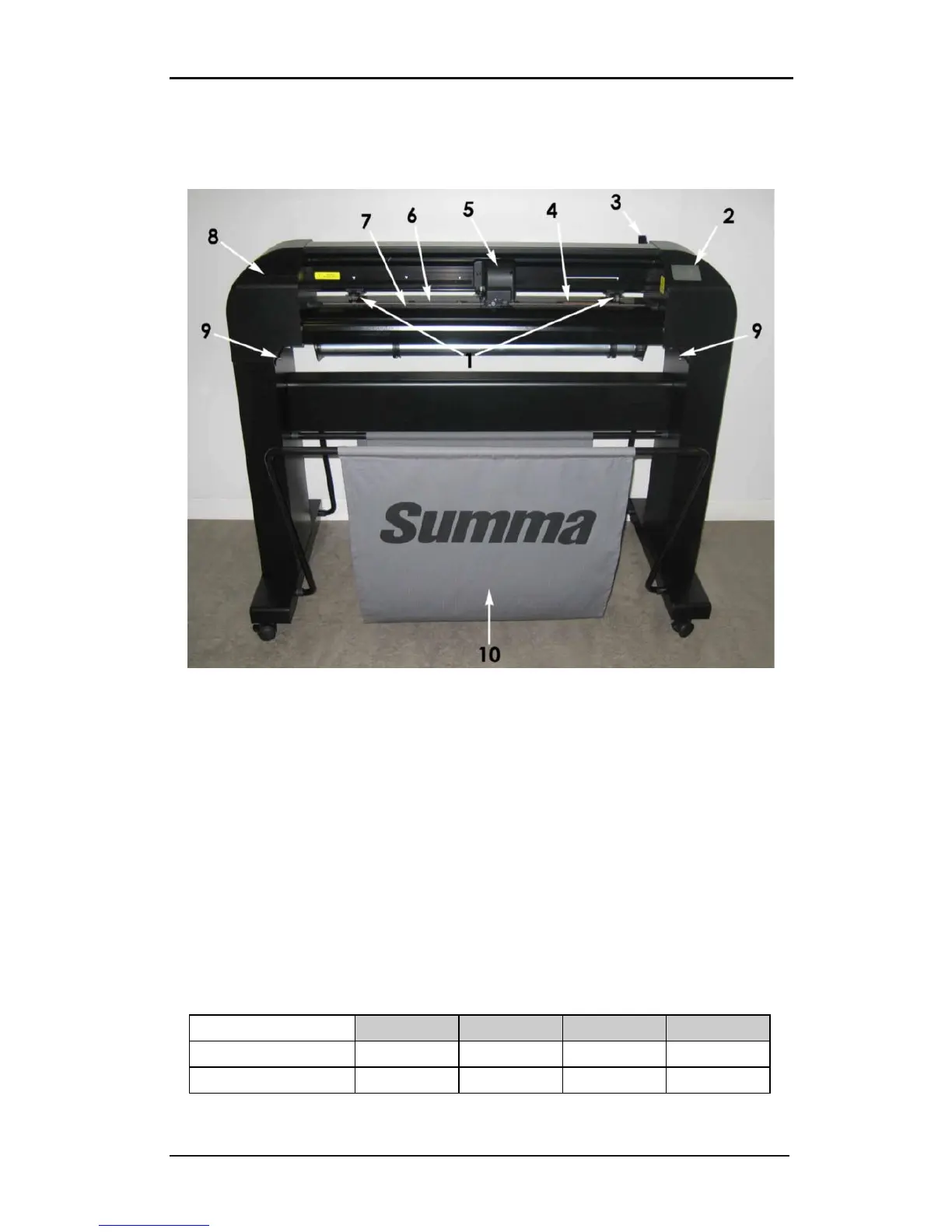
FIG 1-10
1-10 S CLASS™ CUTTER, FRONT VIEW
1. Pinch rollers: The pinch rollers clamp the media to the drive system to ensure accurate
tracking. The S120(T) has one and the S160(T) and S 140(T) have two extra pinch rollers
to ensure that wide media stays flat in the middle. The outer drive pinch rollers have a
selectable pressure; the extra rollers in the middle can be enabled or disabled.
2. Touch panel: All cutter activity can be initiated from the 320x240 dot touch panel. The
panel displays information about the cutter’s current status and/or actions that need to
be taken.
3. Pinch roller lever: This lever is used to raise and lower the pinch rollers for media
loading.
4. Media drive sleeves: The media drive sleeves move the media only when the pinch
rollers are in the “down” position. The following table lists the number of sleeves
installed on each model of the S CLASS™ cutters.
Number of sleeves
S75 (T) S120 (T) S140 (T) S160 (T)
Short sleeve 4 7 8 9
Long sleeve 1 1 1 1










 To Next Page