Components Description
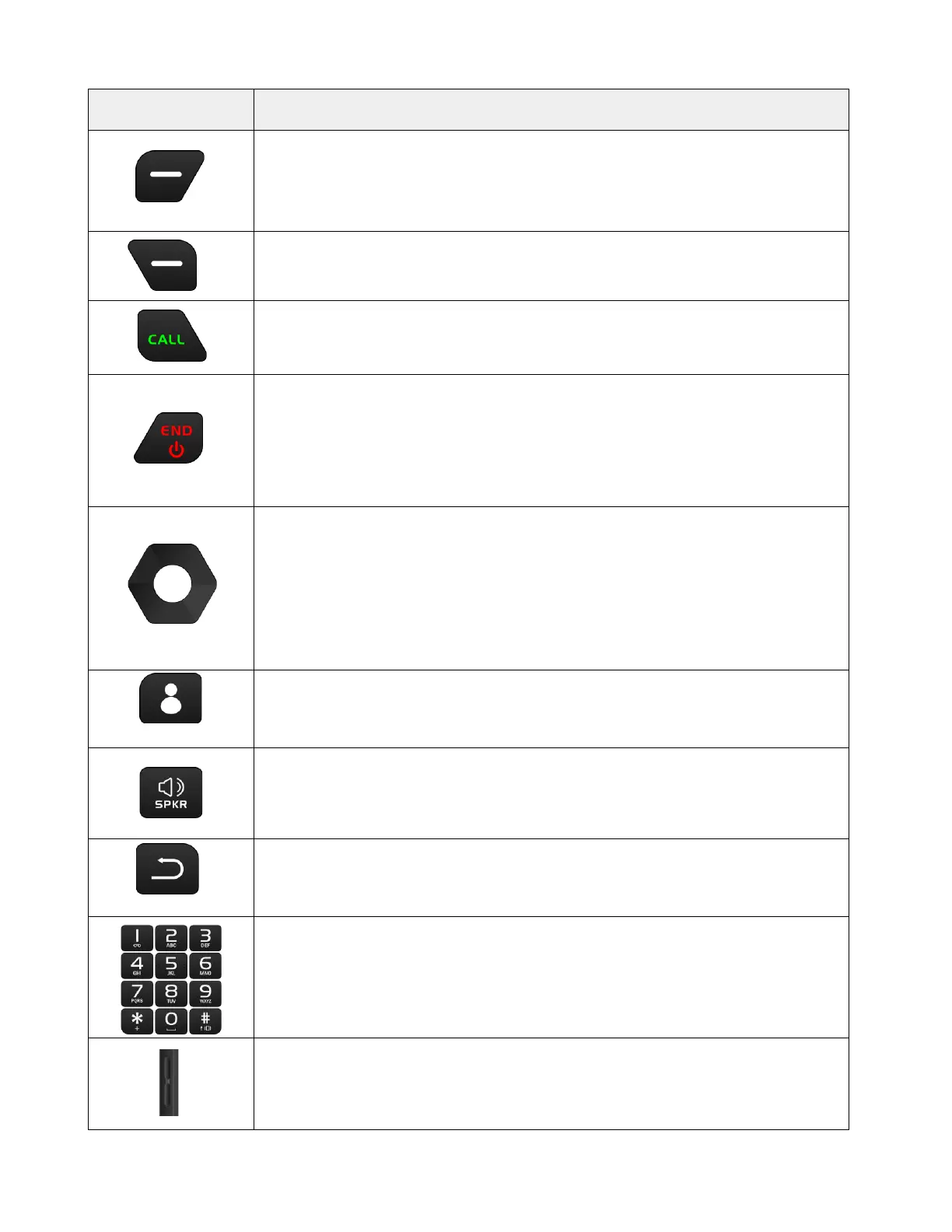
Left Soft Button
Access Notifications on the home screen
Choose specific functions in other apps
Access Messages on the home screen
Choose specific functions in other apps
Place/Answer Call Button
To answer or place a call
Press to enter call history
End of call / Power Button
Press to end a call
Long press to choose options of Restart, Power off, or Lock the phone
Long press to turn on the phone
Press the Power Button with the Volume Down Button at the same time to take
Navigation Buttons
Press for shortcut access to apps from the home screen, you can customize the
shortcuts in Settings
Up: to access Music
Down: to access Gallery
Left: to access Recent apps
Right: to access Shortcut to turn on/off Wi-Fi, Bluetooth, etc
Favorite Contact Button
Press to enter saved favorite contacts
Speaker Button
Press to mute/unmute the media players and adjust the media volume by using
the Volume Buttons on the side
Press to mute incoming call ringtone
Return Button
Press to return to the previous screen
Number Buttons
Press to dial numbers
Long press “1” to enter voicemail
Long press other numbers for quick calling
Long press the # Hash Key to turn on Vibrate mode
Volume Buttons
Press to adjust the ringtone
Press Volume Down Button with the Power Button at the same time to take a



 To Next Page