GB.GOLDSKE.160901
www.swegon.com 11
We reserve the right to alter specifications without notice.
3. Commissioning
3.1 General
Commissioning sequence:
1. Remove the air handling unit’s protective plastic foil.
2. Check that there are no foreign objects inside the unit, duct
system or functional sections.
3. Check that rotary heat exchanger rotor (only GOLD RX)
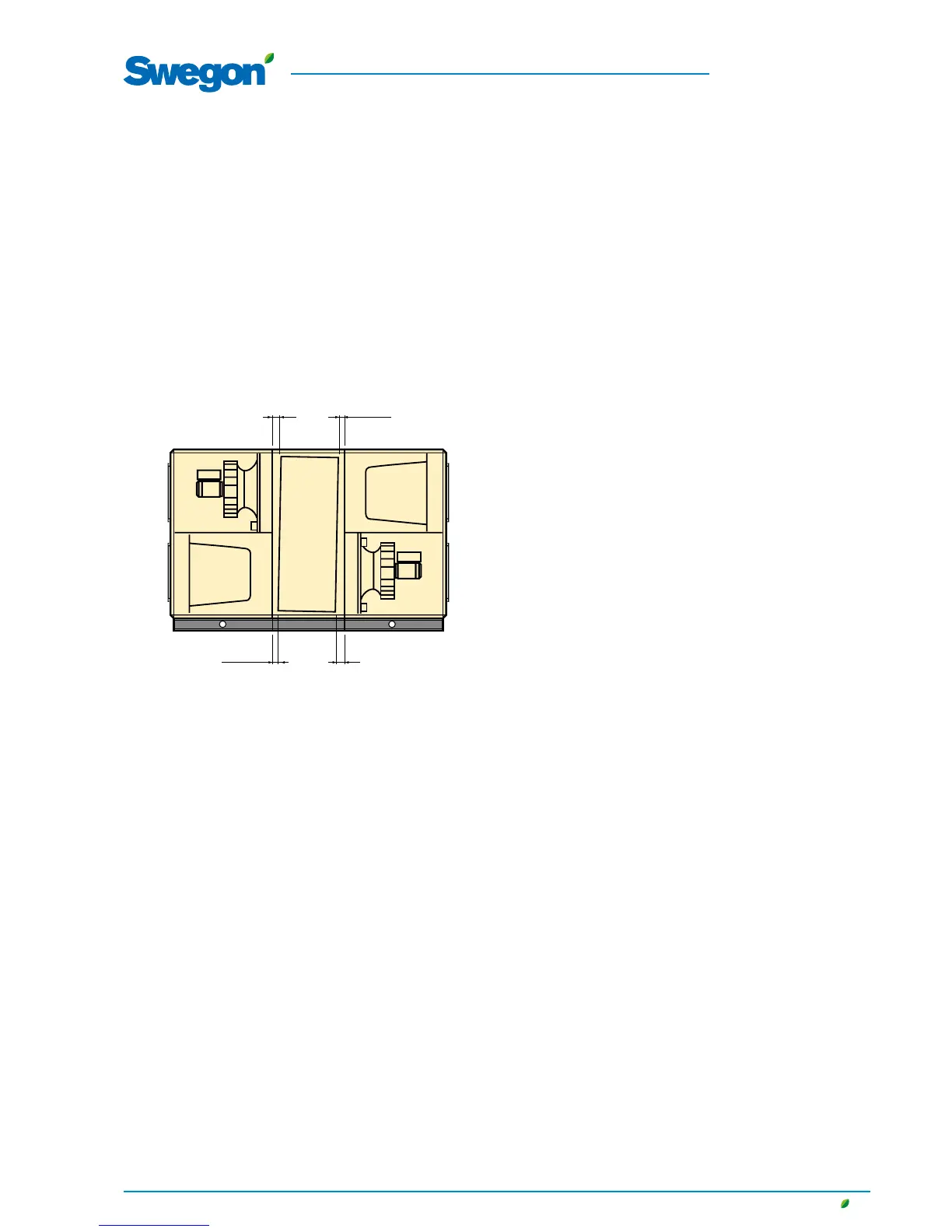
rotates easily. On sizes 50-120, the rotary heat exchanger
must be angled slightly towards the filter, see drawing below.
If the inclination needs adjusting, see special instructions for
adjusting the inclination of the rotary heat exchanger (04-80)
or the installation instructions for the GOLD (120).
GOLD RX,, sizes 50-120: The illustration shows the factory-pre-
set rotor inclination for Fan Arrangement 1. The inclination must
always be toward the filter, which means that the inclination for
Fan Arrangement 2 is in the other direction.
4. Turn the safety isolating switch to the ON position (I).
5. Select the appropriate language, if you have not already done
so. See Section 5.3.7 or 6.4.7.
6. The air handling unit has a factory setting that makes it ready
to operate. See Section 11.2 Commissioning Report.
However, in many cases, these settings need to be adjusted to
suit the current installation.
If necessary, enter the fan position setting (inspection side),
see Section 6.4.10.
Program the timer (switch clock), operating mode, tempera-
tures, airflows and functions according to the procedures in
Sections 4-15.
Select whether the airflow unit of measurement shall be l/s,
m
3
/s, m
3
/h or cfm.
Fill out the Commissioning Record and save it in the docu-
ment pocket of the air handling unit.
In some cases it might be necessary to adjust the P-band
and the I-time if the heating regulation system is oscillating
or operates sluggishly. This requires entering a special code.
Contact your Swegon representative.
7. Activate, if needed, manual or auto operation (Dashboard) or
lock the speed of the fans (AIRFLOW ADJUSTMENT image).
Adjust the airflow in the duct system and air terminals as
described in Section 3.2.
8. Check and adjust, if required, the pressure balance in the air
handling unit as described in Section 3.3.
9. Finish off with a filter calibration as described in Section 6.3.





 To Next Page