GB.GOLDSKE.160901
www.swegon.com 79
We reserve the right to alter specifi cations without notice.
6.4.20 Communication
The potential for communication and monitoring is inte-
grated as standard into the AHU. The AHU is ready to be
connected via EIA-485. For connection and wiring to the
AHU, see Section 10.5 Wiring to terminals.
Communication can also be established via Ethernet
without software other than an ordinary web browser
such as Internet Explorer.
Further information about interfaces, protocols and con-
fi guration is available at www.swegon.se (com).
Commu-
nication
External Port B
Wireless LAN
6.4.20.2 Wireless LAN
The AHU's control unit is, as standard, equipped with Wi-Fi func-
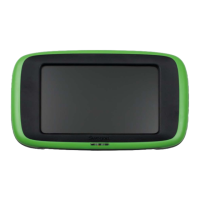
tion and can be connected to e.g. a wireless hand-held terminal
(accessory), portable computer or smart phone.
The password can, via the hand-held terminal, be changed to an
optional combination of digits. The password and the SSID can
also be entered in alphabetical form on the AHU's web page.
To connect to a portable computer or smart phone, note the
settings on SSID, password and IP address. Activate Wi-Fi in the
portable computer or smart phone and search for the wireless
network (with the same name as the SSID). Connect by entering
the password.
Open your web browser and update the page. The web browser
will then automatically connect to the control circuit card. To log
on, write your user name (local or installation), and enter the
password (local = 0000, installation = 1111, factory setting).
Settings:
Value Setting range Factory setting
Wireless LAN On/Off Off
SSID Optional GOLD
Password (WPA2-PSK)
1)
123456789
IP address Not adjustable 192.168.234.1
Net mask Not adjustable 255.255.255.0
MAC address Not adjustable Not adjustable
Channel (frequency
band)
5 - 11 5
1)
Certain smart phones require at least six characters.
6.4.20.1 External Port B
For communication with network. Specify protocol and settings
for Ethernet.
Settings:
Value Setting range Factory setting
DHCP On/Off Off
IP address
(static or dynamic)
Net mask
Default GATEWAY
Primary DNS
Secondary DNS
10.200.1.1
255.255.255.0
0.0.0.0
0.0.0.0
0.0.0.0
MAC address Not adjustable




 To Next Page