25. ROUTE SURVEYING
198
25.8.7 Inverse width peg
The route widths and coordinates for center pegs on every calculated curve can
be found by using inverse width peg calculation.
• There are two methods for specifying arbitrary width peg coordinates: key entry
and observation.
PROCEDURE Using key entry to specify arbitrary width
pegs
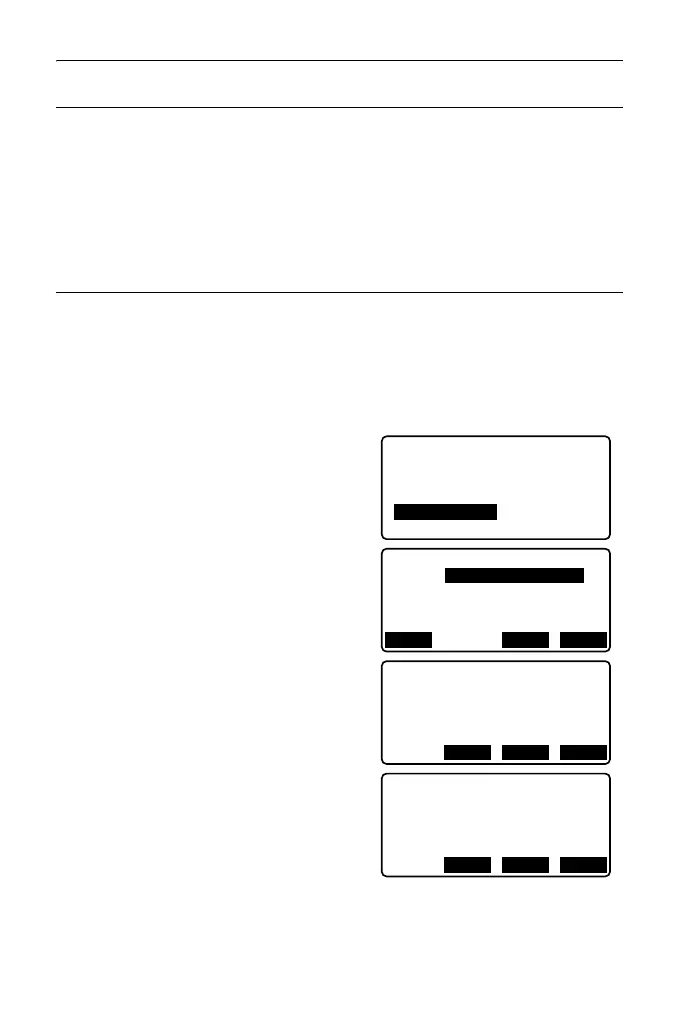
1. In the second page of the OBS mode
screen, press [MENU], then select
"Road".
2. Select "Alignment" to enter the route
calculation menu.
3. Select "Road topo" to enter the road
topo menu.
4. Input the arbitrary width peg
coordinates.
5. Press [OK] in the screen shown in
step 4 to display the coordinates and
point name of the center peg.
6. Press [OK] in the screen shown in
step 5 to display the route width and
point name of the width peg.
Define elements
Alignment
Auto calc.
Calc coord
Road topo
Setting
Np:
Ep:
Alignment/Road topo
0.000
0.000
LOAD MEAS OK
N
E
173.318
Road topo/CL peg
196.031
Sta..ing
123.456m
No. 12+3.456
REC OKS-O
N
E
173.318
Road topo/WidthPeg
196.031
CL ofs
5.000m
No. 12+3.456R
REC OKS-O



 To Next Page