4. INSTALLATION PROCEDURE FOR OPTIONAL EQUIPMENT EO18-33027
4.4 RIBBON SAVING MODULE (B-EX904-R-QM-R)
4-27
4.4 RIBBON SAVING MODULE (B-EX904-R-QM-R)
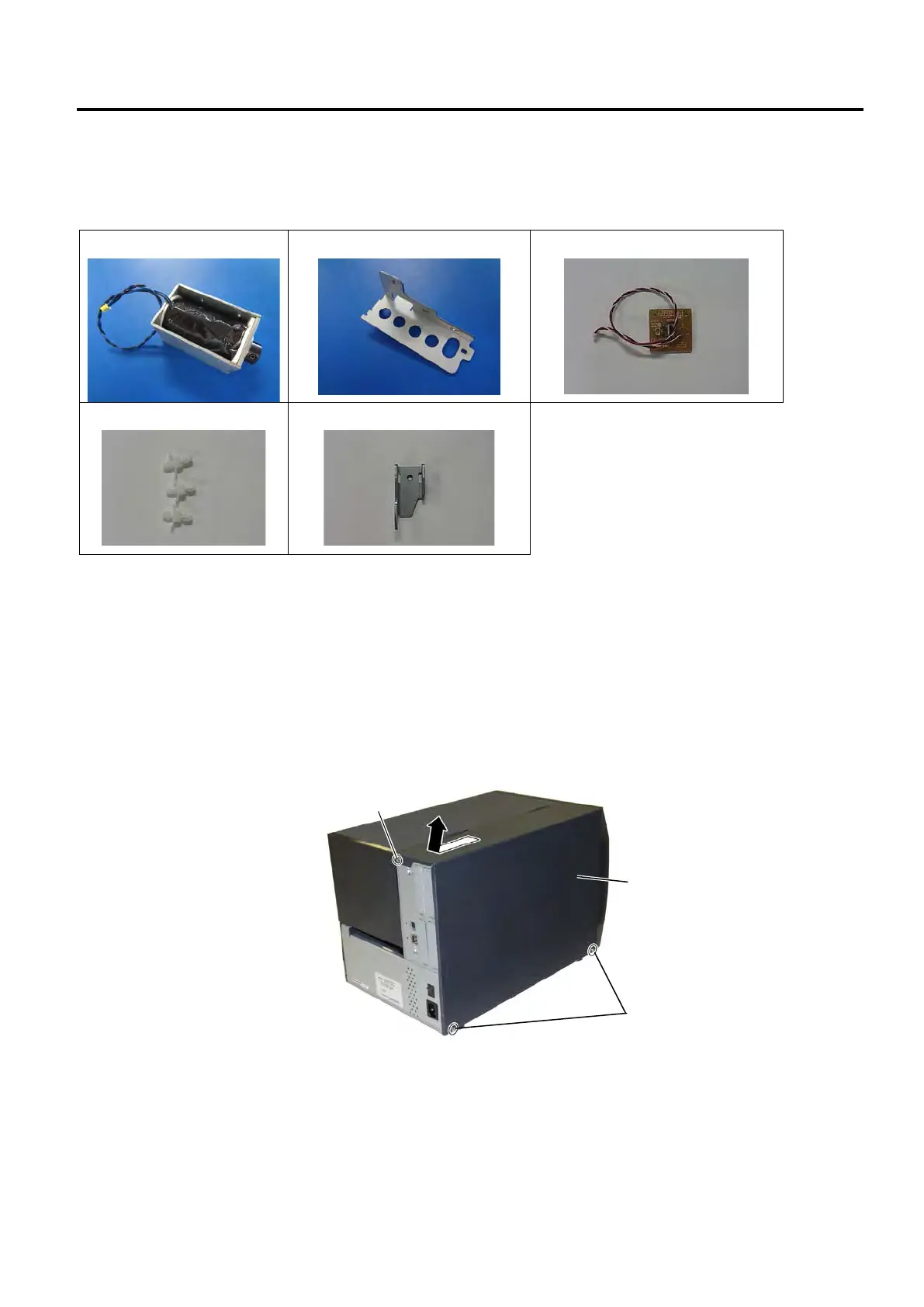
All the following parts are supplied with the kit. Make sure you have all items shown below.
Solenoid Base Plate (1 pc.)
Head Up Link Plate (1 pc.)
• M3x6 Screw (5 pcs.)
• Installation Manual (1 copy)
NOTE: When the Rotary Cutter (B-EX204-R-QM-R) is used on the B-EX4T series, be sure to install the Ribbon
Saving Module to enable the head-up function. Failure to do this may cause a paper jam or ribbon error.
4.4.1 Removing the Covers
1. Turn the printer power off and disconnect the Power Cord.
2. Remove the three B-4x5 screws from the Side Panel (L).
3. Slide the Side Panel (L) backward, and raise it to remove from the printer.



 To Next Page
 Loading...







