Troubleshooting and diagnostic options
TR-Electronic GmbH 2019, All Rights Reserved Printed in the Federal Republic of Germany
Page 142 of 154 TR - ECE - BA - GB - 0139 - 02 11/21/2019
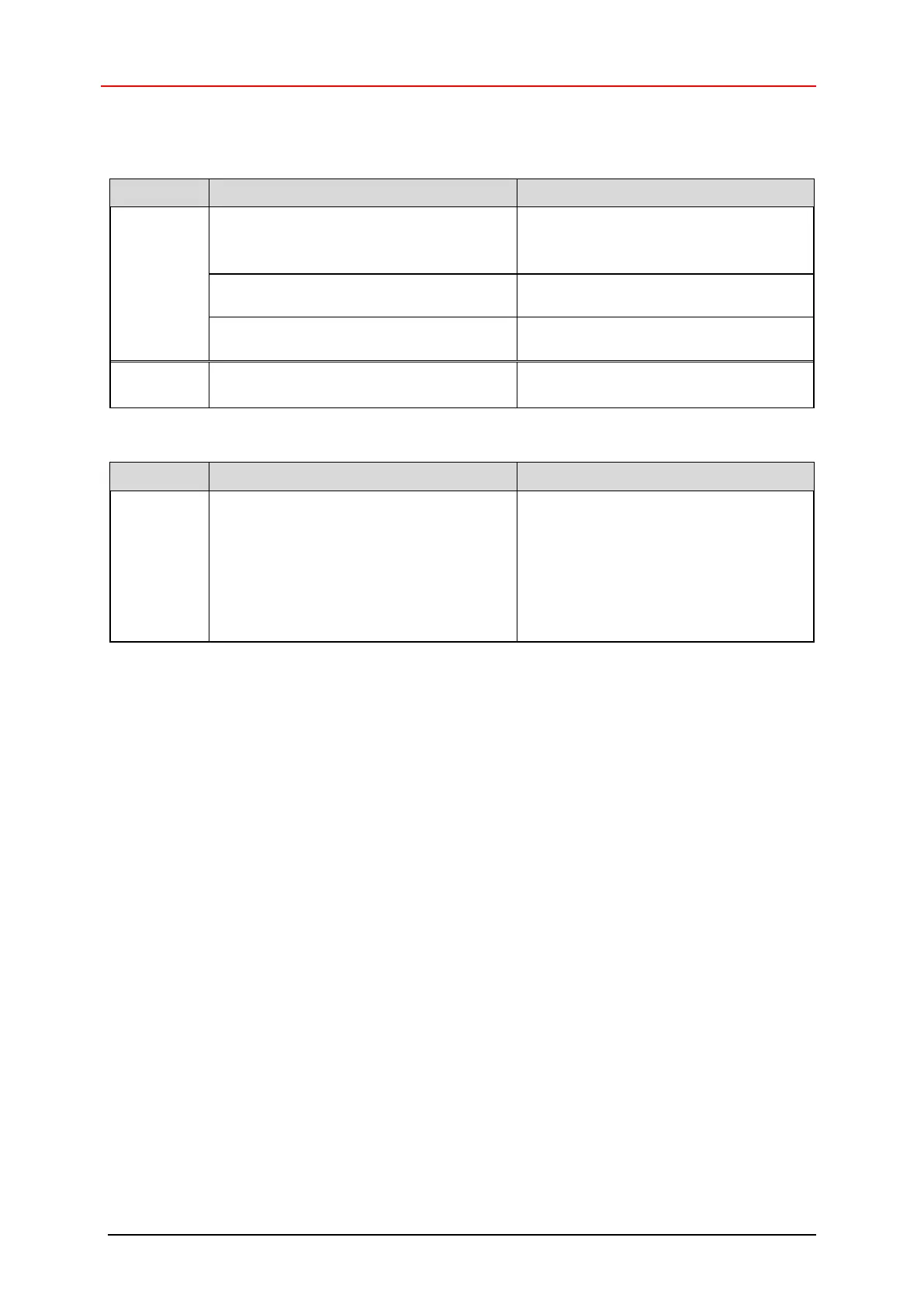
9.1.2 Net-Status, Bicolor LED
Voltage supply absent or too low
- Check power supply, wiring
- Is the voltage supply in the permissible
range?
Connector incorrectly wired or screwed
down
Check wiring and connector position
Hardware error, measuring system
defective
Normal mode, measuring system in data
exchange
- No connection to the IO controller
- No data exchange
- Invalid configuration parameters, project
setup configuration different from
measuring system configuration
- Check bus connection
- IO controller available and online?
- Check device name, IP address and
subnet mask.
- Make sure that the setup configuration
parameters match the measuring
system configuration










 To Next Page