Chapter 8: DICOM 00.053.204, Revision A SonixTouch Q+ Service Manual
8-4
8.1.2.2 DICOM Storage Settings – AE Configuration Storage Settings
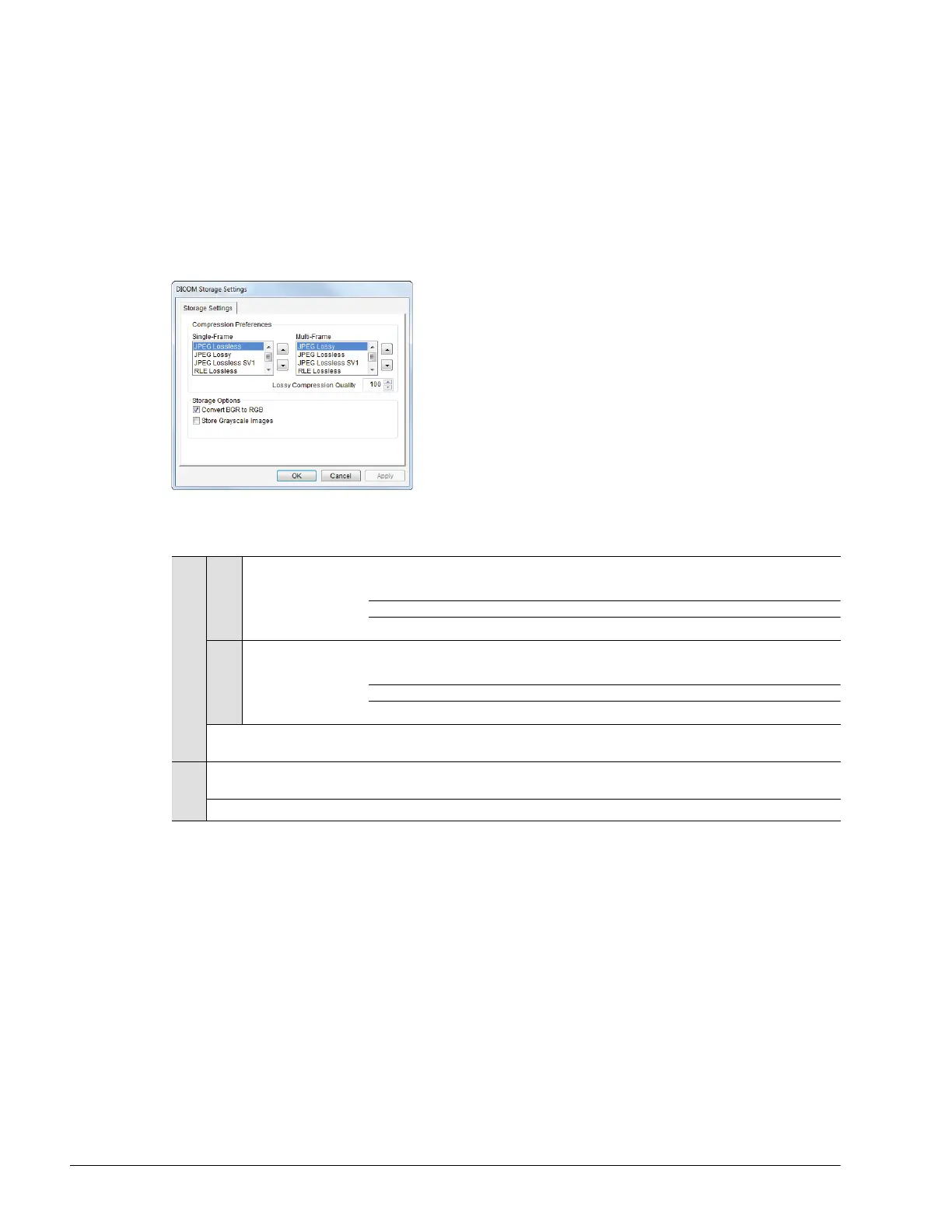
The DICOM Storage (AE Configuration) Storage Settings dialog specifies how images are stored.
To Access AE Configuration-Specific Storage Settings:
1. Tap the touch screen Menu button.
2. Select Administrator > DICOM > Storage… > AE Configuration > Settings….
Figure 8-4: DICOM Storage Settings – AE Configuration – Storage Settings
Table 8-3: DICOM Storage Settings – AE Configuration – Storage Settings
Compression Preferences
Single-Frame
JPEG Lossless
JPEG Lossless SV1
RLE Lossless
JPEG Lossy
No Compression
Set DICOM image format storage order for single frame images.
Note: Refer to the DICOM Standard for details on image formats.
Multi-Frame
JPEG Lossy
JPEG Lossless
JPEG Lossless SV1
RLE Lossless
No Compression
Set DICOM image format storage order for Cine loops.
Note: Refer to the DICOM Standard for details on image formats.
Lossy Compression
Quality
Select the quality (1% – 100%) of image compression.
Storage
Options
Convert BGR to RGB
Select to swap the color components of the image pixel data – the blue colors are
swapped with the red colors.
Store Grayscale Images Select to store images in grayscale format.



 To Next Page