SonixTouch Q+ Service Manual 00.053.204, Revision A Chapter 7: Field Service Components
7-39
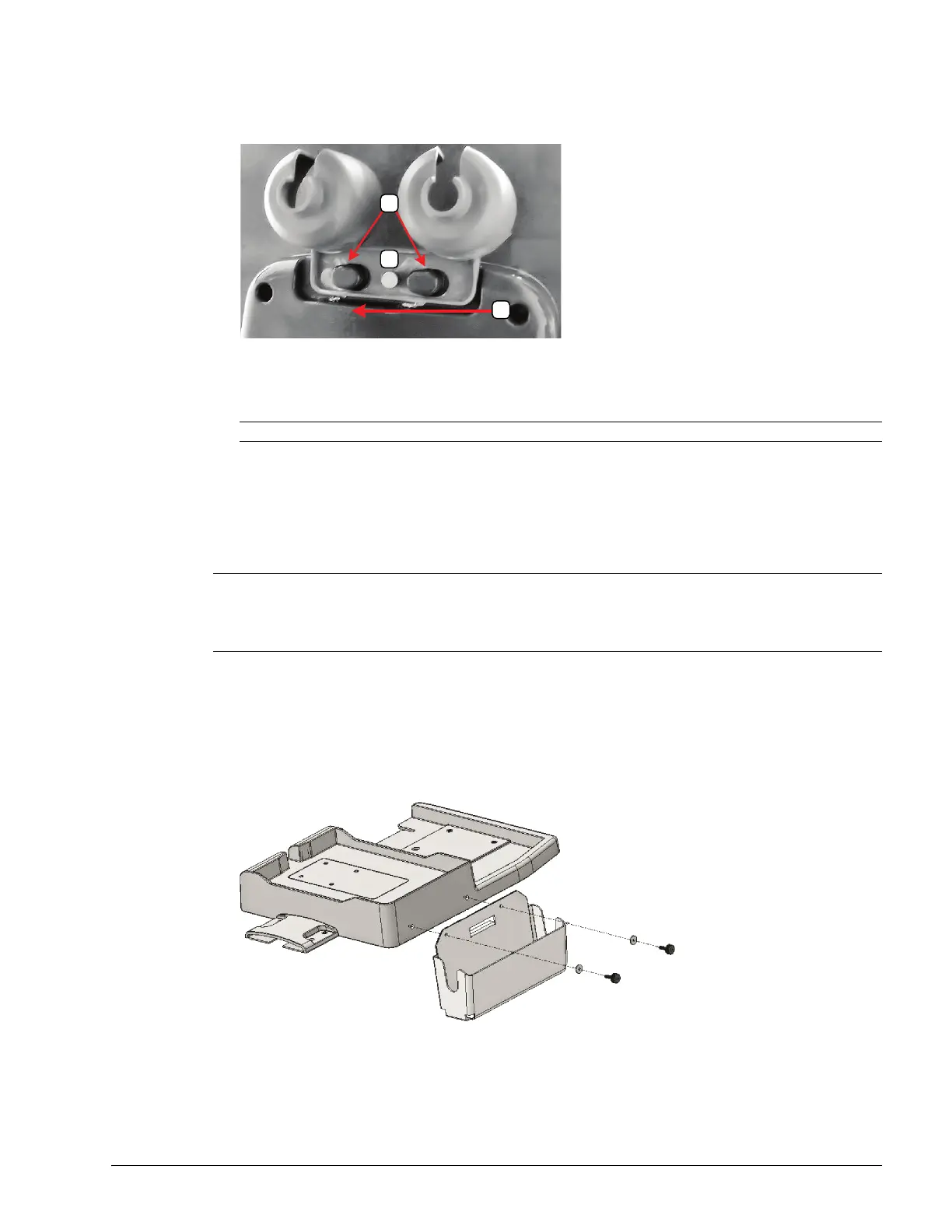
To Remove Transducer Holders and Cable Hooks:
1. Remove all transducers from the transducer holders.
2. Undo the thumbscrew (1) holding the transducer holder and cable hooks to the console.
3. Remove the cable hook.
4. The transducer holder is held in place by two tapered mounting flanges (2). Pushing the holder toward the
back of the console (3) will loosen it from these flanges, allowing it to be pulled down and removed.
7.8.2 Peripheral Tray
If the system order included the peripheral tray it will come pre-installed – with the exception of the peripheral tray
basket. The basket will have to be installed after delivery.
7.8.2.1 Attaching/Detaching the Peripheral Tray Basket
To Attach/Detach the Peripheral Tray Basket to the Peripheral Tray
1. Using the two sets of supplied nylon washers and thumbscrews, attach/detach the peripheral tray basket to the
peripheral tray while the tray is attached to the system.
Note: View from underneath the console.
Note: For best results, Ultrasonix recommends removing the peripheral tray basket before cleaning (11.2.10). This
will allow the operator to clean all the various curves and folds in a more effective manner.
If a USB printer has also been installed, it should be removed as well (3.3.7.4).
The peripheral tray is not available for systems that have SonixGPS installed.



 To Next Page