SonixTouch Q+ Service Manual 00.053.204, Revision A Chapter 3: System Installation
3-23
To Attach the Peripheral Tray Basket to the Peripheral Tray
1. From underneath the back of the peripheral tray, fasten the two thumbscrews (1) through the holes provided
into the two "threaded standoffs" (2) (already attached to the base of the USB printer.
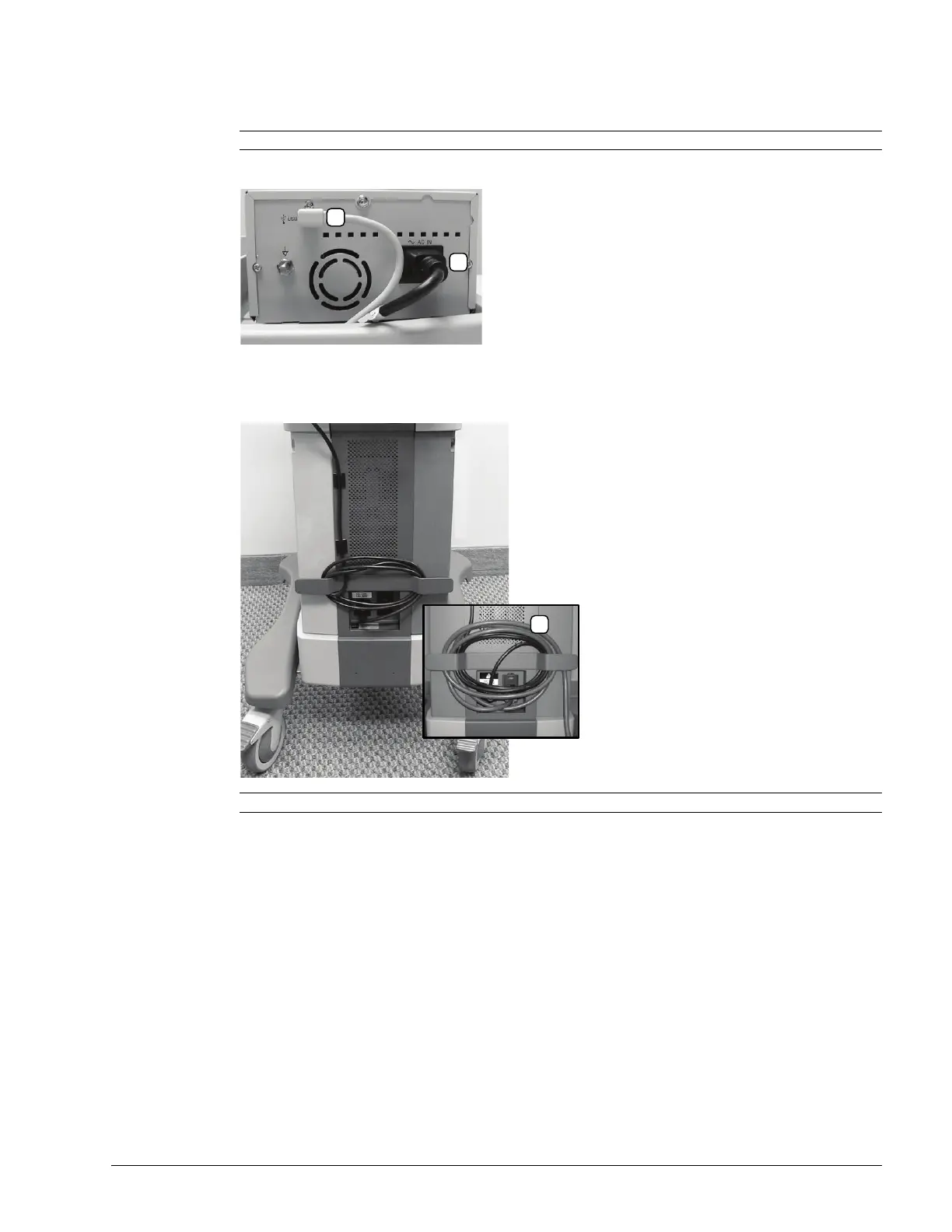
2. The USB (1) and Power cable (2) are pre-installed and will only need to be connected.
3. To help prevent cable clutter, the power cable is held in place with self-adhesive cable clips with enough slack
to connect it to the system. If desired, during use, excess slack in the system power cable can also be secured
(1).
3.3.7.5 Barcode Reader
To connect the barcode reader, plug the reader's USB connector into one of the USB ports on the system. Refer to
7.3.3.2 or 7.3.3.3 for USB port locations.
Note: Refer to Figure 3-8 and Table 3-4 for a detailed view of the installation.
Note: The system will arrive with the power cable already connected as shown above (1).



 To Next Page