Chapter 3: System Installation 00.053.204, Revision A SonixTouch Q+ Service Manual
3-22
3.3.7.3 Peripheral Tray and Basket
If the system order included the peripheral tray it will come pre-installed—with the exception of the peripheral tray
basket. The basket must be installed after delivery.
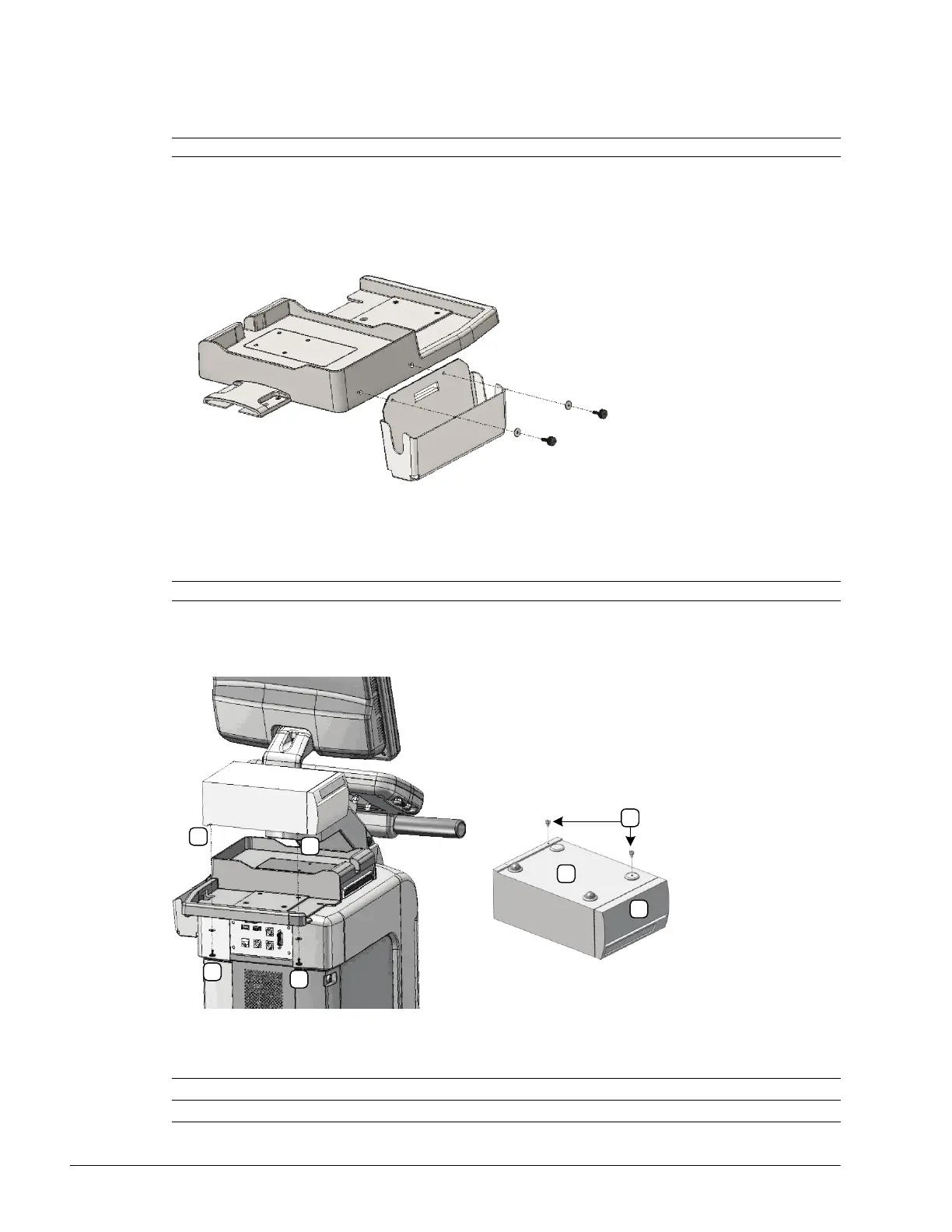
To Attach the Peripheral Tray Basket to the Peripheral Tray
1. Using the two sets of supplied nylon washers and thumbscrews, attach the peripheral tray basket to the
peripheral tray while the tray is attached to the system.
3.3.7.4 USB Printer Mounted on the Peripheral Tray (If Applicable)
If the system order included the peripheral tray and a USB printer, the printer must be installed after delivery.
Figure 3-8: USB Printer Mounted on the Peripheral Tray
Table 3-4: USB Printer Mounted on the Peripheral Tray
Note: The peripheral tray is not available for systems with SonixGPS installed.
Note: The USB printer will arrive prepared for mounting on the Peripheral Tray.
1 Thumbscrews A Printer bottom
2 Threaded Standoffs B Printer front



 To Next Page