SonixTouch Q+ Service Manual 00.053.204, Revision A Chapter 8: DICOM
8-5
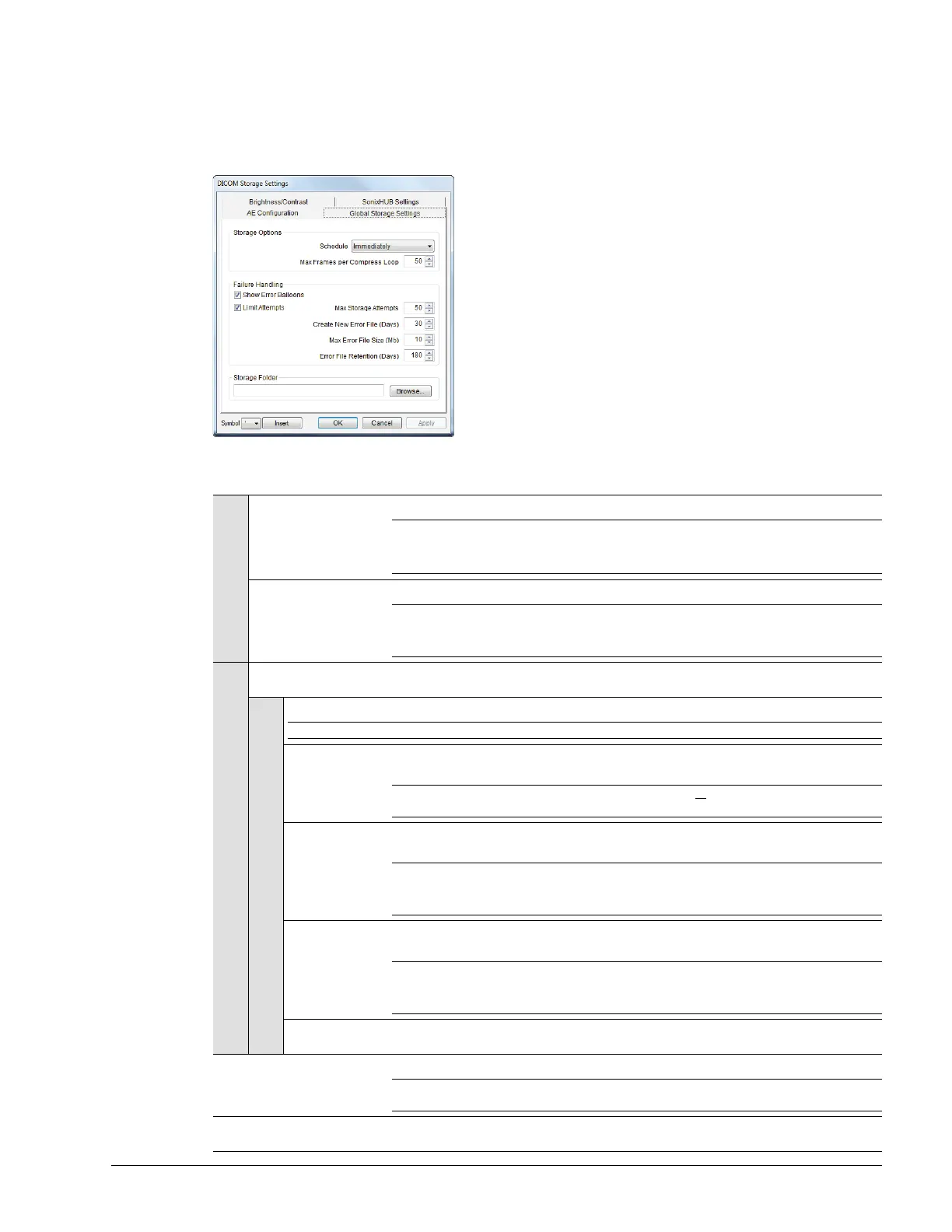
8.1.2.3 DICOM Storage Settings – Global Storage Settings
The DICOM Global Storage Settings dialog specifies global image storage parameters.
Figure 8-5: DICOM Storage Settings – Global Storage Settings
Table 8-4: DICOM Storage Settings – Global Storage Settings
Storage Options
Schedule
Select an auto-transfer setting: End of Exam, Immediate, On Idle.
Note: This applies only if:
• at least one device is enabled
•a Custom Key has been configured for DICOM Store (8.2.3.3).
Max Frames per
Compress Loop
Maximum number of frames compressed at one time: 10–300. The default is 50.
Note: Once all frames in a given file are compressed, the completed file will be transferred.
Compression type is based on the Multi-Frame format selected in the Storage
Settings dialog.
Failure Handling
Show Error Balloons
Select to enable the display of DICOM Storage error messages (e.g., Failed to connect
to DICOM).
Limit Attempts
Select to configure error handling after a failed DICOM storage attempt.
Note: If Limit Attempts is not selected, the following four options will be grayed out.
Max Storage
Attempts
Select the maximum number of times the system will retry after a failed storage attempt:
1–1000. The default is 50.
Note: Failure may occur during DICOM file creation or DICOM file transfer. The retry
setting applies to both failure types.
Create New Error
File (Days)
Select the length of time (in days) that initiates the creation of a new error file: 1–90. The
default is 30 days.
Note: When a new file is created, the existing file is saved, renamed and stored for 180 days.
This setting works in conjunction with Max Error File Size (Mb). A new file is created
based on whichever limit is reached first.
Max Error File
Size (Mb)
Select the file size (in Mb) that initiates the creation of a new error file: 1–50. The default
is 10 Mb.
Note: When a new file is created, the existing file is saved, renamed and stored for 180 days.
This setting works in conjunction with Create New Error File (Days). A new file is
created based on whichever limit is reached first.
Error File
Retention (Days)
Select the length of time (in days) that each error file will be retained: 30–180. The default
is 180 days.
Storage Folder
Enter, or Browse for, the location (local or remote) where the images will be stored.
Note: If a value is specified, DICOM (specifically, the AE Configuration and Storage
Commitment dialogs) will be disabled, preventing the transfer of images to an SCP.
Insert (Symbol)
Enables the insertion of text symbol(s) not available on the keyboard (e.g., punctuation,
symbols and letters from other languages).



 To Next Page