Chapter 8: DICOM 00.053.204, Revision A SonixTouch Q+ Service Manual
8-2
8.1 DICOM CONFIGURATION OPTIONS
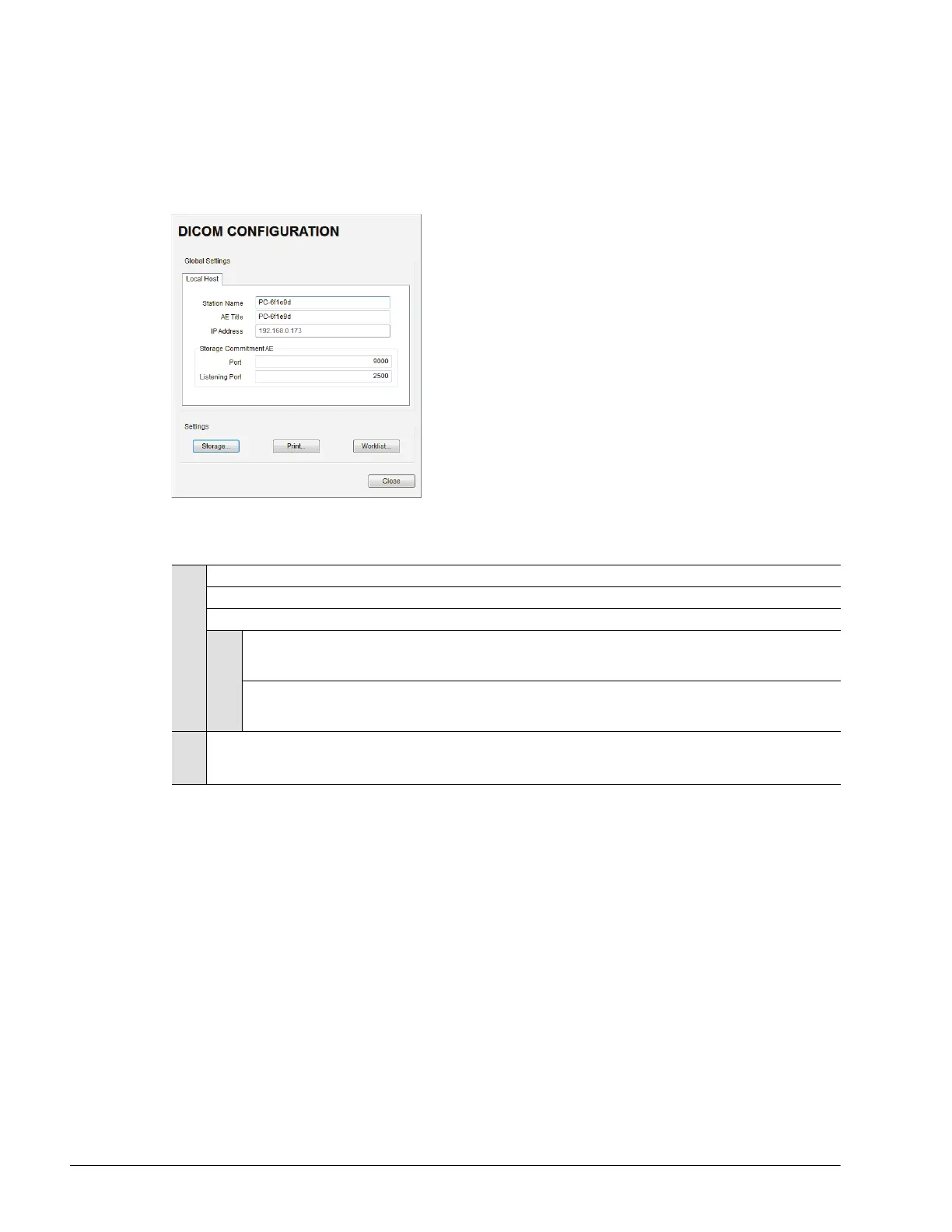
8.1.1 Global Settings
In order to facilitate DICOM configuration, certain settings are controlled globally.
Figure 8-2: DICOM Global Settings
Table 8-1: DICOM Configuration – Global Settings
To Access Global DICOM Settings:
1. Tap the touch screen Menu button.
2. Select Administrator > DICOM.
8.1.2 DICOM Storage Settings
The DICOM Storage Settings dialog offers basic and advanced settings for configuring the system for DICOM
image storage.
To Access DICOM Storage Settings:
1. Tap the touch screen Menu button.
2. Select Administrator > DICOM > Storage….
Local Host
Station Name General DICOM Station Name.
AE Title AE (Application Entity) Title of the Sonix system.
IP Address Unique identifier of the Sonix system (informational only).
Storage
Commitment AE
Port Port issues Storage Commitment requests (N-Action).
Listening Port Listening Port receives incoming Storage Commitment responses (N-Event).
Settings
Storage...
Print...
Worklist...
Use to access specific DICOM Storage, Print and Worklist settings.



 To Next Page