Configuring Devices for the DME
DME Admin Guide 199
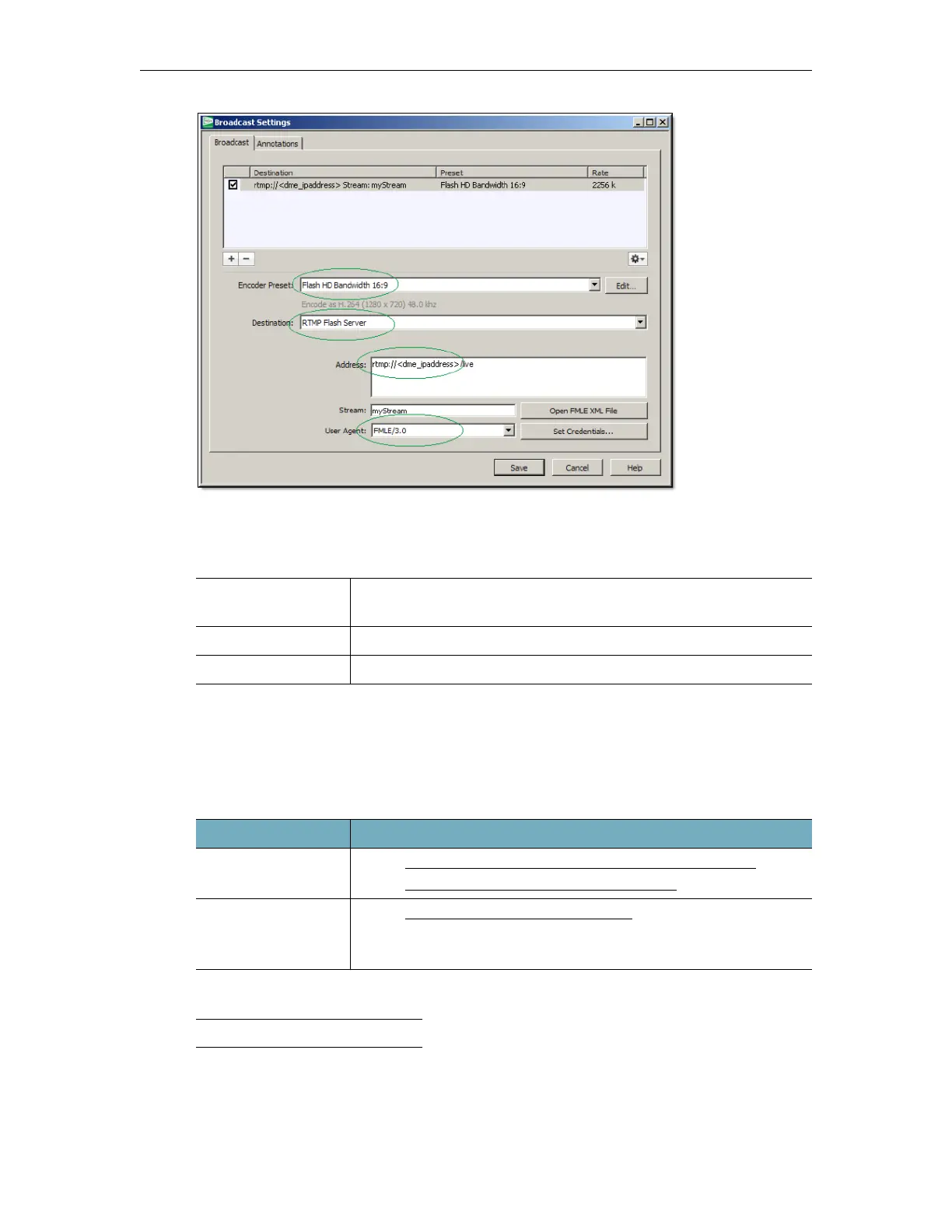
Figure 1. RMD Broadcast Page
Playback Examples
Configure Rich Media Studio (RMS) for the DME
Although the DME is integrated with Vbrick RMS v1.3 or higher, for best results, Vbrick
recommends v1.6 or above.
Recommended Streaming Methods
† or higher
Stream to the DME with RMS 1.6
Stream to the DME with RMS 1.3
VEMS Mystro
(Live Entered URL)
rtmp://<VODServerIPaddress>/live/mystream
VBOSS
rtmp://fml.2D84.edgecastcdn.net/202D84/fls/2D84/mystream
iOS http://<dme_ip_address>/HLS/<stream_name>/playlist.m3u8
RMS Version Recommended Streaming Method
RMS 1.6 † • See
Stream to the DME with an RTP Auto-Unicast Push
• See
Stream to the DME with an RTMP Push.
RMS 1.3 † • See
Stream to the DME with RMS 1.3
• With this method you will have to copy the .sdp file to the DME
every time you modify the RMS video parameters.


 To Next Page