202 © Vbrick Systems, Inc.
Playback Examples
Stream to the DME with an RTMP Push
This topic explains how to configure an RMS-to-DME stream using an RTMP Push output.
This is an alternate improved interface (that requires DME 3.1.1 or higher).
To configure an RTMP Push to a DME:
1. Go to the
Session Properties page and then click Outputs and Create.
2. Click on the
Live icon, highlight H.264 for Flash, and click Next.
3. Click on the
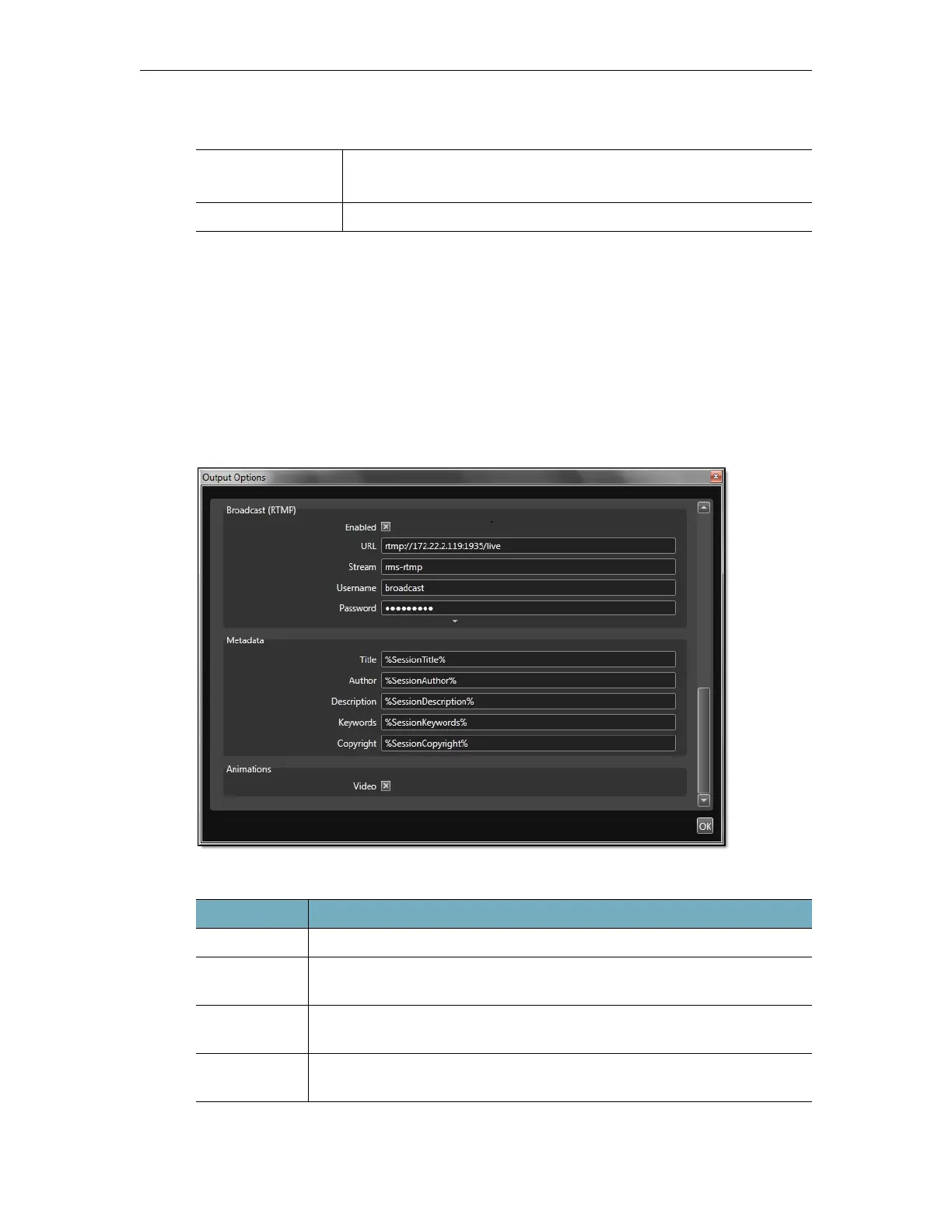
Options button, scroll down to Broadcast (RTMP), and expand the pane.
4. Configure the
URL, Stream name, and credentials as follows:
VEMS Mystro (Live
Entered URL)
vbrtsp://172.1.1.1/vbStream1S1
vbhttp://172.1.1.1/vbStream1T1.sdp
iOS
http://<dme_ip_address>/HLS/<stream_name>/playlist.m3u8
Field Description
URL DME IP address in this format:
rtmp://<DME_IP_Addr>:1935/live
Stream User configurable stream name that will be shown on Monitor >
Multi Protocol Connections page and used in a Flash player.
Username DME user name from User Configuration > Stream Input Authentication
page.
Password DME user name from User Configuration > Stream Input Authentication
page.


 To Next Page