Videojet DataFlex 6530 Service Manual - Rev AA E-21
E.1.15.2Disabling the Master Printer
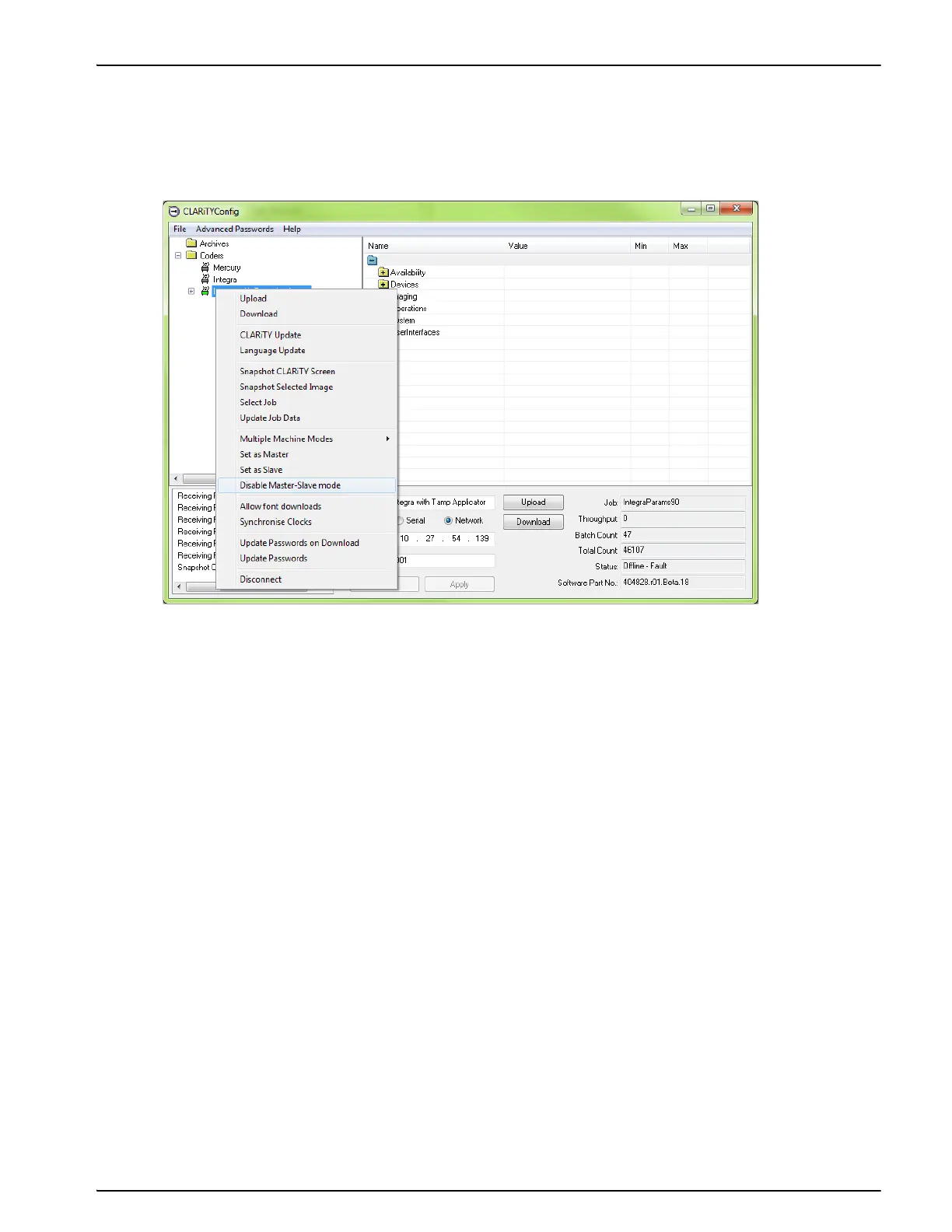
1. Establish communications between CLARiTY Configuration Manager and the Master printer
(“Connecting the CLARiTY Configuration Manager to the Printer” on page 4-8).
2. Right click on the 'New Printer' icon when the icon turns 'green' and Select 'Disable
Master/Slave mode', from the list as shown in Figure E-22.
A confirmation box appears asking you to confirm this action.
3. Click Yes do one of the following:
- Replace the Master printer with a new printer containing identical configuration
parameters and ensure the old Master printer has been removed from the network.
- If using advanced configuration, replace the Master printer with a new printer containing
identical configuration parameters, but with a new IP address.
- Disable Master/Slave mode for one Slave printer, then configure it to be the new Master
and connect the remaining Slaves.
- Disable Master/Slave mode for all Slaves and use as standalone printers only.
Figure E-23: CLARiTY Config - Slave Disabling



 To Next Page