Videojet DataFlex 6530 Service Manual - Rev AA E-3
E.1.7 Software Configuration
To configure Master/Slave mode, CLARiTY Configuration Manager (part number - 361725) is
required.
The Videojet DataFlex 6530 printers may be configured using a serial cable or a network
connection. However, this manual assumes that a standard Null Modem cable (part number -
400720) is being used.
E.1.8 Master/Slave Basic and Advanced Configuration
The following section describes two modes of operation for a Master/Slave group of printers.
• Basic Configuration: This configuration is used if the group is to be used as a
'standalone group'.
• Advanced Configuration: This configuration is used if the group is to be connected
to a wider area network.
Note: If a Videojet DataFlex 6530 printer has previously been configured to Advanced Configuration
mode, this setting is saved as the standard default configuration for the printer.
E.1.8.1 Basic Configuration - Configuring the Slave Printers
To configure the slave printer proceed as follows:
1. Establish communications between CLARiTY Configuration Manager and the first Slave
printer (“Connecting the CLARiTY Configuration Manager to the Printer” on page 4-8).
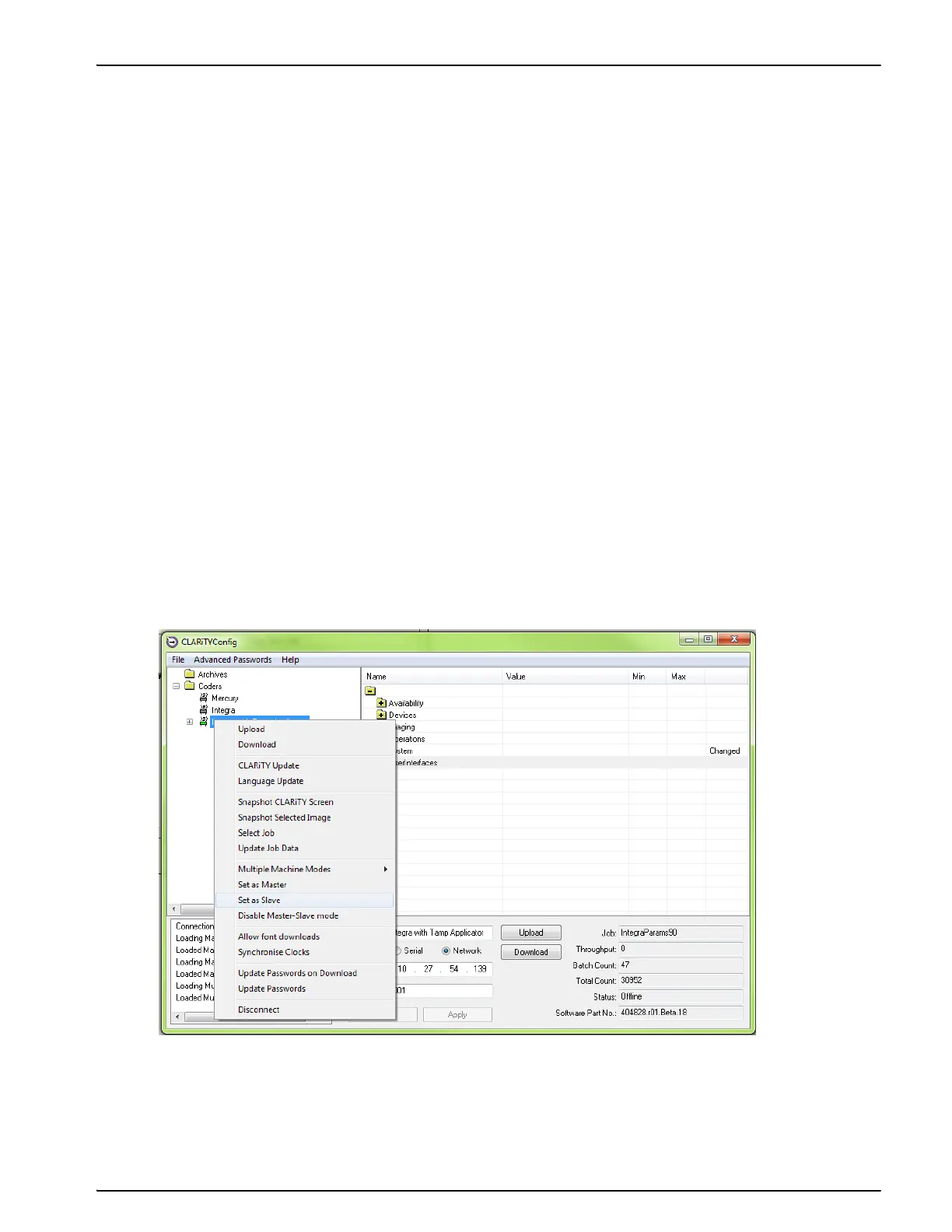
2. Right click on the New Printer icon when the icon turns 'green' and select Set as Slave, from
the list as shown in Figure E-2.
A configure slave printer dialog box appears (Figure E-3).
Figure E-2: CLARiTY Config - Slave Setup



 To Next Page