Videojet DataFlex 6530 Service Manual - Rev AA F-3
F.4.4 Availability Page
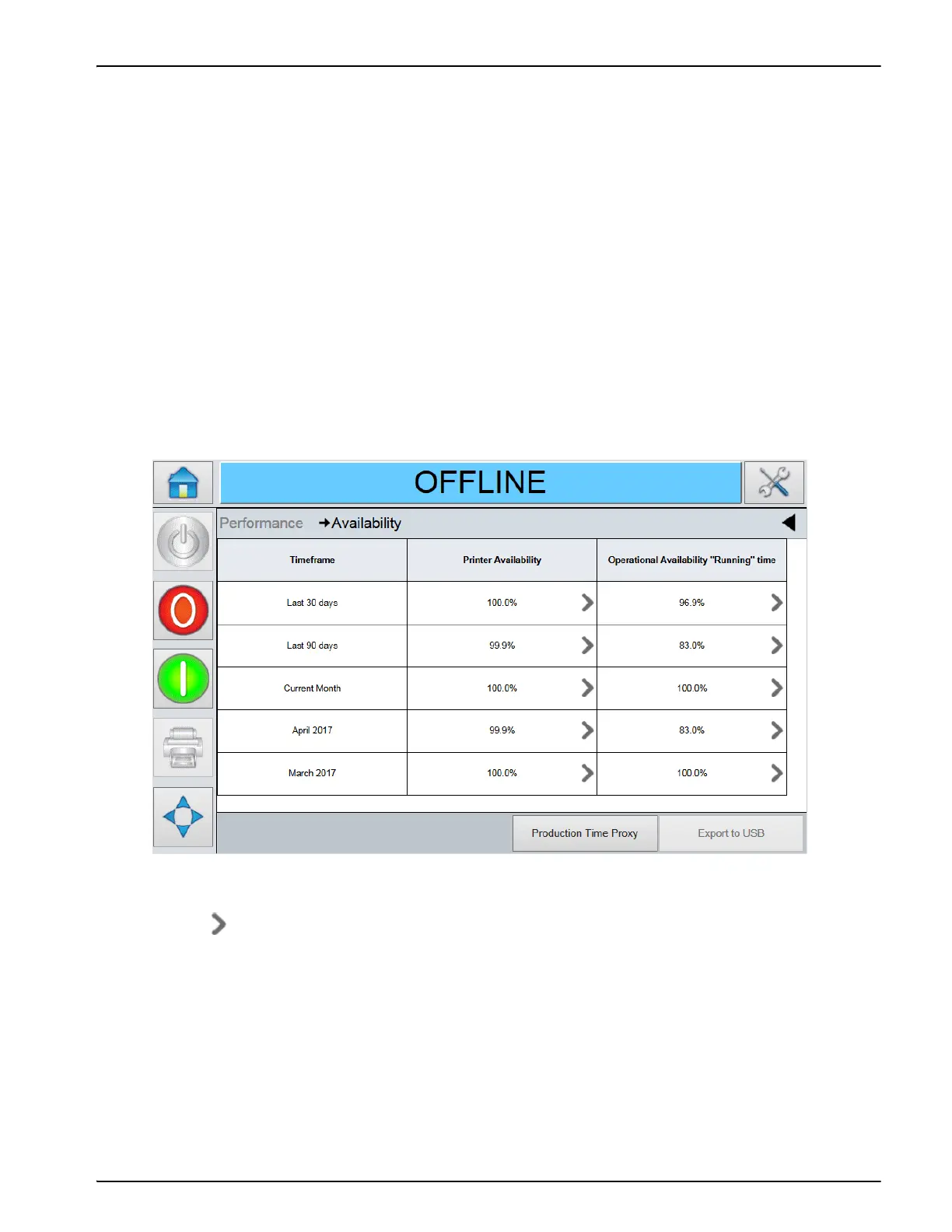
Access the Availability page by navigating to Home > Performance > Availability. The availability
page displays the equipment availability and operational availability data against the time frame
(Figure F-1).
Each screen allows you to interrogate the availability data and fault pareto to understand each
cause of non-availability.
Availability menu allows you to interrogate equipment availability and operational availability
data for the life of the equipment. The detailed event log of the equipment events will contain six
months of data. You can select a time period for further detail on faults causing a drop in
equipment or operational availability.
This data can be exported to USB for further interrogation.
Refer to "Export to USB" on page F-7 section for information on how to export to USB stick.
All data can be exported to USB for further interrogation.
Refer to the Operator Manual for complete information on
How to use Availability tools.
Touch to view the Fault Pareto page for the selected availability data. The page displays the
fault type, downtime and fault frequency (Figure F-2 on page F-4 and Figure F-3 on page F-4).



 To Next Page