Chapter 2 Installation Procedures
15
OTHER CONFIGURATIONS
You can include other video equipment (such as a Videonics video
mixer) in a configuration for extended functionality. You can also use a
GPI (General Purpose Interface) device to control productions exter-
nally. This section explains these other configurations.
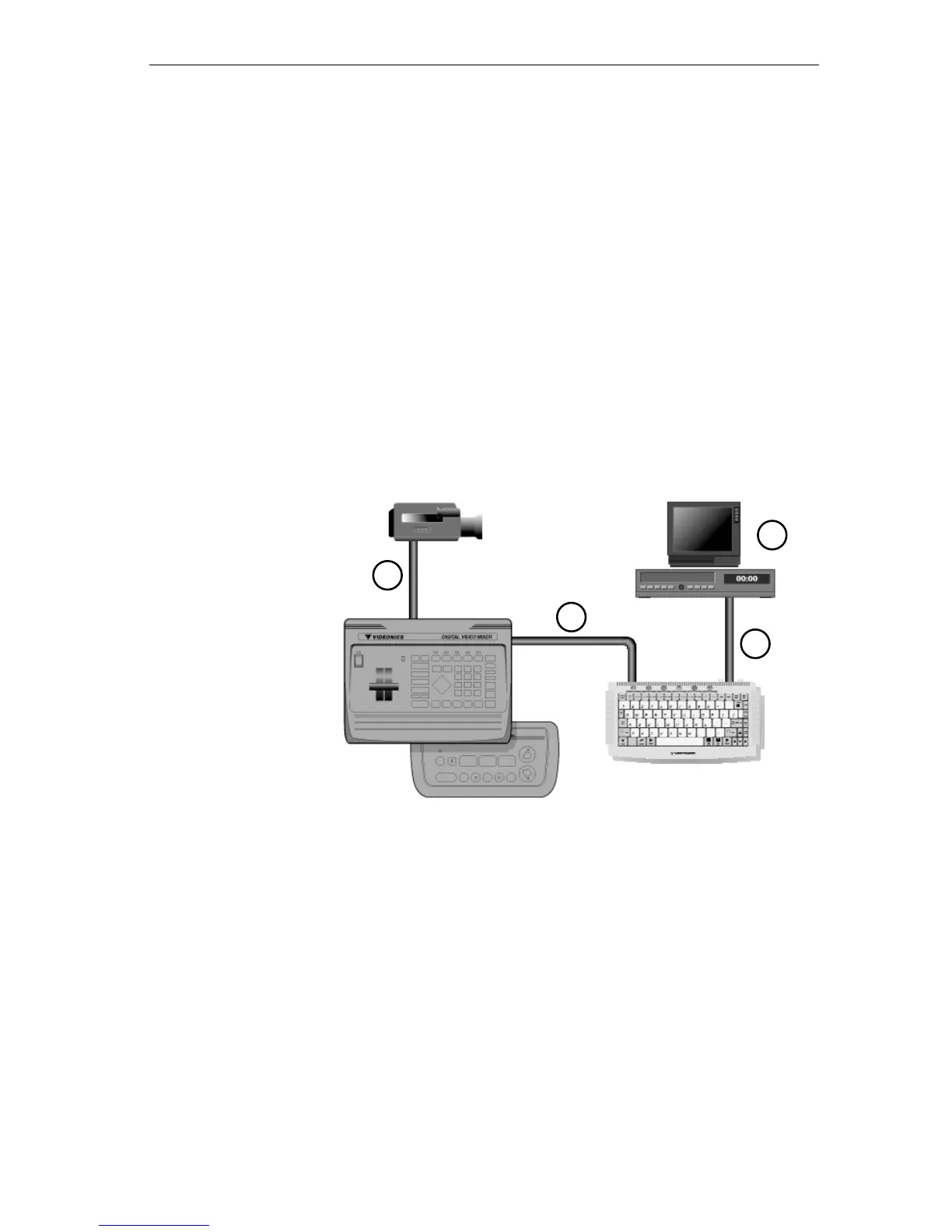
Using Other Videonics Equipment
If you own a Videonics Thumbs Up or Video Mixer, you can include it in
your configuration. Thumbs Up provides remote control of other
equipment. A video mixer lets you apply special effects and combine
footage from multiple sources.
To create a configuration such as this:
1 Connect the
OUTPUT from a camcorder (input device) to the
INPUT on Thumbs Up or Video Mixer.
2 Connect the
OUTPUT from Thumbs Up or Video Mixer to the
INPUT on the Personal TitleMaker.
3 Connect the
OUTPUT from Personal TitleMaker to the INPUT
on a recording VCR. With this connection, you can record
finished Personal TitleMaker projects.
4 Connect the
OUTPUT from the VCR to the INPUT on a video
monitor. With this connection, you can see exactly what gets
recorded on the VCR, including your titles.
1
2
3
4
MX-1 Mixer
Videonics
Thumbs Up
Videonics



 To Next Page