EasyManua.ls Logo

WEG CFW-09 - Page 114

WEG CFW-09
362 pages
Print Icon
To Next Page IconTo Next Page
To Previous Page IconTo Previous Page
Loading...
115
CHAPTER 5 - START-UP
ACTION
LED DISPLAY
DESCRIPTION
LCD DISPLAY
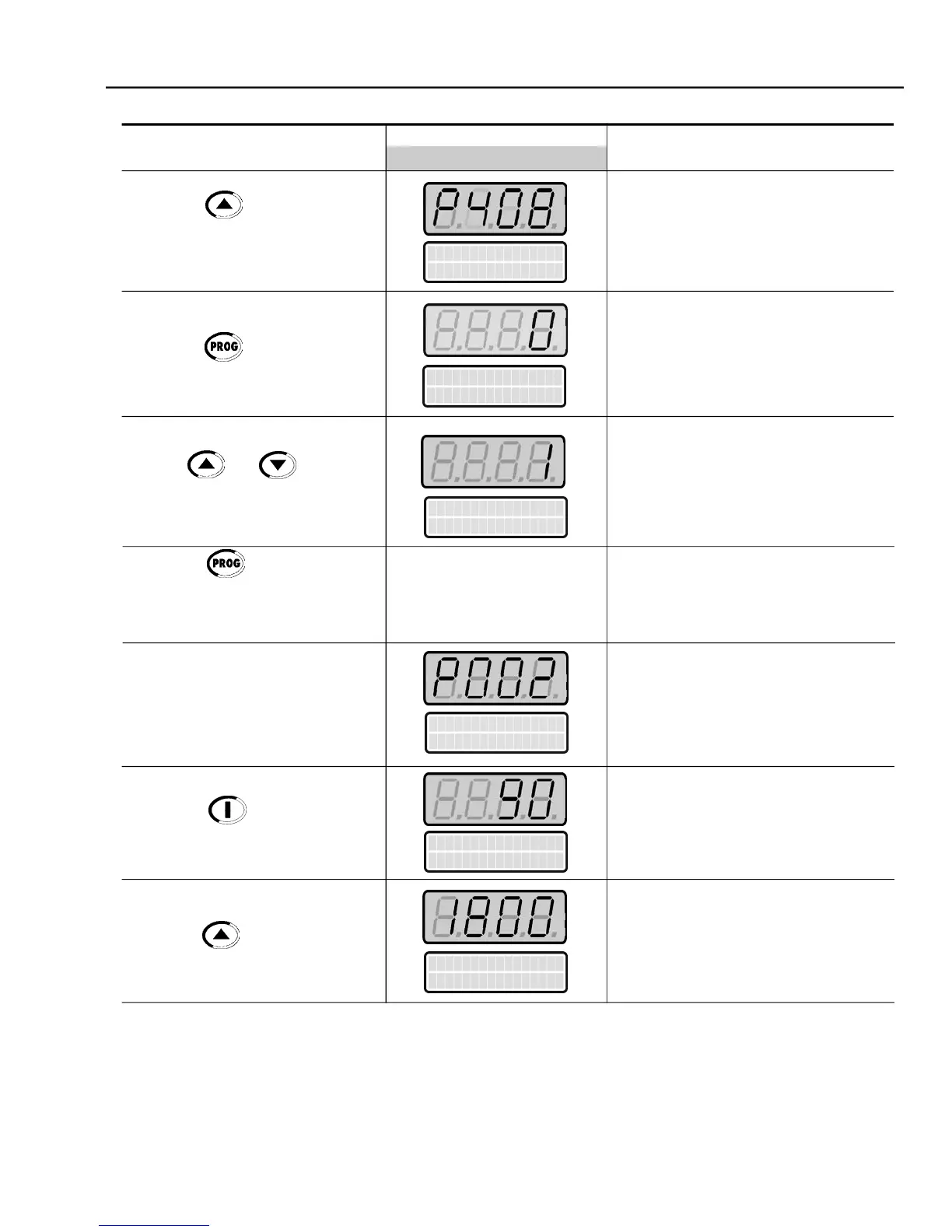
Self-tuning Mode Selection:
0 = No
1 = No Rotation
Enter the programmingmode
Only select option 1 (No Rotation)
Self-tuning routine in progress
(2)
Motor Speed (rpm)
Motor accelerates from 0 to 90 rpm*
(Minimum Speed), in the Forward (CW)
direction of rotation
(3)
* for 4 pole motors
Motor accelerates up to 1800 rpm*
* for 4 pole motors
Run Self Tuning
P408 = No
Press the key to go to the
next parameter
Press the key to enter the
programming mode
Use the and keys to
select the desired Self-tuning mode
Press the key to start the
self-tuningroutine
Note:
Display shows P409 to P413
duringthe Self-Tuningroutine
End of the Self-tuning routine.
Inverter is back to normal operation
Press the Start key
Press the key and hold until
1800 rpm is reached
Motor Speed
P
0
0
2
=
X
X
X
X
r
p
m
Messages and values of
the estimated parameters
areshown
Run Self Tuning
P408 = No
Run Self Tuning
P
4
0
8 = No Rotation
Motor Speed
P
0
0
2
=
90 r
p
m
Motor Speed
P
0
0
2
=
1
800 r
p
m

Table of Contents