Axio Imager 2 OPERATION ZEISS
Operating the motorized microscope via the touchscreen of the TFT display
01/2016 430000-7544-001 109
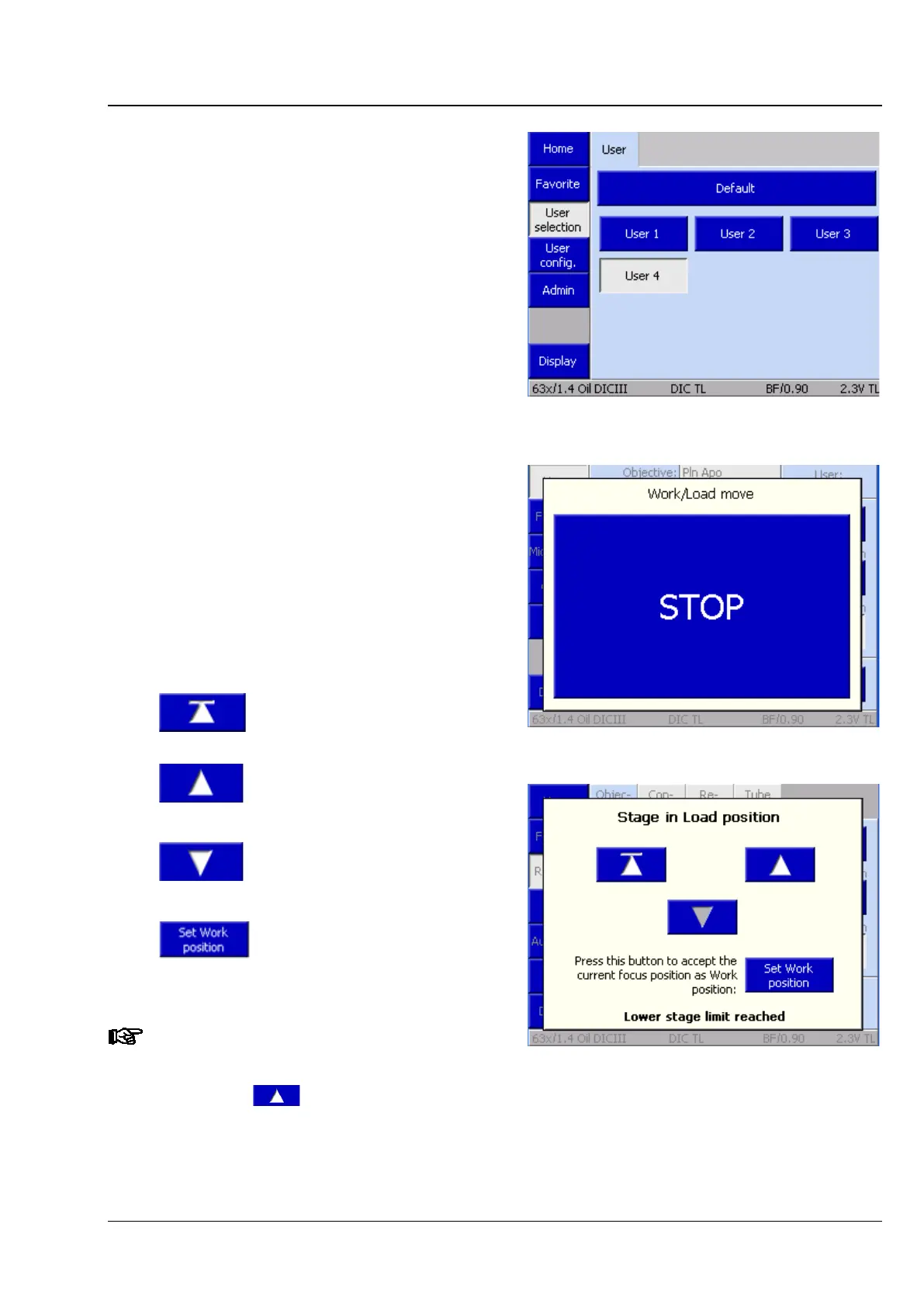
− User button:
When this button is pressed, the user
selection page will appear (Fig. 95).
A preconfigured user may be chosen on the
user selection page. For the configuration
of a user, see Section 4.8.6.
− Load Position button:
When this button is pressed, the stage
travels to the load position. The load position
is approximately 10 mm below the operating
position. The load travel of the stage can be
interrupted using the STOP button (Fig. 96)
or any button on the stand base.
When the stage arrives in the load position,
the Load Position popup window (Fig. 97)
appears with the following control elements:
Stage returns to operating
position.
While this button is pressed,
the stage travels to the
operating position (up to the
upper stage stop).
While this button is pressed,
the stage moves down (to
the lower stage stop).
When this button is pressed,
the current focus position is
set as the operating
position.
Caution! If the set operating position is
below the current focus position, the
focusing drive will move downward
when the button is pressed.
Fig. 95 User selection page
Fig. 96 STOP button
Fig. 97 Stage in load position








 To Next Page