ZEISS OPERATION Axio Imager 2
Operating the motorized microscope via the touchscreen of the TFT display
116 430000-7544-001 01/2016
4.8.5.2 Light page
Light path and intensity control functions are
contained on the Light page.
As many as four tabs are available here, depending
on the configuration of the microscope:
− Light path: Light path control
− Illumination: Filter wheels and lamp voltage
for reflected and transmitted light
− F/A TL: Field and aperture diaphragm control in
transmitted light
− F/A RL: Field and aperture diaphragm control in
reflected light
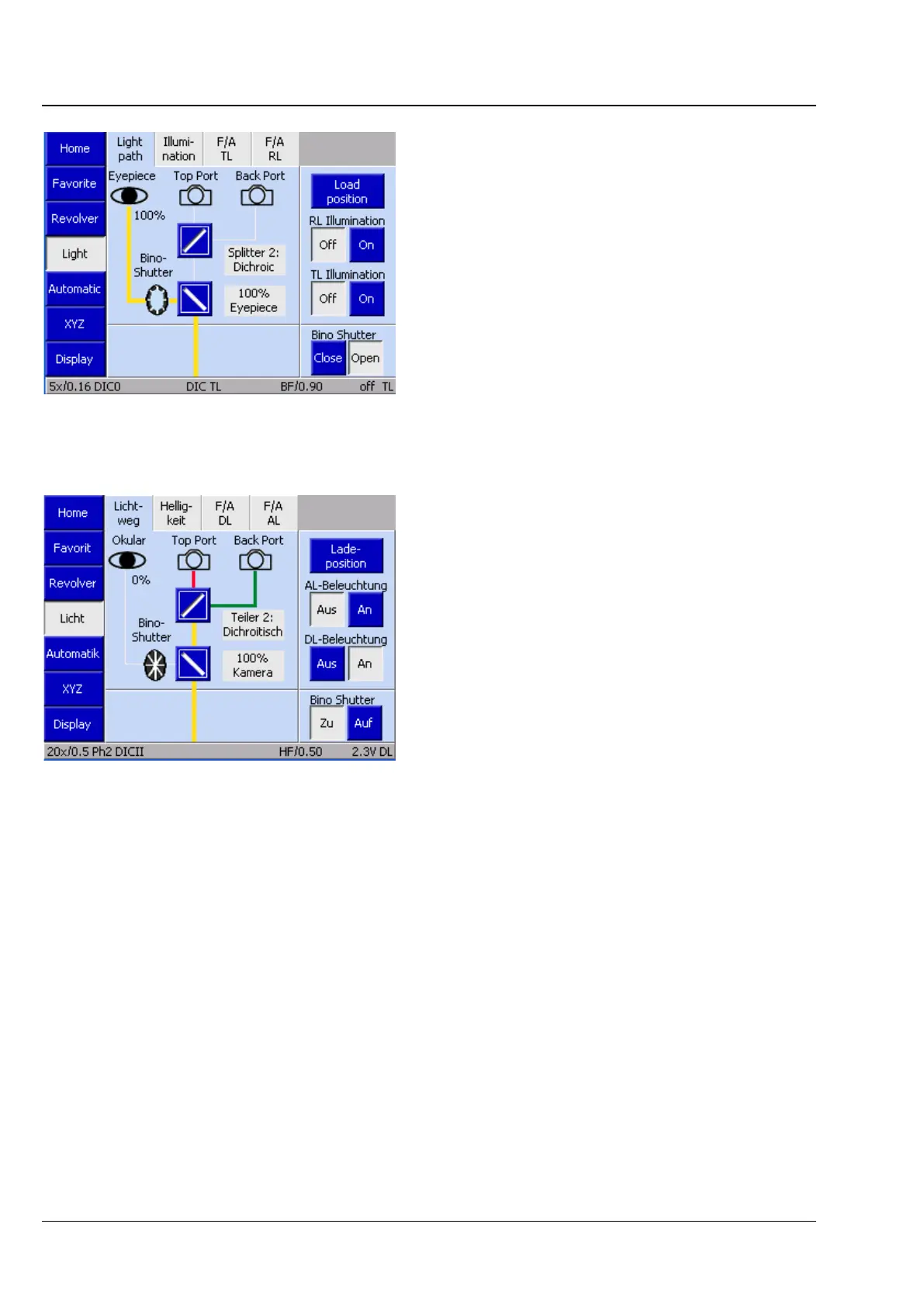
(1) Light path tab
The light path of the microscope on the imaging
side is shown in a schematic diagram beneath the
Light path tab.
Colored lines symbolize the light path.
− yellow
Active light path, which can be adjusted via
mirrors
− gray
Inactive (unknown) light path, which cannot be
adjusted
Special case: Dichroic deflection
− blue
"Side Port deflected" deflection plane
(first dichroic deflection)
− green
"Side Port in pass-through mode" deflection
plane (second dichroic deflection)
or deflected for 2TV tube
− red
2TV tube in pass-through mode
(dichroic passage)
Fig. 111 Light page
Fig. 112 Microscope -> Light -> Light path








 To Next Page