Axio Imager 2 OPERATION ZEISS
Operating the motorized microscope via the touchscreen of the TFT display
01/2016 430000-7544-001 127
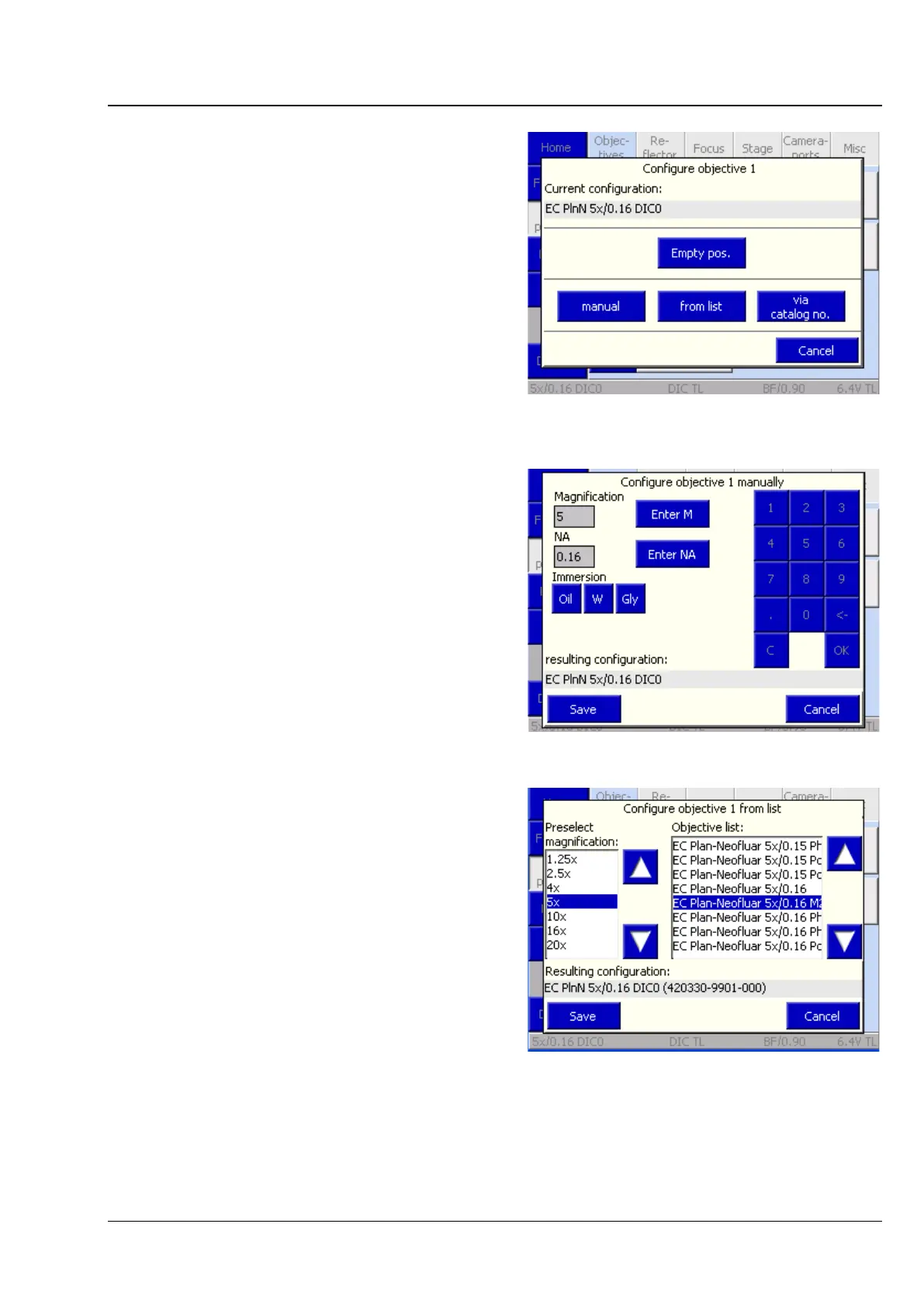
In the Configure Objective # popup window, you
can choose among various options:
− Empty position button
Deletes the objective configuration from the
current position. Acknowledge the
confirmation prompt with Yes.
− Manual button
The user must manually enter magnification,
numerical aperture (NA) and immersion
information. (See Fig. 128)
To execute the configuration procedure,
press the Save button. To abort the
procedure, press the Cancel button.
− From list button
The user chooses a magnification from the
Preselect Magnification list and an
appropriate objective from the Objective
list (Fig. 129).
To execute the configuration procedure,
press the Save button. To abort the
procedure, press the Cancel button.
A number of DIC prisms / sliders are
allocated to certain objectives which are
suitable for differential interference contrast
(DIC). This allocation is made when the
selection of the objective is acknowledged.
Fig. 127 Config -> Components -> Configure
objective
Fig. 128 Configuring objective manually
Fig. 129 Configuring of objective from list








 To Next Page