8 Operation Instructions for Use
2660021169042 Rev. A 2018-038.5 Acquire Data (Scan)
88 / 246 2660021169042 Rev. A 2018-03
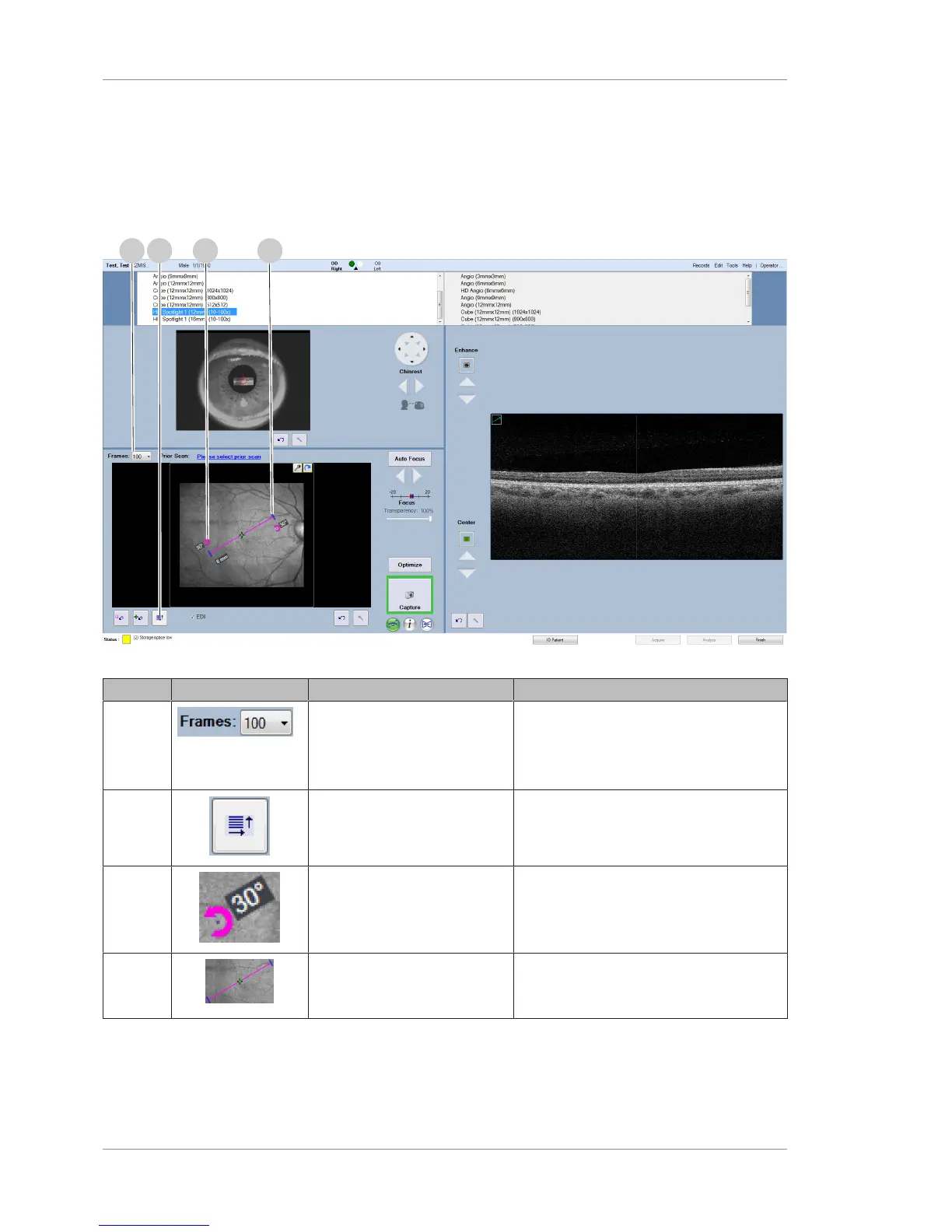
8.5.2.1 Acquire HD Spotlight Screen
This section describes the unique elements of the HD Spotlight
acquire screen. For information about the common elements of
acquire screens, refer to: Acquire Angio, Cube, and HD 51 Scans
Screen [}83].
Figure20: HD Spotlight 1 Acquire Screen
Pos. Symbol Name Explanation
1 Frames Select the number of frames (scan repeti-
tions)
Choose one: 10, 20, 30, 40, 50, 60, 70,
80, 90, or 100.
2 Set Angle and Length Select to enable slice angle and length
settings.
3 Adjust Scan Angle Move the end of the angle adjustment
arrow the change the angle of the scan.
4 Adjust Scan Length Drag the ends of the slice selector in and
out to increase or decrease the scan
length (up to 16 mm).


 To Next Page
 Loading...










