Instructions for Use 8 Operation
2660021169042 Rev. A 2018-03 8.5 Acquire Data (Scan)
2660021169042 Rev. A 2018-03 89 / 246
8.5.2.2 Acquiring HD Spotlight Scans
To repeat the settings for a prior scan, see: Repeating an Earlier
Scan [}96].
To acquire HD scans:
Prerequisite
þ Select the Patient [}74]
þ Prepare the Patient [}78]
þ Determine Scan Type [}80]
Action 1. Select Acquire.
ð The Acquire Screen opens.
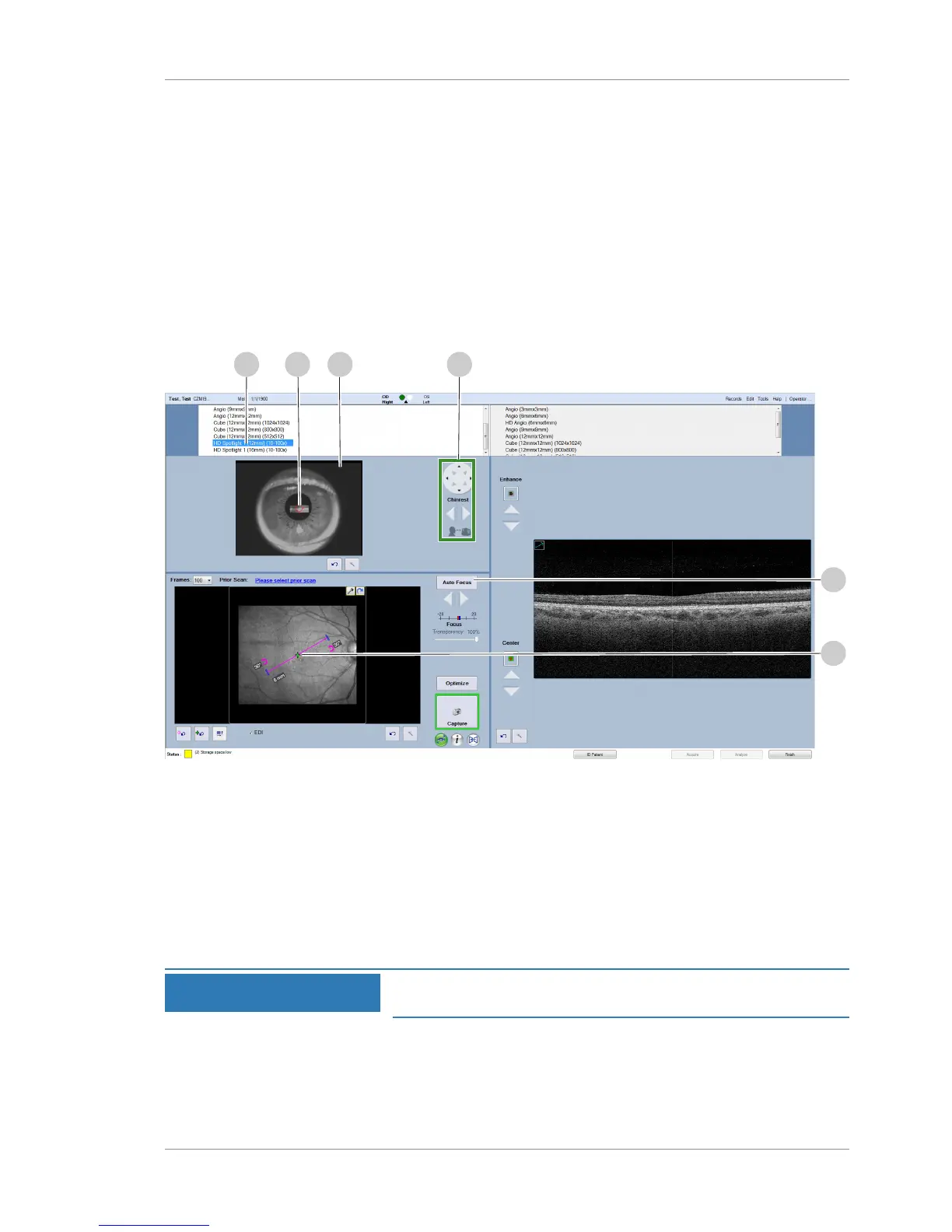
2. Select HD Spotlight 1 (1) under OD or OS.
ð The chinrest moves into place for the selected scan.
3. Left-click on the center of the pupil (2) in the viewport (3).
ð The pupil target appears in the viewport.
4. If needed, move the chinrest settings (4) to position the
image in the viewport (3).
5. Click Auto Focus (5) and ensure that the pupil target (2)
remains centered.
NOTE
If the fundus image becomes dark after you click Auto Focus,
recenter the pupil target and adjust the image brightness.
6. To set the fixation target, click on a new location in the fundus
image (6)













 To Next Page