• The corresponding event is triggered.
During recording, you can select the button to manually stop the recording:
The recorder will automatically stop recording on the following occasions:
• Recording task completion.
• Recorder is out of paper.
• A technical malfunction occurred in the recorder.
• The operating mode of the defibrillator monitor is changed.
Caution
If the lead, gain, and filtering mode of the ECG waveform are changed during recording, the
ECG waveform on the recording paper will also change, but the lead, gain, and filtering mode
mark of the waveform will not change.
13.4 Recording Settings
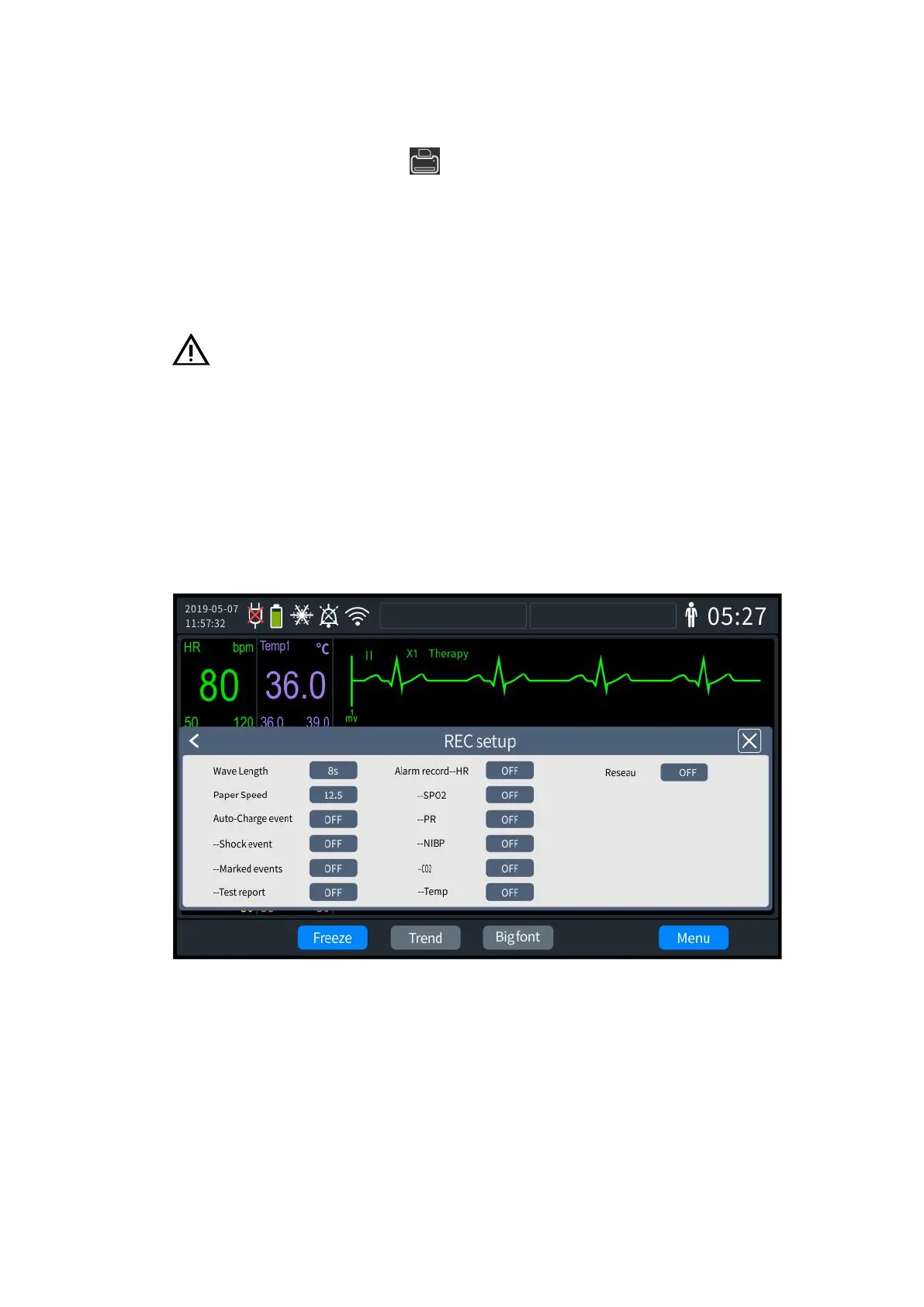
1. Press the knob to bring up the [Menu] screen and select [General Configuration] -
[Recording settings]. The Recording settings screen is shown in the following figure:
13- 1 Recording settings
2. Select [Real-time Waveform Recording Time] which can be set to:
[8s]: Record the waveforms of 4s before and after the current time.
[16s]: Record the waveforms of 8s before and after the current time.
[32s]: Record the waveform of 16s before and after the current time.
3. Select [Record Output Speed], and set the recorder output speed to "12.5," "25" and
"50".
4. "ON or "OFF" can be set as required.



 To Next Page