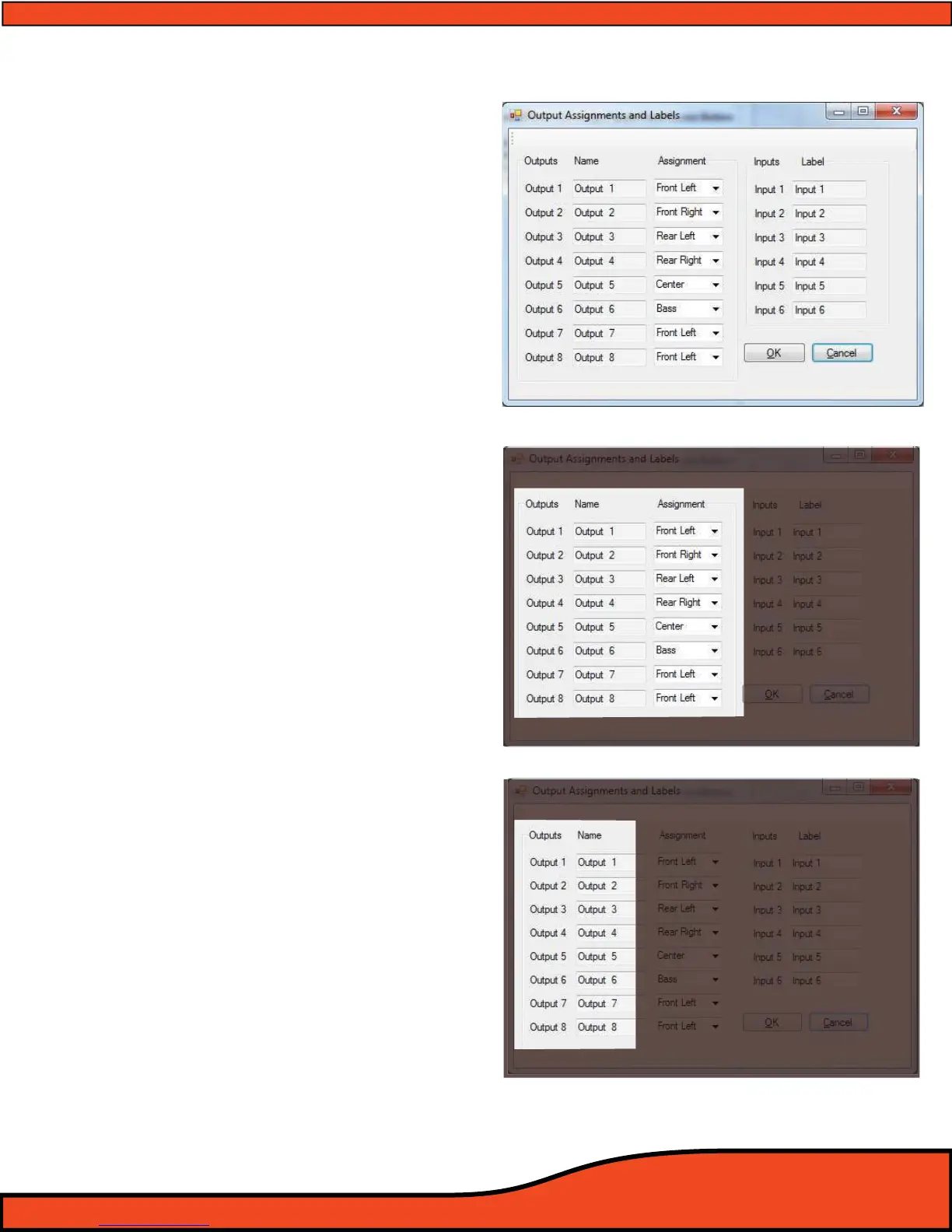
Diagram 10.1
Diagram 10.2
Diagram 10.3
10) OTHER PS8 FEATURES, USER DEFINED FEATURES, AND MORE
10.1 - User dened channel names and denitions
The PS8’s output assignments and labels
panel allows users the ability to dene the
names of all input and output channels for
a improved reference and ease of use when
using the tuning features of the PS8. This
panel also allows users to dene the gener-
alized function and assignened fader
placement and orientation of each channel
for future control with the PSC (Optional)
controller.
10.1.1- Outputs
The PS8's eight output channels are indi-
vidually changeable with the individual
names and functions. This category will
always allow users to refer to the individual
channels by the original channel designa-
tion and their place in the output line up.
(See diagram 10.2)
10.1.2- Channel Naming Boxes
Channel naming boxes allow users to
customize the name of each of the PS8's
individual 8 channels of output. To make a
change to all or one of the channel names,
simply click on the desired channel name
box, enter the new name, and then hit
enter. When you are completed with all of
the desired changes, be sure to click on the
“OK” button.
(See diagram 10.3)



 To Next Page