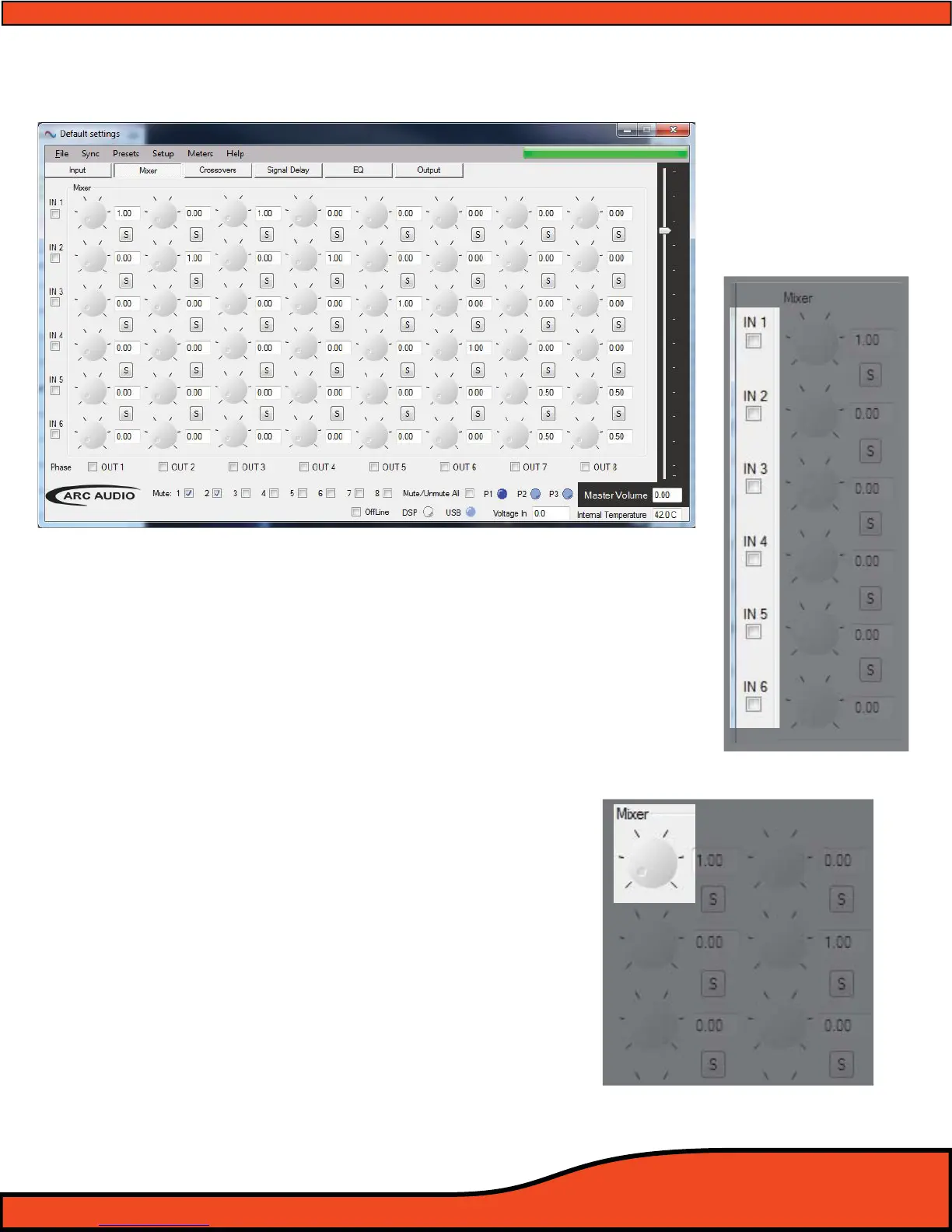
12.3 - Mixer Control Panel (Advanced mode)
12.3.1 - Input Channels & Invert Polarity Check Boxes
When in Advanced mode, the numerical values down the left side of the active
panel window identify the PS8's six RCA input channels. Below each number is a
check box that gives users the ability to invert the polarity of the signal coming
into the mixer on its individual channels.
(See diagram 12.9).
This feature gives greater exibility to combine input polarity and custom signal
mixing for things like phantom center channels and true rear environmental rear
ll applications.
12.3.2 - Input/Output Channel Intersection Variable Level Controls
In Advanced mode, rather than clicking on a check box and
having a xed signal level from your input channels routed to
the output channels, you have the ability to do any level of
mixed signal level on independent or multiple channels to a
single output.
(See diagram 12.10).
The dials are controllable by placing your mouse pointer on the
dial and dragging the dial to the desired location, clicking on it
and using the arrow keys to change the value, or by double
clicking on the Channel Intersection display
(See diagram 12.11).
Diagram 12.9
Diagram 12.10
Diagram 12.11



 To Next Page