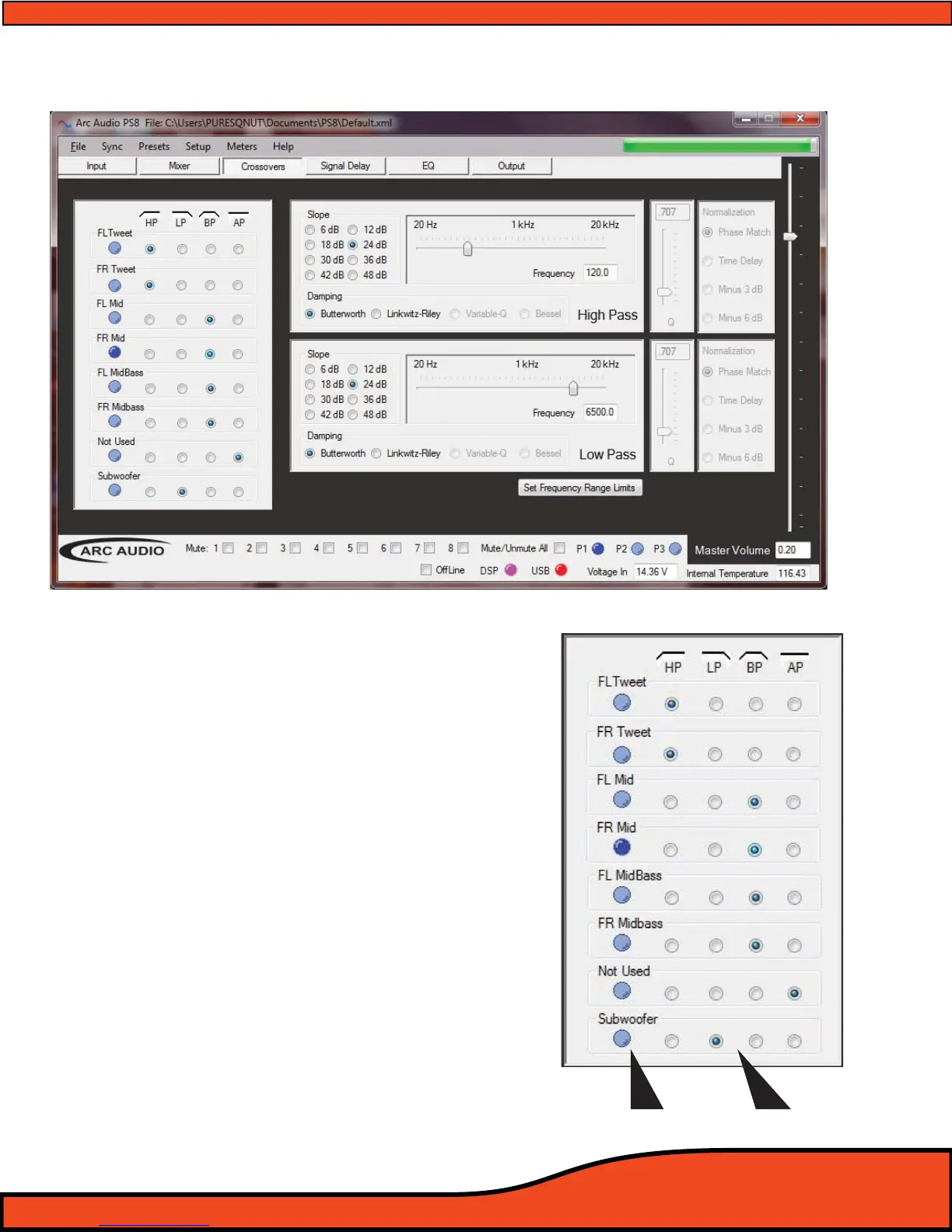
12.4 - Crossover Control Panel
12.4.1 - Channels 1-8 Crossover Type Selection Window
The crossover type selection window gives users the
ability to identify the individual output channels
and the types of crossovers that are available on
each of the PS8's output channels.
(See diagram 12.16)
12.4.2 - Channel Assigned Name Display
After users have established user dened channel
names
(See section 10.1) in the input/output chan-
nel assignment panel,
(See diagram 12.16) dened
channel names are displayed in this area for easy
use and recognition while setting up the system
crossovers.
12.4.3 - Channel Crossover Type Check Boxes
To select the type of crossover needed for each
channel simply click on the desired check box (dot)
in correspondence with the channel and crossover
type you are wanting.
(See diagram 12.16)
Diagram 12.15
Diagram 12.16
Channel Name Crossover Types



 To Next Page