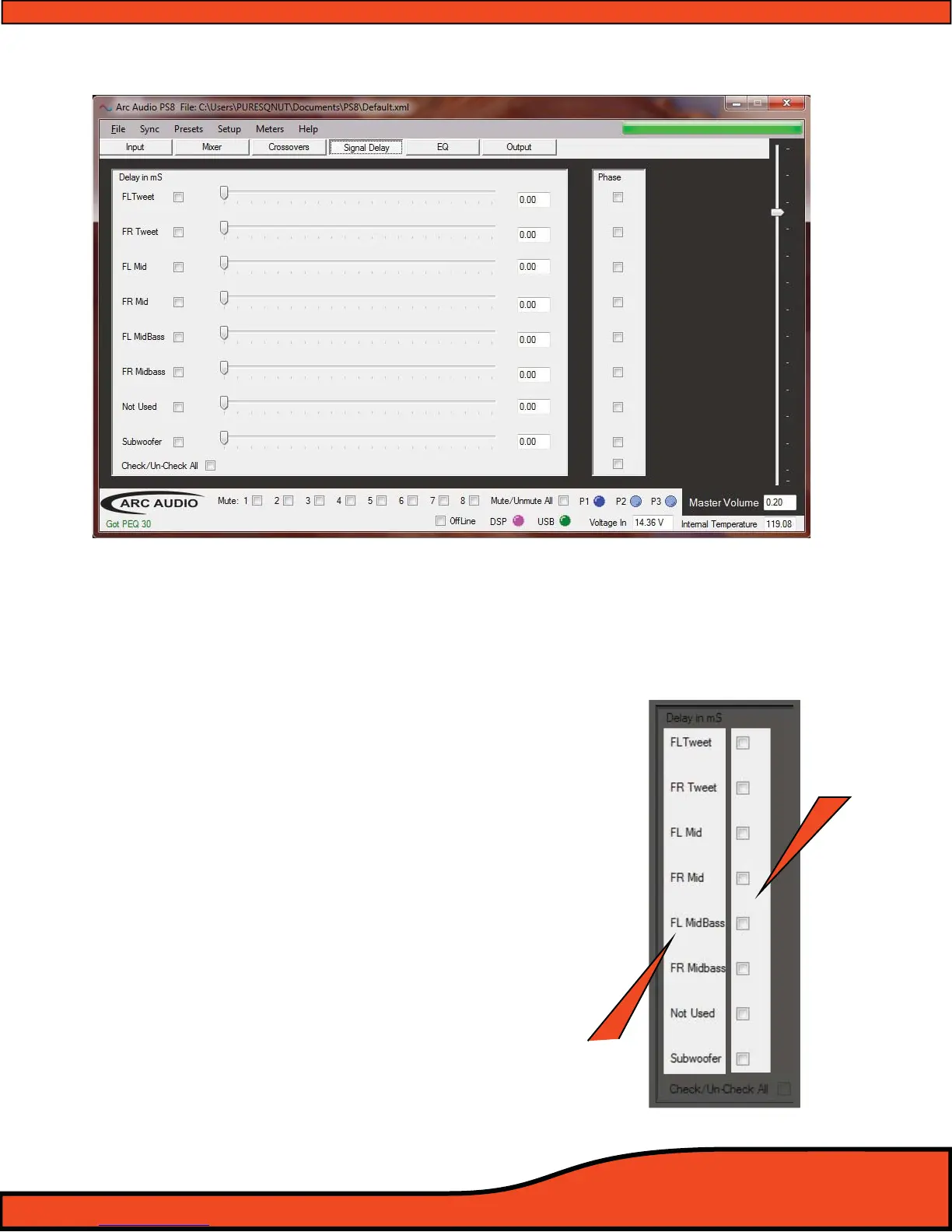
12.5 - Signal Delay / Channel 1-8 Output Invert Polarity Control Panel
12.5.1 - Channels 1-8 Signal Delay Adjustment Utility Window
The PS8's Signal delay panel oers users the ability to manually adjust each of the output channels with
up to 12ms of variable signal delay. The signal is adjustable in true .021ms increments found in 48mHz
processors, which is also the maximum sampling rate found in 99.9% of today's traditional high end car
audio applications. (Don't let the competition fool you.)
12.5.1.1- Channel Assigned Name Display
After users have established user dened channel
names
(See section 10.1) in the input/output channel
assignment panel
(See diagram 12.31), dened chan-
nel names are displayed in this area for easy use
and recognition while setting up the individual
channel delay settings.
12.5.1.2 - Channel Link/Unlink Button
(See diagram 12.31)
Checking or un-checking on these individual
channel check boxes allows users to group and
ungroup any combination or number of channels
together so they can individually adjust each
channel’s signal delay by itself, or in the selected
groups, to improve the accuracy and ease multiple
channel group delay.
Diagram 12.30
Diagram 12.31
Channel Name
Displays
Channel
Link/Unlink



 To Next Page