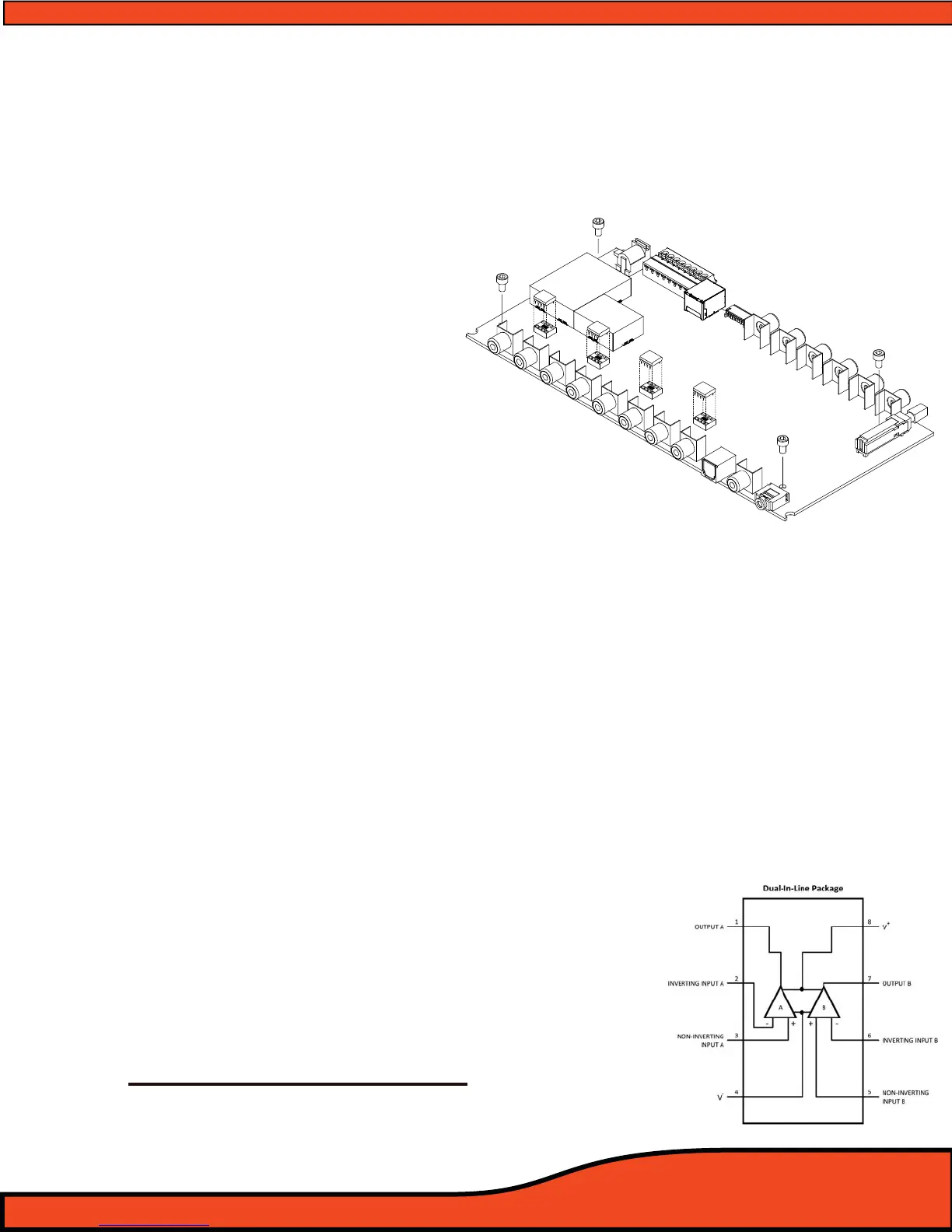
15.0 Replacing/Upgrading the PS8's Output Devices
The PS8 oers a rst of its kind user customizable platform allowing the most discriminating of audiophiles
to change out the PS8's four output devices. The Opamps can be changed without the need of a soldering
iron or specialty tools potentially resulting in damage to the PS8. We have included instructions for this
change out process as well as a list of approved output devices that have been tested compatible and will
not result in voiding the warranty if they are changed out.
Step 1 - Unplug all connections from the PS8
Step 2 - Remove the PS8 from the vehicle and its
place of installation
Step 3 - Open up the PS8 by unscrewing all case
screws exposing the PS8's main circuit
board
Step 4 - Touch your hands momentarily on the
outer casing of the RCA connections to
discharge any potentially damaging
static electricity (If your climate is
extremely dry and hot we recommend you use anti static straps of nd a way to ground yourself to
earth before attempting any portion of this process. PS8's damaged due to static electricity
discharge during this process are not covered under warranty.)
Step 5 - Carefully lift the stock output devices out of their sockets using your ngers. The tment of the
stock output device is rm and will require a little eort to remove them.(It is not recommended to
use any kind of pry took, screwdriver etc as this can cause damage to the socket.) Remove the
devices one at a time so you may use the other devices as a reference of proper orientation for the
reinstallation of the new device.
Step 6 - Paying close attention to the other devices still installed pay special attention to the orientation of
the device. (Note: Installing the device backwards can case unrepairable damage to the PS8 and IS
NOT COVERED under any part of the ARC Audio product warranty) Carefully set the device on top of
the socket making sure that the pins are lined up exactly with the socket holes and then press
rmly. (Repeat this for all 4 devices)
Step 7 - Put the case back together and reinstall the PS8 into your vehicle.
(SPECIAL NOTE: Not all output devices will work on the PS8. Only use devices from the
approved list above! Not all 8 pin output devices have the same pin out function and
can cause irreparable damage to the PS8.)
ARC AUDIO APPROVED OUTPUT DEVICES
- Texas Instruments 5532 - National Semiconductor LME49720
- Burr Brown OPA2134 - National Semiconductor LM4562
- Burr Brown OPA2604



 To Next Page