24 User’s Manual—SNAP™ 500 Gen 1 and Gen 2
Classification: Avery Dennison - Public
3.6 Communications Cable Installation
Use one of the following interface cable options:
Null-modem serial cable – Part number 05581139 connector
USB / Serial adapter – Part number 05581140
Ethernet adapter – Part number 05591105. ASUS, BCM, or Advantech
motherboards support the Ethernet port on the printer so the Ethernet
adapter is not required.
3.6.1 Serial Cable
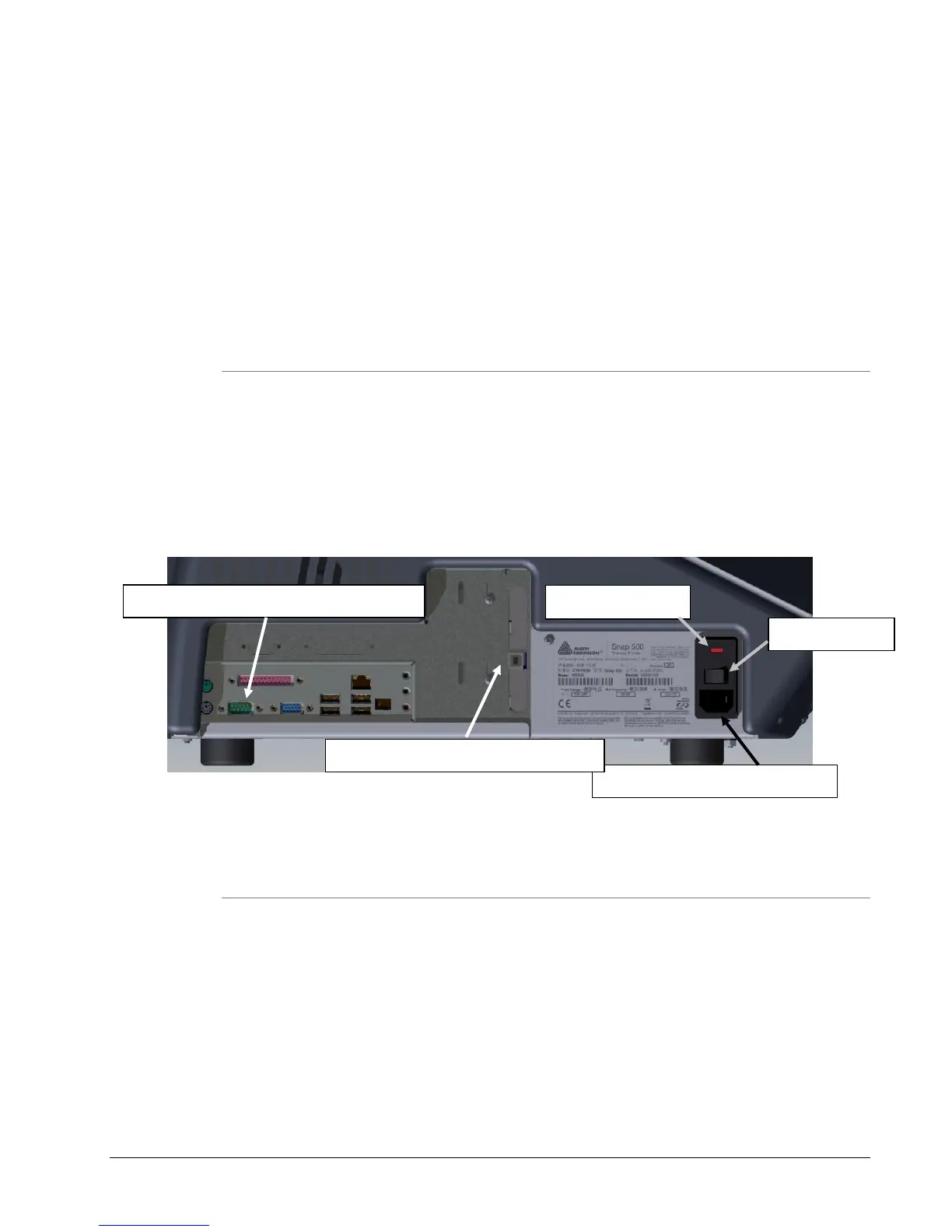
Locate the communication cable connectors on the backside of the printer
(see Figure 6).
Plug in the serial cable connection to the serial port.
The default serial port setup in the printer is 115,200 baud, no parity, 8 data bits,
1 stop bit.
Figure 6: Rear View of the Printer
3.6.2 USB Cable
Use either the USB option card if higher download speeds are required for
the extra expense of the option, or
USB to Serial adapter, if the USB connector is needed and serial download
speed is acceptable.
Serial Port for Communication to Printer
AC Connection for Power Cable
USB or Ethernet cards (if installed)















 To Next Page