44 User’s Manual—SNAP™ 500 Gen 1 and Gen 2
Classification: Avery Dennison - Public
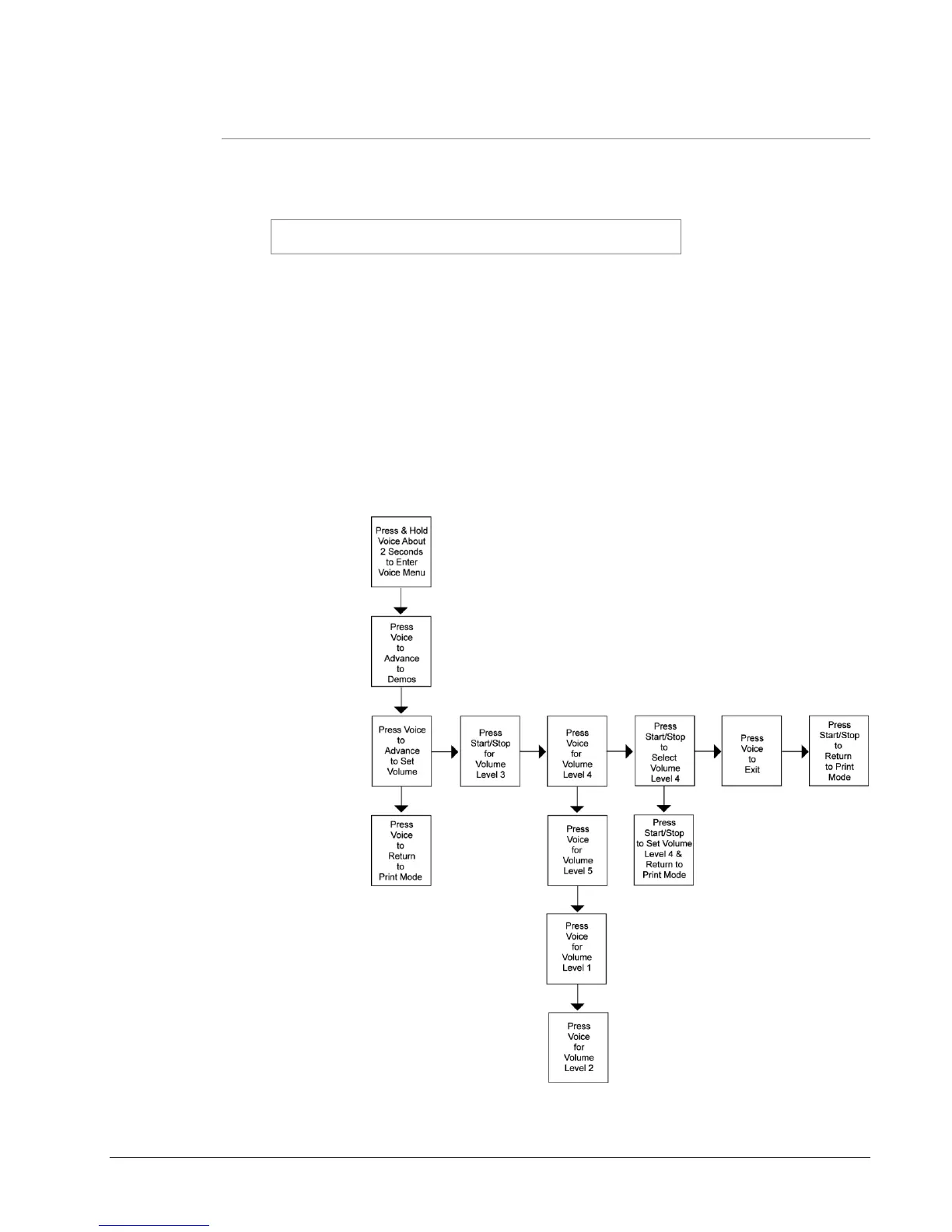
4.5.2 Setting / Adjusting Voice Button Volume
The volume level of the voice messages on your SNAP 500 printer is set at Level
3 at the factory. To adjust volume:
NOTE: During the menu, the printer will begn with the
current volume at which your machine is set, Level 3.
1. Press and hold the Voice button longer than two seconds to activate the
Option Menu System: “Press Start for Test Pattern.”
2. Press the Voice button: “Press Start to Set Volume.”
3. Press the Start / Stop button: “Press Start for Volume Level 3.”
4. Press the Voice button: “Press Start for Volume Level 4.”
5. Press the Voice button: “Press Start for Volume Level 5.”
6. Press the Start/Stop button: “Volume Set to Level 5. Returning to Print
Mode.”
Figure 12B: Adjusting Voice Volume















 To Next Page