User’s Manual—SNAP™ 500 Gen 1 and Gen 2 21
Classification: Avery Dennison - Public
3.5 Printer Setup
3.5.1 Attaching the Stacker
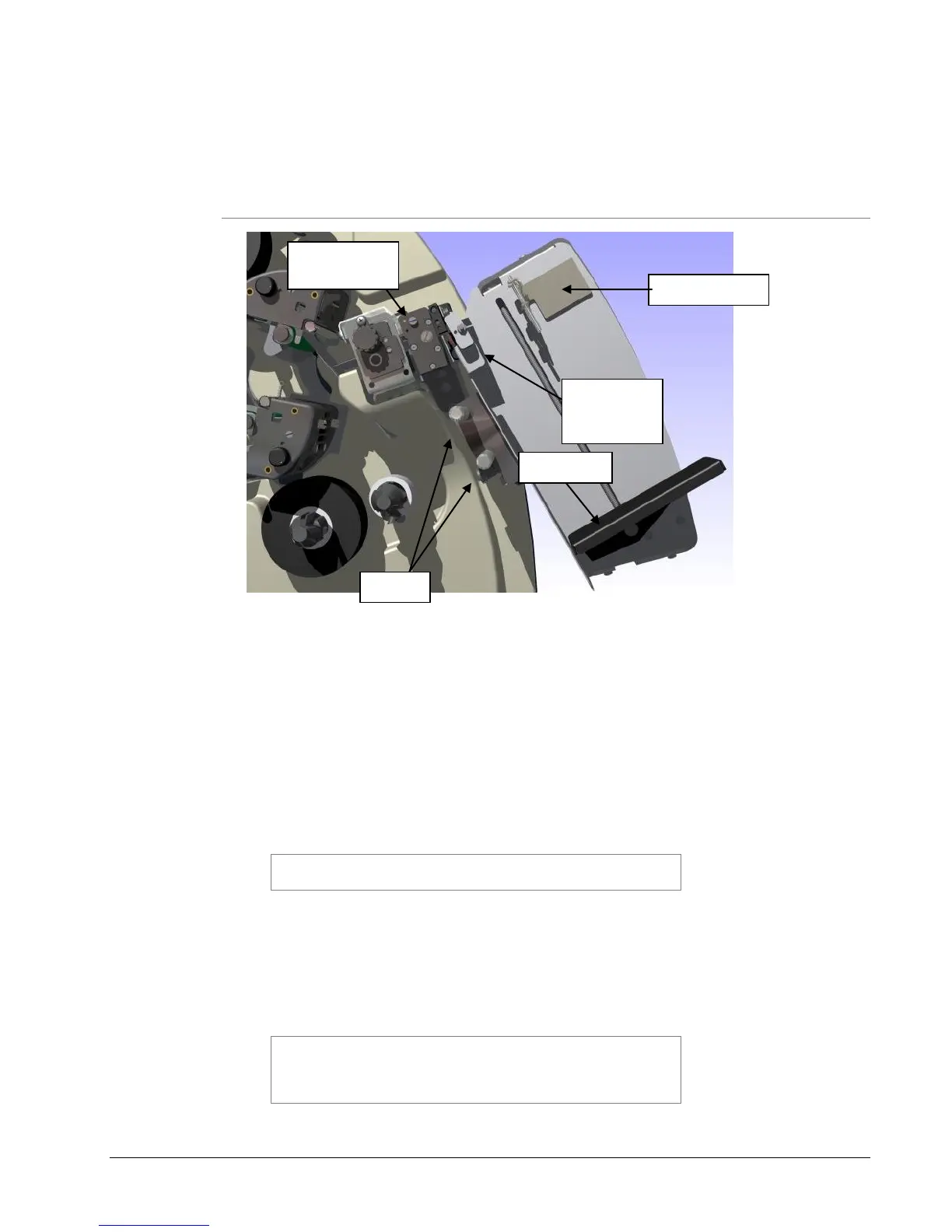
Figure 4: Rotary Knife and Stacker
The stacker and knife are two separate assemblies that can be installed and/or
replaced quickly and easily. For information on removing or adjusting the
stacker, refer to Section 4.2.
1. Locate the two shafts on the printer below the Rotary Knife assembly (see
Figure 4).
2. Slide the stacker onto the two shafts until the backside of the stacker is
beyond the tape size to be run. The stacker should go under the Nip Roller
Striper Plate.
NOTE: Be sure to slide the top of the stacker behind the
Nip Roller stripping plate.
3. Connect the stacker interface cable extending from the bottom of the stacker
assembly into the larger connector on the right side of the printer. Rotating
the connector and applying light pressure inward will help engage the
connectors.
4. Cycle power on the printer to allow it to detect the stacker.
NOTE: There is a sleeve on the connector that will snap
when the connector is fully engaged with the mating
connector. The two cables will slide into each other only
when the connectors are properly aligned with each other.
Nip Roller
Stripper
Plate















 To Next Page