User’s Manual—SNAP™ 500 Gen 1 and Gen 2 73
Classification: Avery Dennison - Public
8.0 Upgrading the Printer Firmware
8.1 Introduction
The SNAP 500 printer firmware can be updated electronically using “UPG” files
received from Avery Dennison. A “UPG” file is a software file with “.upg” as an
extension. Files are either “zip” files, which must be extracted/unzipped, or UPG
files.
To upgrade the printer firmware, you will need a “UPG” file.
After receiving the “UPG” file, you may upgrade your printer one of three
methods way:
PCMate Platinum can perform the upgrade. This takes approximately 15-20
minutes. Please be patient.
USB flash drive containing UPG file inserted into one of the USB slots on the
back of the printer can perform the upgrade. This takes approximately 4-5
minutes.
The Ethernet Interface Option if installed can be used to upgrade through the
printer’s web server.
8.2 Selecting the UPG file
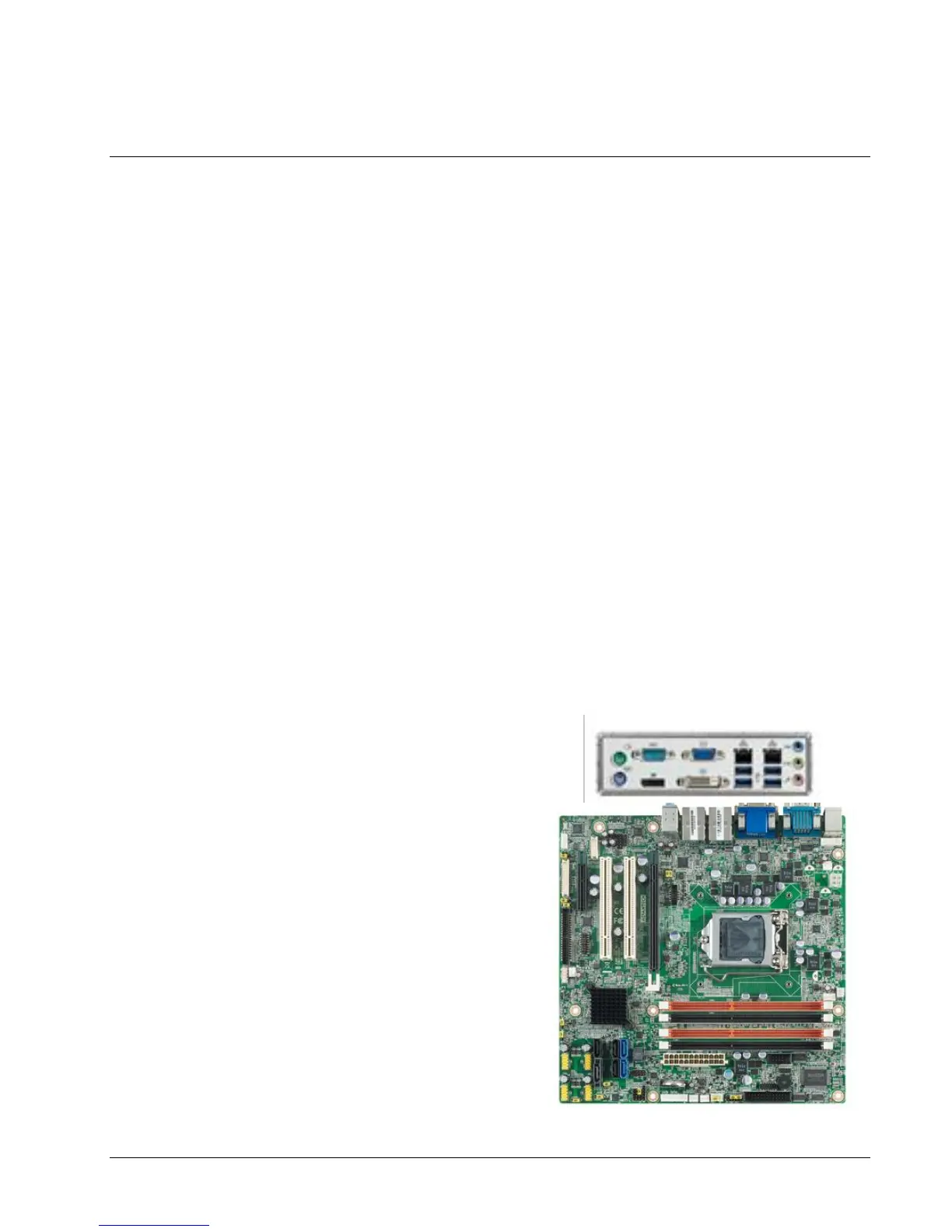
The UPG file you need will depend on the motherboard in the SNAP printer being
upgraded. If you are unsure, you can look at the connector area of the
motherboard. .
The current motherboard (as of Feb
2017) looks like this:
If necessary, you can remove the
back cover. See that the current
motherboard is Green and called
“Advantech”.
If you have this in your printer,
you will need firmware 3.35 or
above.
Firmwares 3.35 an above also
work for BCM (blue) and ASUS
(brown) motherboards.















 To Next Page