136
Appendix 1, User Guide for MC5 HART Option
For the Digital Output (PV), MC5-IS opens the Instrument Input
Window for checking/editing the settings. Use B/Next Page Func-
tion Key to check/edit the Instrument Output Window data.
Do not alter any
settings unless
you have the
knowledge and
are authorized to
trim the HART
instrument.
Note.
Some of the menu options may be disabled when trimming certain HART
instruments. Refer to the HART instrument’s manual for device dependent
information concerning the trimming procedure.
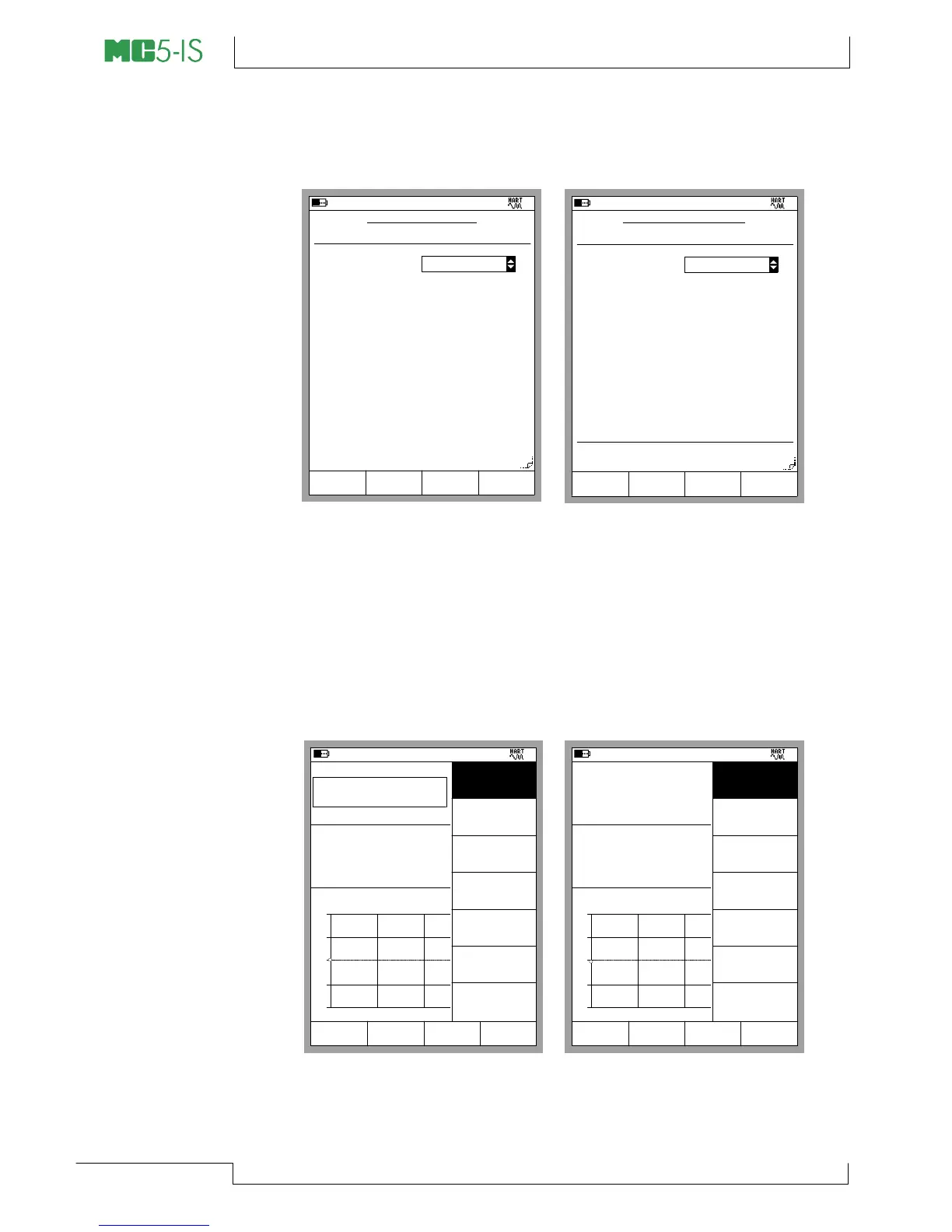
Selecting the A/Trim Function Key opens the Calibration Windows
with the HART instrument’s trim menu opened. More of the Menus
in the subsequent chapter.
Trimming Menus
The contents of the HART instrument’s trim menu depends on
whether the Analog Output (AO) or the Digital Output (PV) is trimmed.
The leftmost picture below shows the contents of the menu for the
Analog Output (AO). The menu in the rightmost picture is for the
Digital Output (PV).
11.04.2002 8:50
INSTRUMENT INPUT
Input Method
Measured
Unit
mbar
Range
0.000000
Pressure
Port 1
INT1C
Pressure type
Gauge
0 %
1000.0000
100 %
Trim
page
Next
Edit
11.04.2002 8:51
INSTRUMENT OUTPUT
Output Method
Range
4.000000
Current
Port
E
Unit
mA
0 %
20.000000
100 %
Transfer Function
Linear
Measured
Trim
page
Next
Edit
21.05.2002 12:27
Input
Error
1.00
Output
mA
3.999
-0.01 % alueesta
4.000
+
0
-
0% 50% 100%
Current [Keyed]
Current [E: Meas.]
mA
kalibrointi
Hylkää
TallennaMENU
Close
Trim Lower
0% Range
Trim Upper
100% Range
Check Any
Value
Reset AO Trim
21.05.2002 13:15
Input
Error
1.00
Output
kPa
1.842
-0.04 % alueesta
1.844
+
0
-
0% 50% 100%
Pressure [P1:INT1C]
Pressure [E: HART]
kPa
kalibrointi
Hylkää
Tallenna
gauge
MENU
Close
Trim Lower
0% Range
Trim Upper
100% Range
Reset Static
Pressure
Check Any
Value
Zero PV
Reset PV Trim


 To Next Page