17
The User Interface
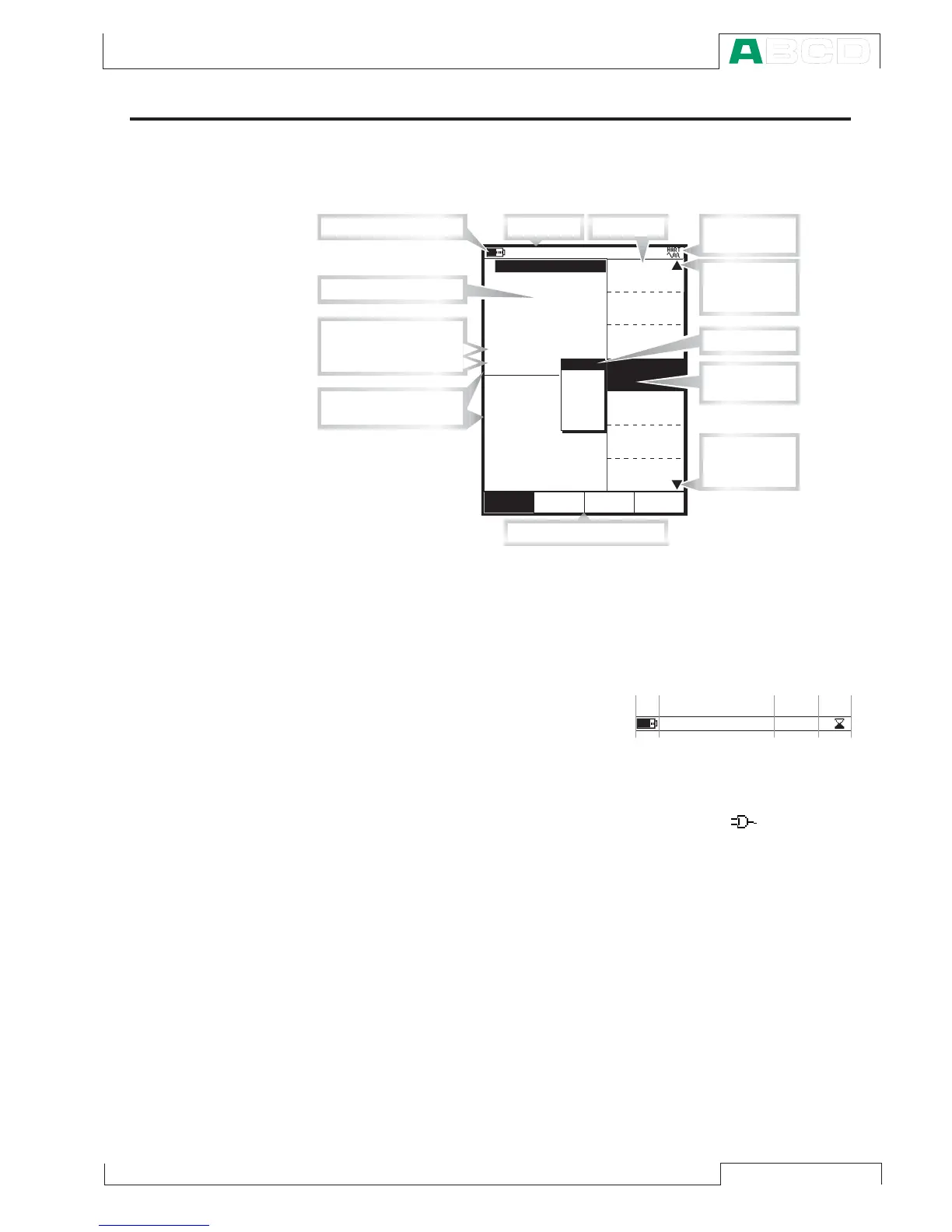
The main elements of the User window can be seen in the following
picture:
All possible elements are not included in the previous picture, but
the important ones are discussed in the following chapters.
The Status Bar
The Status Bar at the
top of the display is vis-
ible all the time. It is di-
vided into four main sec-
tions.
The first (leftmost) section displays the charge level of the battery.
The battery symbol is replaced by a plug symbol ( ) if you are
using the battery charger. The second section displays the time
and date. The third section displays the temperature measured with
the optional environment sensor, if the sensor is connected to MC5-
IS.
The fourth section (rightmost) section displays additional informa-
tion in the form of symbols, like:
• An hourglass when MC5-IS is working on something that takes
time.
• A question mark when an error occurred.
Note that the fourth section is empty for most of the time. The sym-
bols are visible only when needed.
C l o s eW i n d o w 1 W i n d o w 2
M E N UM o d e
O t h e r s
S e t u p S e t u p
0 . 4 5 2 1
m b a r
( g a u g e )
A l a r m <
P 1 : I N T 2 C / - 1 . 0 0 0 0 0 0 . . . 2 b a r
M a x i m u m v a l u e : 1 . 1 2 6 2 b a r
0 . 1 1 2
2 C u r r e n t
b a r
P r e s s u r e
E : C u r r e n t M e a s u r e m e n t
Q u a n t i t y
[ P r e s s u r e ]
[ P 1 : I N T 2 C ]
[ E n g . U n i t ]
U n i t
[ b a r ]
F u n c t / P o r t
D i s p l a y M o d e
k P a
P a
b a r
p s i
m m H
2
O
m m H g
1 3 . 0 9 . 2 0 0 1 1 0 : 4 6
1
H A R T
T y p e
[ g a u g e ]
P r e s s u r e
M o d u l e
P r e s s u r e
Z e r o
I n t e r n a l t e m p e r a
M i n i m u m v a l u e : 0 . 0 0 0 0
M e a s u r e m e n t r e a d i n g
D i s p l a y a r e a d i v i d e d
i n t o W i n d o w 1 a n d 2
M e n u
P o p - u p l i s t
P r e s e n t
s e l e c t i o n
I n d i c a t o r
f o r m u l t i p l e
m e n u p a g e s
S t a t u s B a r
F u n c t i o n k e y b a r
B a t t e r y ' s c h a r g e l e v e l
A d d i t i o n a l
i n f o r m a t i o n
I n d i c
a t o r
f o r m u l t i p l e
m e n u p a g e s
S p e c i a l M e a s u r e m e n t
E x t r a I n f o
A d d i t i o n a l d a t a r o w s :
S e c t i o n s :
1 2 4
T i m e & D a t e
E x a m p l e o f S t a t u s
B a r a p p e a r a n c e
3
2 1 . 3 ° C
MC5-IS Firmware



 To Next Page