72
Startup and Basic Operation
The Alarms activated field makes it possible to deactivate the
alarm limits without clearing the limits.
Set the limits as required. Individual alarm limits may be disabled
by clearing the alarm limits using the B/Clear Limit Function Key.
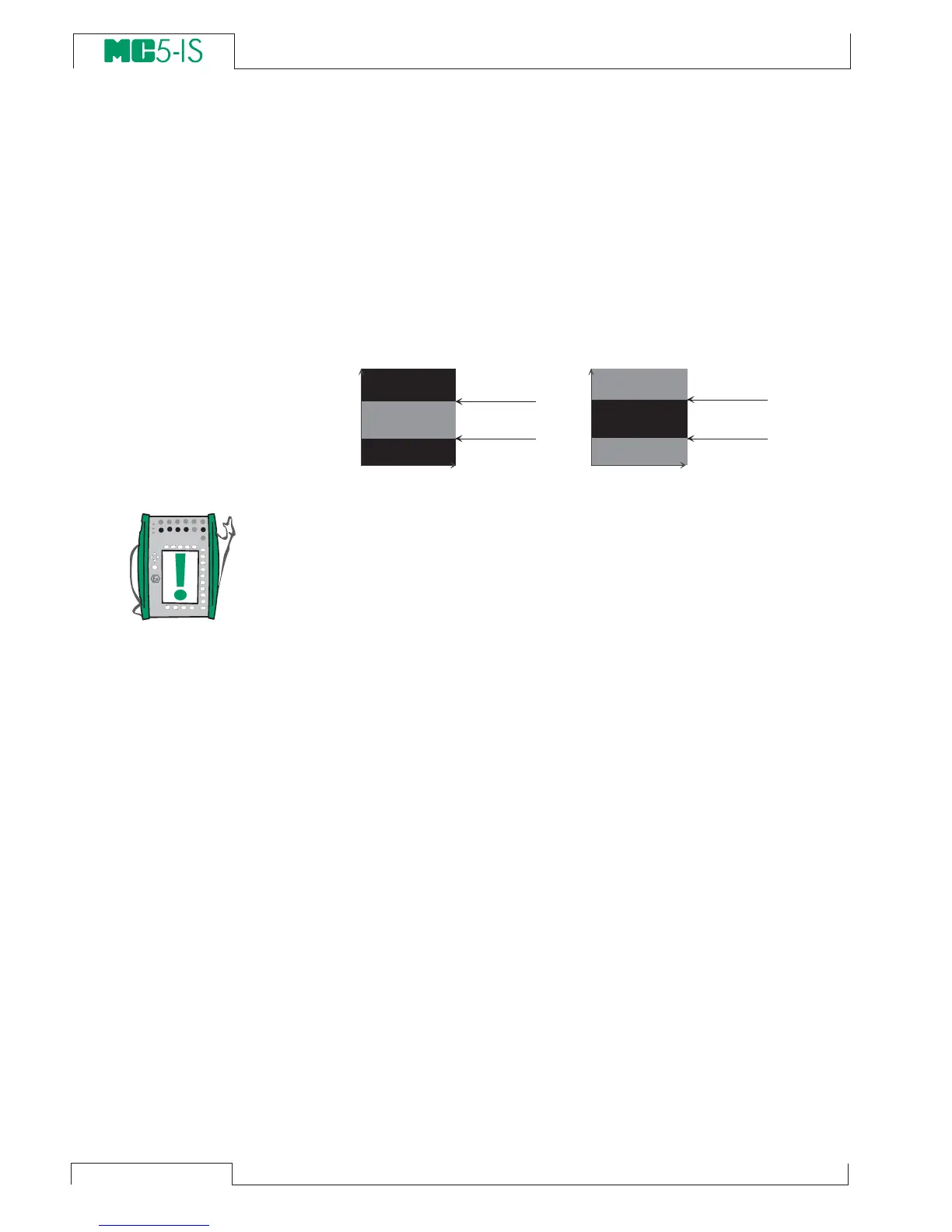
The “<“ (lower than) limit may have a higher value than the “>” (higher
than) limit. In that case MC5-IS emits an alarm when the measure-
ment is inside the range specified by the alarm limits.
Note.
Remember to set/check also the rate alarm unit if you set any rate
alarms.
Appearance of the alarm settings.
The alarm settings can be seen as symbols in the measuring win-
dow and in the window setup menu as follows:
Symbol Definition
[ - - ( - - )] No limit settings
[< - ( - - )] Low limit is set
[ - > ( - - )] High limit is set
[< > ( - - )] Low and high limits are set
[> < ( - - )] Low and high limits are set. Low > High
[ - - ( < - )] Low rate limit is set
[ - - ( - > )] High rate limit is set
[ - - ( < > )] Low and high rate limits are set
[ - - ( > < )] Low and high rate limits are set. Low > High
[< > ( < > )] All limits are set.
Acknowledging alarms
When an alarm limit is exceeded, MC5-IS emits an audible alarm.
To acknowledge the alarm, press any button. If you do not press a
button, the alarm sound is automatically silenced in a few seconds.
The active alarm limit is underlined in the measurement window as
long as the alarm limit is exceeded.
H i g h a l a r m l i m i t
>
L o w a l a r m l i m i t :
H i g h a l a r m l i m i t
<
L o w a l a r m l i m i t :
A L A R M
A L A R M
N o a l a r m
N o a l a r m
N o a l a r m
L o w a l a r m
l i m i t
H i g h a l a r m
l i m i t
L o w a l a r m
l i m i t
H i g h a l a r m
l i m i t
A L A R M
M e a s u r e d v a l u e
M e a s u r e d v a l u e



 To Next Page