SmartFlex
4.3.7 Examples of SIM Card Switching Configuration
Example 1: Timeout Configuration
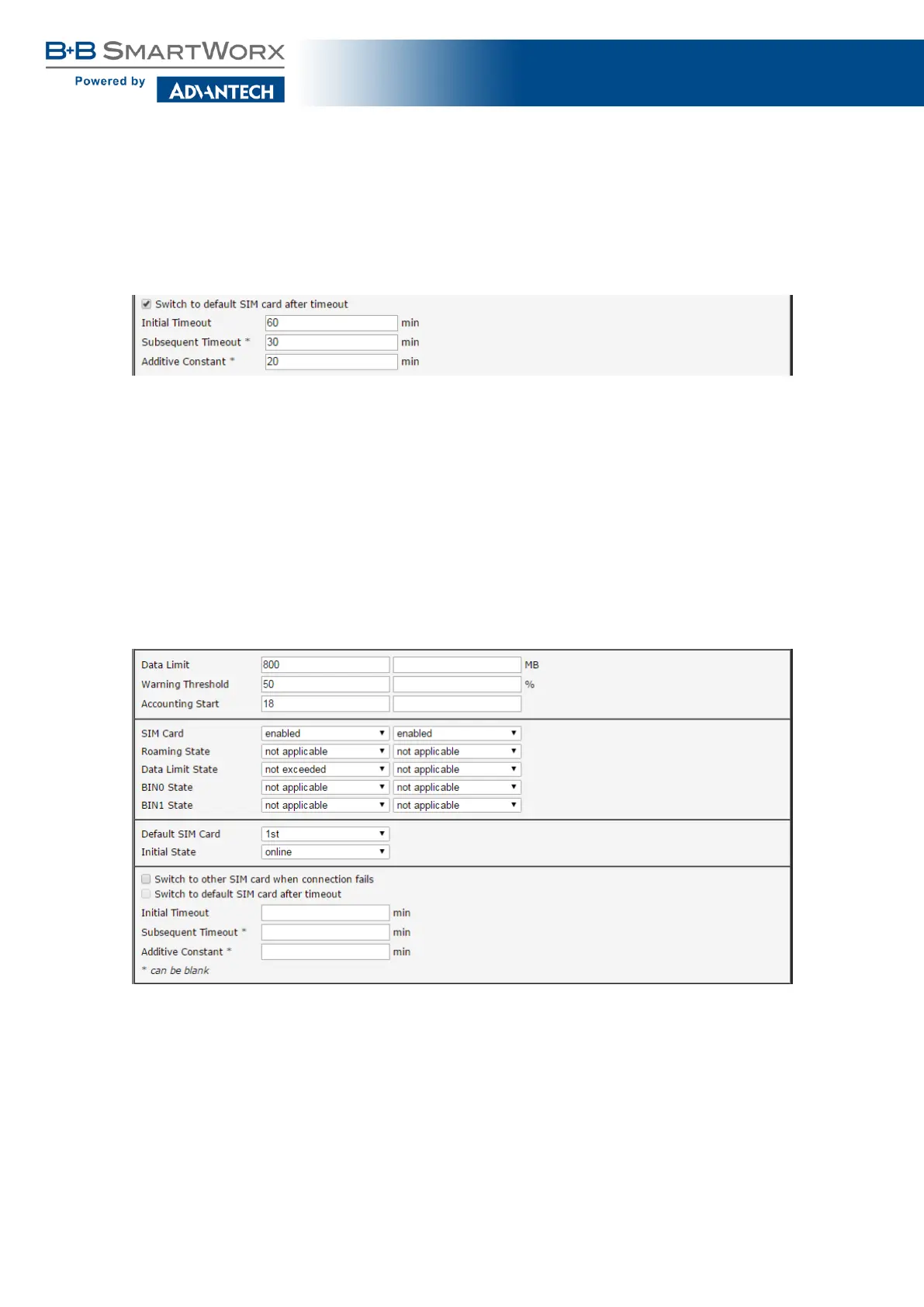
Mark the Switch to default SIM card after timeout check box, and fill-in the following values:
Figure 24: Configuration for SIM card switching Example 1
The first attempt to change to the default SIM card is carried out after 60 minutes. When
the first attempt fails, a second attempt is made after 30 minutes. A third attempt is made after
50 minutes (30+20). A fourth attempt is made after 70 minutes (30+20+20).
Example 2: Data Limit Switching
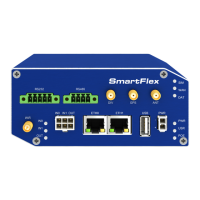
The following configuration illustrates a scenario in which the router changes to the second
SIM card after exceeding the data limit of 800 MB on the first (default) SIM card. The router
sends a warning SMS upon reaching 400 MB (this settings has to be enabled on the SMS
Configuration page). The accounting period starts on the 18th day of the month.
Figure 25: Configuration for SIM card switching Example 2
47


 To Next Page