30
2. Introduction
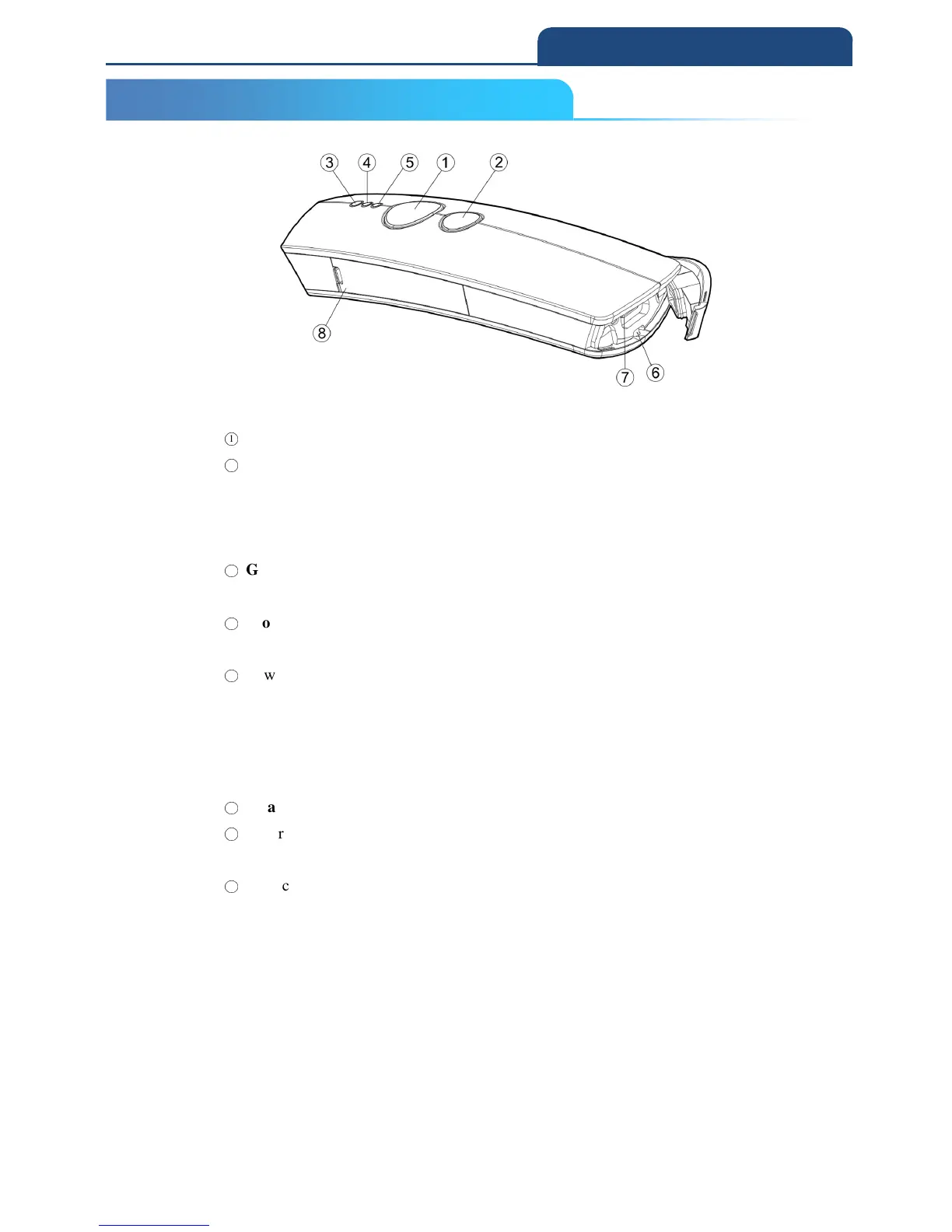
2-5 FUNCTION KEYS AND LED INDICATOR
○
1
Press down Scan Button to decode or store the barcode.
○
2
Press down Small Trigger to perform versatile supplementary functions. For
instance, pressing the key will lead to erasing barcode data which have been
previously decoded in Memory Mode; it also works to pair the scanner with the
Bluetooth devices in Bluetooth Mode.
○
3
Good Read Indicator indicates whether the barcode is successfully decoded.
Green LED shows a successful decoding attempt.
○
4
Mode Indicator indicates the current operation mode. Blue LED stands for
Bluetooth mode, green LED for Cable mode, and orange LED for Memory mode.
○
5
Power Indicator indicates the charge status.
1) When plug USB cable for charging, red LED light will be on to
show a poor charge level, once the charging process is completed,
red LED will flash slowly to show a full battery charge.
2) When unplug, if the red LED flash = low battery
.
○
6
Strap Hole
○
7
Secure the interface cable into USB Host in an attempt to transmit data or to
charge the battery.
○
8
Replace the battery in the Battery Compartment.
2-5 FUNCTION KEYS AND LED INDICATOR



 To Next Page