Receiving Documents
5-28
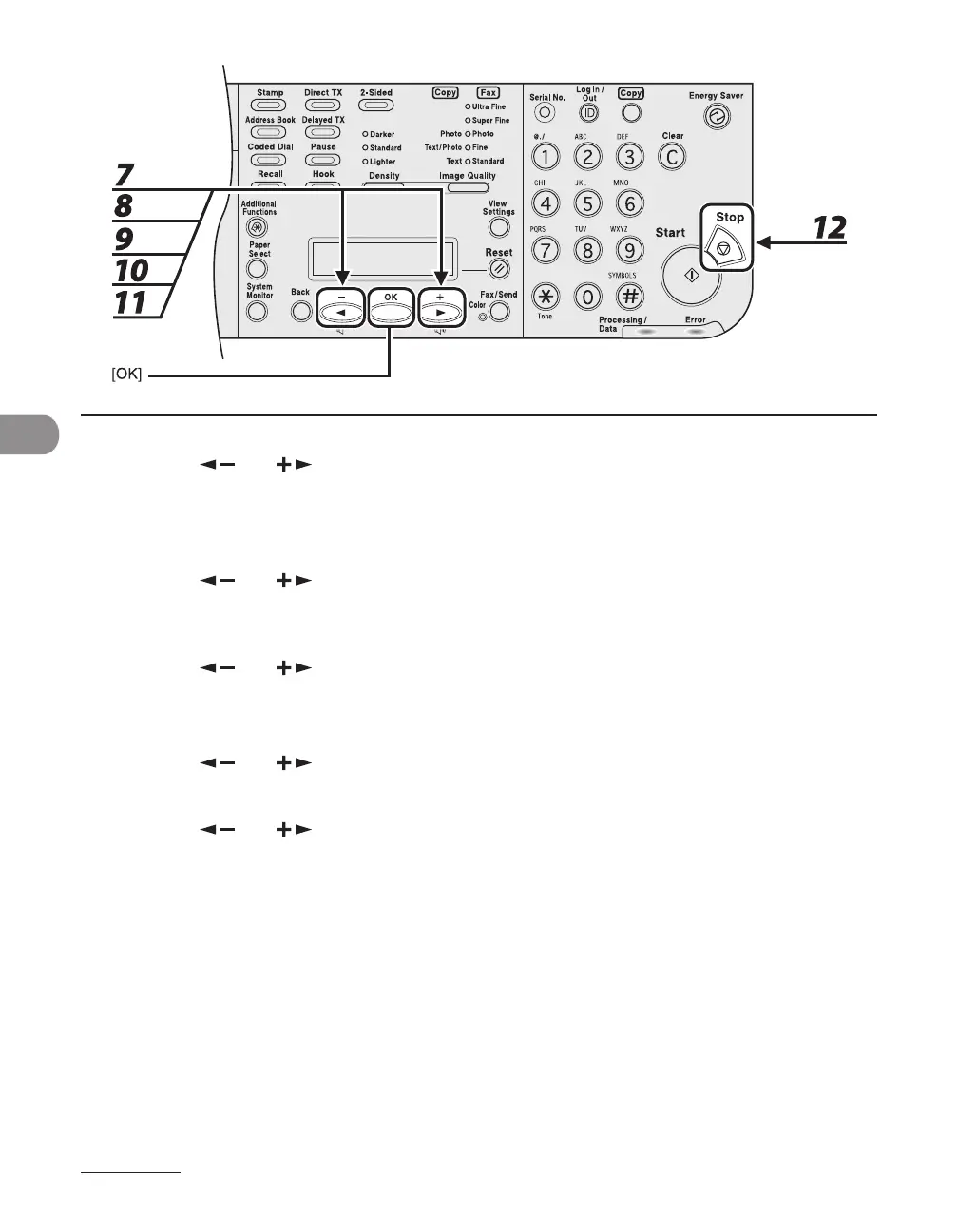
7 Press [ ] or [ ] to select <RX REDUCTION> or <REDUCE DIRECTION>, then
press [OK].
If you select <REDUCE DIRECTION>, skip to step 11.
8 Press [ ] or [ ] to select <AUTO> or <FIXED REDUCTION>, then press [OK].
If you select <AUTO>, adjust the image reduction automatically. Skip to step 10.
9 Press [ ] or [ ] to select a preset reduction ratio (90%, 95%, 97 %, or 75%),
then press [OK].
10 Press [ ] or [ ] to select <REDUCE DIRECTION>, then press [OK].
11 Press [ ] or [ ] to select <VERTICAL ONLY> or <HORIZ & VERTICAL>, then
press [OK].
<VERTICAL ONLY>: Reduces the document vertically only.
<HORIZ & VERTICAL>: Reduces the document both horizontally and vertically.
12 Press [Stop] to return to the standby mode.





 To Next Page