Liberty
™
Automated Microwave Peptide Synthesizer
600178 • Revision 5 • October 2009
36
Method Editor
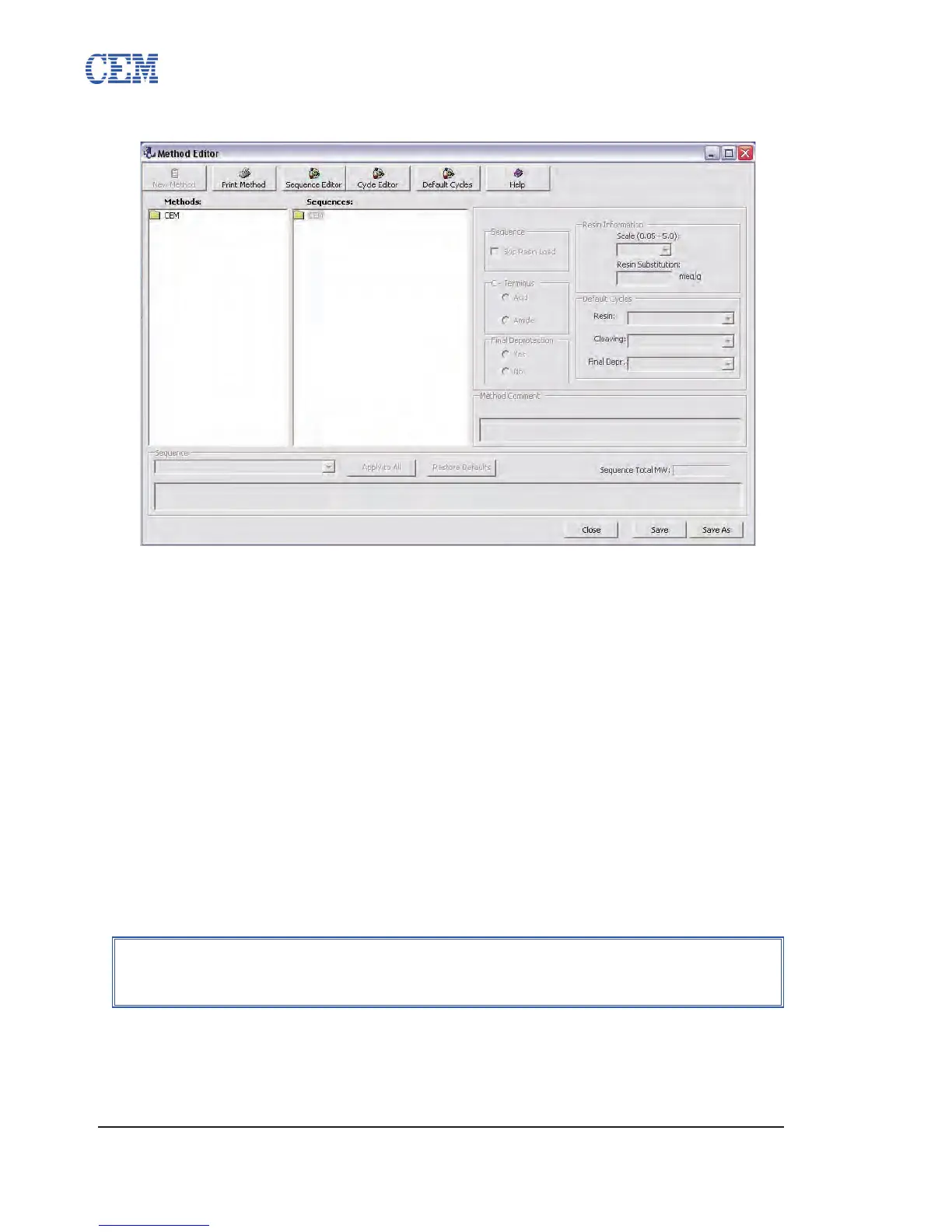
The Method Editor is used to program the specic conditions to be used for a given synthesis.
Once a sequence is selected, several options for the run can be congured that will determine the
specic steps to be used in the synthesis.
The Method Editor can be accessed by clicking the Methods button on the PepDriver main
screen, or by clicking the Method Editor button from the Sequence Editor.
Creating a New Method
Open the appropriate folder in the Methods box for the new method.1.
Click the New Method button.2.
Enter a name for the method and press Enter.3.
Open the appropriate folder in the Sequences box, and click on the desired 4.
sequence. The sequence will then be loaded into the sequence box at the bottom
of the Method Editor window.
Select the synthetic scale (0.05 mmol to 5.0 mmol) from the Resin Information 5.
box.
The remaining options can now be selected.6.
Skip Resin Load: This will skip the initial loading of the resin into the 6.1.
reaction vessel. Select this option only if the resin has been placed directly
into the reaction vessel. This will also skip the resin swelling step.
NOTE
The scale must be selected before changing any other parameters, as each
scale has specic default options that will be loaded upon selection.


 To Next Page